Video event tracking helps you understand how users interact with your video content beyond just view counts. By tracking actions like play, pause, completion, and re-watches, you can pinpoint drop-off points, optimize CTAs, and improve engagement. Here's a quick rundown of the top tools:
- Google Analytics 4 (GA4): Free, tracks YouTube and custom video events, integrates with platforms like Wistia and WordPress.
- Amplitude: Tracks detailed video interactions with enriched data and frustration analytics. Free tier for up to 10,000 MTUs.
- Mixpanel: Event-based tracking with advanced analytics and cohort segmentation. Free for up to 1 million events.
- Heap: Autocapture technology logs all interactions, supports retroactive analysis, and integrates with major platforms.
- FullStory: Automatic tracking with session replays, heatmaps, and AI-powered insights. Free for 30,000 sessions/month.
- Hotjar: Tracks video events via custom triggers, offers session replays, heatmaps, and frustration detection. Free tier available.
- Mouseflow: Requires manual setup for video tracking, offers session replays, heatmaps, and friction detection. Free for 500 sessions/month.
Quick Comparison
| Tool | Free Tier | Key Features | Pricing (Starting) |
|---|---|---|---|
| GA4 | Yes | Free YouTube tracking, customizable events | Free |
| Amplitude | Yes (10k MTUs) | Frustration analytics, enriched video data | $49/month |
| Mixpanel | Yes (1M events) | Advanced analytics, session replays | $0/month |
| Heap | Yes (10k sessions) | Retroactive analysis, Autocapture technology | Free |
| FullStory | Yes (30k sessions) | AI insights, session replays, heatmaps | Custom Pricing |
| Hotjar | Yes | Heatmaps, session replays, frustration detection | $39/month (Growth Plan) |
| Mouseflow | Yes (500 sessions) | Friction detection, AI assistant, heatmaps | $25/month (Essential) |
These tools cater to different needs, from free basic tracking to advanced analytics for large-scale businesses. Choose based on your goals, audience size, and existing tech stack.
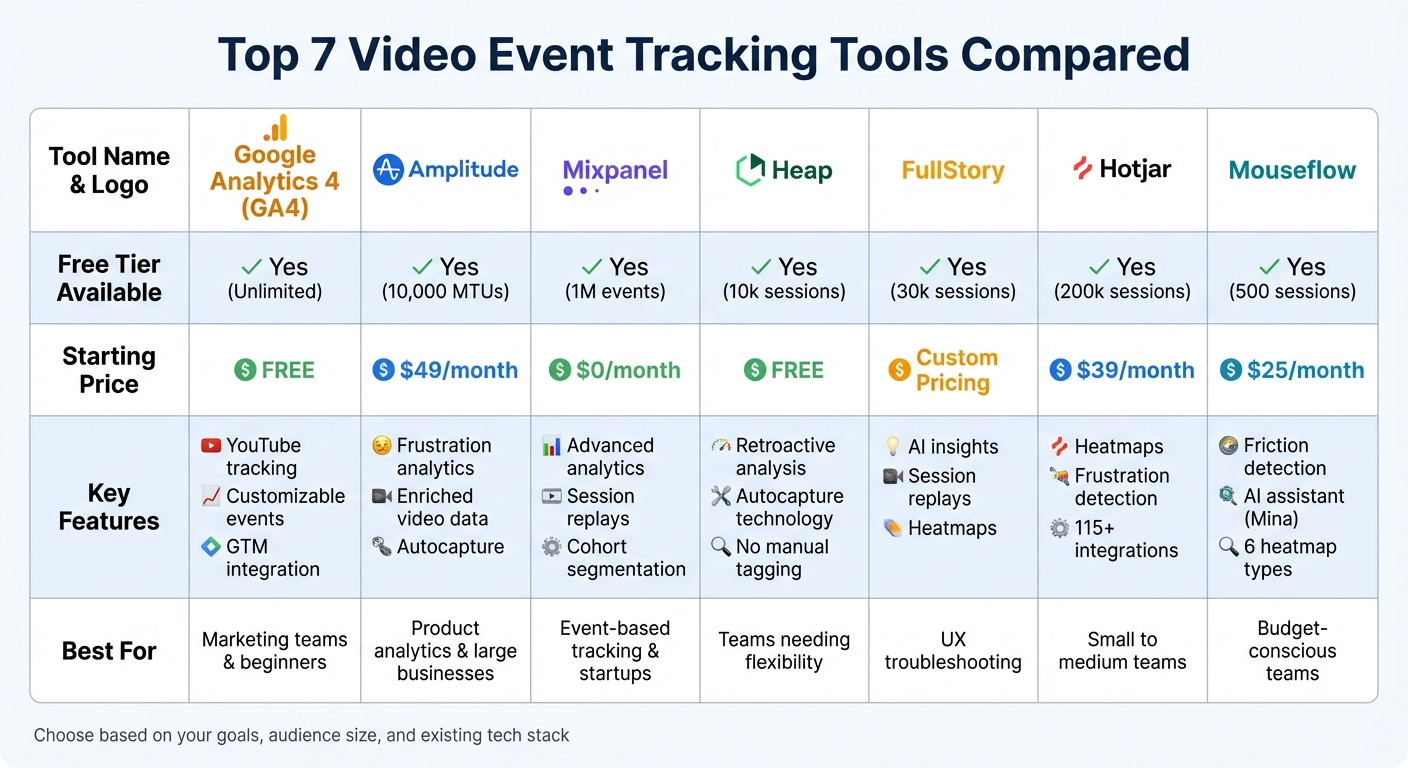
Video Event Tracking Tools Comparison: Features, Pricing, and Free Tiers
1. Google Analytics 4
Video event tracking capabilities
Google Analytics 4 (GA4) makes video tracking easy with its free, built-in Enhanced Measurement feature. By default, it automatically tracks three key events: video_start, video_progress, and video_complete, monitoring progress at 10%, 25%, 50%, and 75% intervals. Each of these events includes helpful metadata like video_title, video_url, video_duration, video_percent, and video_provider. If you're embedding YouTube videos, make sure to include the enablejsapi=1 parameter for seamless tracking.
For videos outside of YouTube, such as HTML5, MP4, or Vimeo, you’ll need to configure tracking through Google Tag Manager (GTM). GTM also allows you to track additional actions like pausing, seeking, or buffering. Plus, you can customize progress thresholds - say, tracking at 90% instead of the default settings - to gain more precise insights.
Integration options with other tools or platforms
GA4 works seamlessly with platforms like Wistia, which automatically tracks events such as plays, progress (25%, 50%, 75%, 100%), CTA clicks, and email captures. For Vimeo, you can integrate GA4 using a tracking script, but note that this feature is only available with Business or higher membership plans.
If you’re using WordPress, plugins like Analytify make it easier to visualize GA4 video data. You can also link video engagement metrics directly to Google Ads, enabling custom retargeting for audiences who interact with your videos. However, if you’re setting up custom tracking via GTM, remember to disable GA4’s Enhanced Measurement “Video engagement” setting to avoid duplicate events.
Pricing and scalability
GA4 video tracking is completely free and can accommodate everyone from solo creators to large enterprises. Keep in mind that data may take 24–48 hours to appear in your reports. For advanced reporting, you can export data daily to BigQuery at no extra cost, provided you stay within sandbox limits. To unlock deeper insights, you can register video_title and video_url as Custom Dimensions in the GA4 Admin panel.
With its cost-free setup and advanced tracking features, GA4 offers a powerful website analytics tool for understanding video engagement at any scale.
sbb-itb-5174ba0
2. Amplitude
Video Event Tracking Capabilities
Amplitude makes it easy to track video interactions by capturing key events like play, pause, and completion. These events are enriched with details such as timestamps, user or device IDs, video IDs, duration, and completion percentages. The Autocapture feature automatically records interactions like "Element Clicked" or "Element Changed", so you can track video player usage without needing manual tagging. While Session Replay can reconstruct user actions, it doesn’t record actual streaming video due to privacy and technical constraints. For more reliable data, server-side tracking ensures you capture completion events even if users leave the browser before finishing the video. Moreover, Frustration Analytics identifies rage clicks and dead clicks on video player elements, offering additional insights into user behavior.
Integration Options with Other Tools or Platforms
Amplitude integrates seamlessly with various tools to enhance your workflow. For example, it provides a standalone Session Replay SDK that works with platforms like Segment. Using the Model Context Protocol (MCP), you can bring Amplitude insights directly into AI tools such as Claude or Cursor. Additionally, Amplitude enables direct URL links to specific session replays, which can be embedded into CRMs or support tickets for streamlined collaboration.
"It's exciting that we can do everything in one platform and that we don't have to jump between GA and Hotjar and Amplitude."
- Kevin Leier, Digital Analytics Manager, CDK Roadster
Pricing and Scalability
Amplitude’s pricing is based on usage, measured by Monthly Tracked Users (MTUs) or event volume. The free Starter plan includes up to 10,000 MTUs, 10 million events, and 1,000 session replays. For more robust needs, the Plus plan starts at $49/month and supports up to 300,000 MTUs or 25 million events, along with 10,000 session replays. For larger businesses, custom Growth and Enterprise plans offer higher capacities. Startups with fewer than 20 employees and under $10 million in funding can apply for a free one-year Growth plan through the Startup Scholarship. It’s worth noting that Autocapture events for Session Replay and Heatmaps don’t count against your event limits.
Advanced Features
Amplitude brings together session replays and analytics for a more comprehensive view. The Session Replay feature includes a synchronized timeline, making it easy to jump to specific user actions. Heatmaps, which include click, selector, and scroll data, provide visual insights, while Frustration Analytics highlights usability issues like rage and dead clicks. By default, session replays are stored for 30 days, but this can be extended up to 12 months. Success stories highlight impressive results, such as a 30% reduction in onboarding time, a 20% boost in conversions, and a 27% increase in Fender Play® conversions.
3. Mixpanel
Video Event Tracking Capabilities
Mixpanel uses its standard track method to capture custom video events like "Video Watched" or "Video Played" using an Object-Action naming convention. You can also attach properties, such as duration, to make these events more specific. For interactions within iFrame-embedded players like YouTube, Mixpanel offers detailed guidance to track actions like play and pause within the embedded element. This data is invaluable for measuring user retention and assessing product performance.
Integration Options with Other Tools or Platforms
Mixpanel goes beyond basic tracking by offering extensive integration options. It works seamlessly with platforms like Improvado, Segment, and mParticle for both web and mobile data management. Developers can leverage its wide range of SDKs (JavaScript, iOS, Android, React Native, Flutter, Unity) or opt for server-side tracking. It also connects to major data warehouses like Snowflake, BigQuery, and Databricks. Since frontend tracking can lose 15-30% of events due to ad blockers, server-side tracking becomes a reliable alternative.
Pricing and Scalability
Mixpanel uses an event-based pricing model that accommodates anywhere from 1 million to 1 trillion monthly events. The Free plan covers 1 million events and includes 10,000 session replays. The Growth plan also starts with 1 million free events, with additional events priced at $0.28 per 1,000, and offers 20,000 monthly session replays. For larger needs, Enterprise plans provide custom pricing, advanced governance, and premium support. Startups (under five years old and with less than $8 million in funding) can take advantage of a free first year.
Advanced Features
Mixpanel doesn’t just stop at tracking; it also offers top analytics tools. Session Replay allows teams to visually analyze user journeys and identify where users drop off. These replays are typically available within a minute of recording. By default, session replays are stored for 30 days, but Enterprise customers can adjust this period to anywhere from 7 to 360 days.
Other standout features include AI Summaries, which automatically highlight key patterns and summarize user sessions, saving time on manual reviews. Heatmaps help visualize user clicks, making it easier to spot missed opportunities. Additionally, Magic Playlists group session replays of users who completed specific actions, like "Video Completion", for more focused qualitative analysis.
"Session Replay is a game changer, providing a middle ground between quantitative and qualitative data. We can optimize conversions by seeing exactly where users get stuck."
- Kevin Trong, Head of Product
4. Heap
Video Event Tracking Capabilities
Heap requires manual setup for video tracking through its heap.track API. While its Autocapture technology automatically logs user actions like clicks, swipes, taps, and pageviews right from installation, it doesn't automatically track interactions within iframe-embedded videos (e.g., YouTube, Vimeo, Wistia).
For HTML5 <video> elements, you can directly track events like play, pause, and end. For iframe-embedded players, Heap relies on APIs from each platform. For example:
- YouTube: Uses the YouTube Iframe API to detect player state changes (e.g., state 1 for playing, 2 for paused, 0 for finished).
- Wistia: Utilizes its
_wqengine to monitor playback percentages (e.g., 25%, 50%, 75%, and 100%) and duration metrics. - Vimeo: Implements
player.jsalongside standard media events for tracking.
Though this requires manual configuration, it complements Heap's broader analytics capabilities, helping teams gather detailed insights into video engagement.
Integration Options with Other Tools or Platforms
Heap integrates with more than 10,000 companies across a wide range of social media analytics tools and platforms. Beyond video player APIs, it connects seamlessly with platforms like Shopify, Salesforce, HubSpot, Stripe, Klaviyo, Marketo, Braze, and Intercom, allowing behavioral data to sync across your entire tech stack. For advanced users, higher-tier plans enable data warehouse synchronization with platforms like Snowflake and Redshift.
One standout feature is Heap's retroactive analysis. Since it captures all raw data upfront, you can define a new video-related event today and immediately access historical data for that event. This capability, combined with its integrations, makes Heap adaptable to various business needs.
Pricing and Scalability
Heap uses a session-based pricing model. Here’s a quick breakdown:
- Free Plan: Includes 10,000 monthly sessions, core analytics, and six months of data history.
- Growth Plan: Targets scaling startups, offering 12 months of data history.
- Pro and Premier Plans: Custom pricing for larger organizations with features like advanced governance, account-based analytics, and data warehouse integration.
Additional tools like Session Replay and Heatmaps may be included or available as add-ons, depending on your plan. However, the free tier's 10,000-session limit may be restrictive for high-traffic sites, and session-based pricing can become expensive for businesses with frequent user activity.
Advanced Features
Heap’s Autocapture feature is a game-changer, removing the need for constant engineering support by automatically logging all user interactions after installation. This empowers product teams to define and analyze events without technical assistance.
Another standout tool is Session Replay, which integrates directly into Heap's analytics. It syncs recorded user sessions with defined events, segments, and properties, making it easy to identify the exact moment a user drops off in a video funnel. This helps teams quickly determine whether the issue lies with the content or a technical glitch.
"If there's high drop-off in a funnel, Heap's session replay just shows you exactly why without any additional analysis."
- Krzysztof Rusnarczyk, VP of Research and Design, SanityDesk
Heap also offers Heatmaps, though these may require an add-on depending on your plan. Together, the combination of automatic data capture and qualitative insights from session replays provides a detailed understanding of user behavior, making Heap a valuable tool for video engagement analysis.
5. FullStory
Video Event Tracking Capabilities
FullStory employs its Fullcapture technology to automatically record every interaction and DOM change - no manual tagging required. This eliminates the need to set up tracking codes for each individual element beforehand. For specific video events like play, pause, or completion, the FS('trackEvent') API allows you to send custom instrumented data for deeper analysis.
Unlike traditional screen recording tools, FullStory doesn’t just capture a video of the screen. Instead, it recreates the user experience by referencing the site's DOM. This approach lets you see how users interact with video elements in real time. Additionally, the StoryAI feature summarizes user sessions automatically. This means you can quickly pinpoint where users encounter issues with video content - without needing to watch hours of session replays. The automated tracking integrates seamlessly across platforms for a streamlined experience.
Integration Options with Other Tools or Platforms
FullStory's Data Layer Capture (DLC) feature automatically pulls in data layer attributes from tools like GTM and Adobe Analytics. This reduces the manual work involved in tagging video interactions. It also integrates smoothly with major platforms like Salesforce, Optimizely, Google Analytics, and Jira.
Through Zapier, FullStory connects to over 8,000 apps, enabling custom events to trigger actions in tools such as Slack or HubSpot. For example, Jumbo Interactive identified a costly error on the very first day they implemented FullStory, potentially saving thousands of dollars daily.
Pricing and Scalability
FullStory offers a FullstoryFree plan, which includes 30,000 monthly sessions, 12 months of data retention, and access for up to 10 users. Beyond this, there are three paid tiers:
- Business: Focused on qualitative insights.
- Advanced: Designed for trend discovery and roadmap planning.
- Enterprise: Tailored for data science and predictive modeling.
Optional add-ons include mobile analytics, StoryAI, and features like "Guides and Surveys", depending on your plan.
Advanced Features
FullStory's Session Replay delivers pixel-perfect replays of user sessions, enhanced with AI-generated summaries. The platform also offers Heatmaps, which highlight what users focus on, ignore, or revisit on a page. Frustration Detection automatically flags behaviors like rage clicks, dead clicks, and other signs of user struggle.
Kelly Hoover, Senior Product Manager at Sendoso, shared: "Fullstory lets us look at user behavior both individually and holistically across all of our users... it is a gold mine of information for taking our user experience to the next level".
On the security front, FullStory is SOC 2 and ISO 27001 certified. It also holds the distinction of being the first in its industry to achieve ISO 42001 certification for responsible AI governance.
6. Hotjar
Video Event Tracking Capabilities
Hotjar allows you to track video interactions - like play, pause, and completion - using its Events API and custom JavaScript triggers. For example, you can implement a code snippet like hj('event', 'video_played') to capture user interactions with your video player.
These events are incredibly versatile. You can use them to start session recordings only when someone watches a video or filter existing recordings to focus on sessions involving specific video interactions [58,63]. Hotjar supports up to 10,000 unique event names per site, but only the first 50 unique events within a session are searchable. Additionally, you can prompt surveys right after a video ends, ensuring feedback is collected while the experience is still fresh.
For an easier setup, Google Tag Manager (GTM) simplifies the process. Instead of editing your website's code, you can use GTM to deploy triggers for actions like play, pause, and progress milestones [58,63]. To test if these triggers are working, add ?hjDebug=1 to your URL and check the debug logs in your browser console.
These tracking capabilities integrate seamlessly into broader analytics workflows, offering precise insights into user behavior.
Integration Options with Other Tools or Platforms
Hotjar’s flexibility shines through its integrations with over 115 platforms, including Google Analytics, Segment, Slack, Jira, and Microsoft Teams [62,68]. These connections make it easy to turn video data into actionable insights. For example, its integration with Google Analytics allows you to filter Hotjar heatmaps and session recordings using events defined in Google Analytics, helping you identify what’s behind drops in video engagement. If you’re using Segment, Hotjar can directly receive event data through this platform [58,63].
Hotjar also supports real-time workflows. It sends error alerts to tools like Slack and Microsoft Teams, and you can create Jira tickets straight from session replays, complete with detailed user context. Now part of Contentsquare, Hotjar is introducing AI features like automated session summaries and enhanced error detection to further streamline analytics.
Pricing and Scalability
Hotjar provides a range of plans to suit different needs. The free plan, priced at $0/month, includes 200,000 monthly sessions, heatmaps, recordings, and basic surveys. The Growth plan starts at $39/month (billed annually) and adds features like zone-based heatmaps, journey analysis, and AI-powered session summaries. For advanced needs, Pro and Enterprise plans offer extras like retroactive precision filtering, unlimited projects, and real-time error monitoring (pricing available upon request). All plans include 365-day data retention.
Currently, Hotjar is trusted by over 1.3 million websites and apps in more than 180 countries. Combined with Contentsquare, the platform tracks over 1.7 billion sessions annually [61,65].
Advanced Features
Hotjar provides session replays, which act like video recordings of user sessions, capturing every mouse movement, click, tap, and scroll across all devices [64,65]. Its AI-powered Sense features summarize these replays and heatmaps, highlighting key moments and potential user frustrations [61,68]. Heatmaps visually display user behavior through click maps, scroll maps, and move maps [64,69].
Hotjar also identifies frustration signals, such as rage clicks (repeated clicks in the same spot) and u-turns (users navigating back before completing an action). These insights help pinpoint areas where the user experience may be falling short [60,64,69]. You can even sort recordings by "Frustration Score" to quickly address critical issues. By combining video event tracking with frustration signals, you can uncover whether specific videos are causing technical problems or confusing users [60,64].
"With Hotjar... our conversion rate went from 0.5% to 1.6% for visitors making a payment in just one month"
- Andrew Haehn, Materials Market Operations Director
"With Hotjar... our conversion rate went from 0.5% to 1.6% for visitors making a payment in just one month"
- Luke Calton, Hussle Product Lead
These advanced tracking and integration features make Hotjar a valuable tool for enhancing your analytics strategy.
7. Mouseflow
Video Event Tracking Capabilities
Mouseflow doesn’t track video interactions automatically. To enable this feature, you’ll need to use Google Tag Manager (GTM). For YouTube videos embedded in iframes, tracking isn’t set up by default. You can configure GTM with a custom JavaScript snippet to monitor events like video starts, completions, and progress milestones. Make sure to activate the "Add JavaScript API support to all YouTube videos" option in GTM to ensure tags trigger correctly. If you’re using Wistia, Mouseflow employs cookies to track video progress, allowing viewers to resume playback where they left off. Additionally, session replays provide a detailed look at user interactions - like clicks, scrolls, and hesitations - offering a clearer picture of how users engage with video content.
Integration Options with Other Tools or Platforms
Mouseflow works seamlessly with over 30 platforms, including GTM, GA4, and Adobe Analytics, enabling custom dimensions like Session IDs that link directly to session recordings. It also integrates with tools like HubSpot, Intercom, LinkedIn, and Meta, and offers an Open REST API for developing custom workflows.
"Neither Google Analytics 3 (aka Universal Analytics) nor its successor Google Analytics 4 (GA4) offer session replay capabilities... you can use third-party products to fill this gap – Mouseflow is a notable option." - Alex Drozhzhin, Editor and Copywriter at Mouseflow
Pricing and Scalability
Mouseflow features five pricing plans tailored to different needs:
- Free Plan: 500 sessions per month, one website project, and one month of data retention.
- Essential Plan: $25/month for 5,000 sessions, three months of retention, and one funnel.
- Advanced Plan: $109/month for 25,000 sessions, six months of retention, and five funnels.
- Premium Plan: $319/month for 100,000 sessions, 12 months of retention, and 10 funnels.
- Enterprise Plan: Custom pricing with unlimited sessions, enhanced privacy settings, and priority support.
Mouseflow serves over 210,000 customers worldwide and has earned recognition as a G2 Leader for Heatmap Tools.
Advanced Features
Mouseflow offers a range of advanced tools to enhance video analytics and user experience insights. The platform includes six types of heatmaps - click, scroll, attention, movement, geo, and live/interactive - that update in real time. Its friction detection engine identifies usability issues such as rage clicks, click errors, and excessive scrolling. The "Friction Score" highlights sessions where users encounter difficulties, helping you address problem areas.
Mouseflow also features Mina AI, an AI-powered assistant that analyzes session recordings. By using natural language queries, Mina AI helps uncover conversion barriers and patterns in user behavior. Additional tools include form analytics and journey mapping, which visualize complete user paths across multiple pages. Companies have reported impressive results with Mouseflow: Derek Rose boosted conversion rates by 37%, MEGABAD saw a 78% increase, and WP Engine reduced support tickets by 27% through feedback surveys.
Track Video with Google Analytics 4 and Google Tag Manager
Price Comparison
When evaluating video event tracking tools, comparing their pricing structures can offer valuable insights. These tools range from free options to custom-priced enterprise plans. Other platforms like FoxMetrics also offer behavioral tracking to help refine these insights. For instance, Google Analytics 4 is completely free, while Mixpanel and Amplitude provide free tiers but start charging $0 and $49 per month respectively as usage scales. Pricing for most tools depends on factors like event volume or Monthly Tracked Users (MTU).
| Tool | Starting Price | Free Tier | Key Limitations |
|---|---|---|---|
| Google Analytics 4 | Free | Yes | Enterprise features require Analytics 360 (custom pricing) |
| Amplitude | $49/mo | Up to 50k MTU | Costs increase with event volume |
| Mixpanel | $0/mo | Up to 1M events | Advanced features are only available in higher tiers |
| Heap | Free | Up to 10k sessions/mo | Larger plans require custom pricing |
| FullStory | Custom | No | Pricing available upon contacting sales |
| Hotjar | Custom | Basic free tier | Video recording is included only in higher tiers |
This breakdown highlights how pricing aligns with each tool's features and limitations. Choosing the right solution depends not just on cost but also on functionality, integration capabilities, and how well the tool supports your video engagement goals. Keep in mind that tools with usage-based pricing may see costs rise as your audience or event tracking needs grow.
Conclusion
Video event tracking takes you beyond simple view counts, offering actionable insights that can directly influence your revenue. With 92% of marketers identifying video as a key part of their strategy and video content making up over 80% of internet traffic, understanding detailed engagement metrics is no longer optional - it's essential for refining your approach.
Each tool discussed in this guide serves a specific purpose. Google Analytics 4 is ideal for marketing teams looking to track website traffic and conversions without incurring costs. Amplitude and Mixpanel shine when it comes to product analytics, especially with their advanced cohort analysis features. Heap is perfect for teams that need flexibility, offering retroactive event definitions. For troubleshooting user experience issues, FullStory stands out with detailed session replays. Smaller teams may find Hotjar and Mouseflow valuable for their heatmaps and session insights. By aligning the tool to your strategic goals, you can make more informed decisions. Using marketing performance optimization dashboards can help consolidate these insights.
When selecting a tool, think about your objectives and the compatibility with your current tech stack. For example, sales teams benefit from platforms that integrate with CRMs like HubSpot or Salesforce, enabling automated follow-ups when prospects watch a significant portion of a demo. Content marketers, on the other hand, need tools with features like video-embedded CTAs and lead capture forms. Larger organizations often prioritize advanced governance options like SSO and IP restrictions. As Kim Moseman from Crews Control aptly states:
"The one true mistake with video marketing metrics would be not using them at all... you would have no way to know whether changes are needed - you could be throwing your budget away on ineffective marketing and never know it".
Start by identifying your biggest challenge. If you’re unsure why viewers drop off at specific points, look for tools with second-by-second heatmaps. If connecting video engagement to revenue feels like a mystery, prioritize platforms with robust CRM integrations. Testing elements like thumbnails, CTAs, and hooks using watch-time data can significantly improve landing page conversion rates - sometimes by as much as 80%. The right tool doesn’t just track video performance; it turns video into a measurable asset that drives revenue.
FAQs
Which video events should I track first?
To get the most out of your video marketing efforts, start by keeping an eye on the key metrics that directly affect campaign success and audience interaction. Pay close attention to:
- Watch time: How long viewers stick around to watch your videos.
- Audience retention: The percentage of your video that viewers watch before dropping off.
- Click-through rates (CTR): How often people click on your video after seeing its thumbnail or title.
- Engagement: Likes, comments, shares, and other interactions that show how involved your audience is.
- Conversion rates: How many viewers take the desired action, like signing up or making a purchase.
These numbers give you a clear picture of how your videos are performing and how your audience is responding. By analyzing them, you can pinpoint what’s working, fix what isn’t, and make smarter, data-backed adjustments to continually improve your strategy.
How do I avoid duplicate video events in GA4?
To keep your video event tracking clean and accurate in Google Analytics 4 (GA4), it's crucial to avoid duplicates. Here are some steps to ensure proper tracking:
- Use a unique 'event_id': Assign a distinct 'event_id' to every event. This helps GA4 identify and deduplicate events effectively.
- Check Google Tag Manager (GTM) triggers: Double-check your GTM configuration to ensure triggers are set up correctly and avoid double tagging.
- Monitor reports regularly: Keep an eye on your analytics reports to spot any anomalies or duplicate events early.
- Apply throttling or debouncing techniques: These methods can help limit the number of events sent in a short period, reducing the chances of duplicates.
By focusing on these steps, you can maintain accurate and reliable event tracking in GA4. Proper setup and consistent monitoring are essential to avoid issues.
When should I use server-side tracking for video?
When you need precise attribution and real-time insights for video performance, server-side tracking is the way to go. This approach is particularly useful when browser-based tracking falls short due to privacy settings, ad blockers, or cookie limitations. By handling data collection directly on your server, you get a clearer picture of viewer behavior and conversions. This makes it an excellent choice for tracking customer journeys, fine-tuning ad campaigns, and maintaining data accuracy in environments with heightened privacy restrictions.