Want to stop playing catch-up with competitors? Real-time content monitoring gives you the edge by tracking competitor updates - like website changes, pricing shifts, and social media analytics - as they happen. Instead of reacting too late, you’ll get instant alerts, helping you act quickly and stay ahead.
Here’s what it offers:
- Automated analytics tools for business track competitor websites, social media, SEO rankings, ads, and more.
- Alerts notify you of critical updates, such as new pricing tiers or product launches.
- AI filters irrelevant changes, delivering only actionable insights.
- Integration with platforms like Slack and email ensures updates reach the right teams.
- Tools like MonitoringMonkey, Semrush EyeOn, and Visualping provide tailored solutions for businesses of all sizes.
The Best Way To Track your Competitors Marketing (Competitive Intelligence)
sbb-itb-5174ba0
What Are Real-Time Content Monitoring Tools?
Real-time content monitoring tools are automated systems that continuously scan digital platforms to detect and report changes as they happen [4][5]. Instead of manually checking competitor websites or social media updates, these tools handle the heavy lifting by monitoring key sources and sending alerts whenever updates occur [4].
Here’s how it works: you specify which digital sources to track - like competitor pricing pages, product catalogs, or blog feeds. The tool then keeps an eye on these areas and alerts you to changes, such as a new pricing tier, updated headlines, or a recently published blog post. Some tools even check critical pages every five minutes, ensuring you’re always up to date with time-sensitive information [4][8].
These tools go beyond simple alerts. They provide real-time data on website analytics and changes (both visual and HTML), shifts in paid ad placements, updates to landing pages, fluctuations in social media sentiment, and even technical SEO adjustments like changes to robots.txt files [4][8][10]. Advanced platforms use AI to filter out minor updates - like typos or rotating testimonials - so you only see updates that matter [8][9].
What makes these tools even more powerful is their ability to connect multiple data points. They can track job postings to reveal hiring trends, monitor new backlinks, analyze keyword rankings, and even detect changes in a competitor’s technology stack [10][2]. With Google making an estimated 3,200 algorithm updates annually [1], staying on top of these changes has become a necessity.
Thanks to AI, these tools don’t just collect data - they interpret it. Machine learning categorizes updates, provides plain-language summaries, and even performs sentiment analysis automatically [5][8].
Core Features of Real-Time Monitoring Tools
At the heart of these tools is change detection. Automated crawlers monitor specific elements on competitor websites, such as pricing tables, "Add to Cart" buttons, and feature lists [10][8]. They can even handle dynamic sites built with frameworks like React or Vue by using JavaScript rendering [10].
Visual and text comparisons highlight precise changes. For example, pixel-by-pixel monitoring can detect subtle UI updates or pricing table adjustments that text-only tools might overlook. Whether it’s a new homepage hero image or a repositioned button, you’ll know if it’s a minor tweak or part of a larger strategy.
Multi-channel integration brings data from websites, social media, Google Ads, backlink profiles, and keyword rankings into one unified feed [4][8]. This consolidation helps teams focus on meaningful updates without getting overwhelmed by constant notifications.
AI-driven summarization makes the data actionable. Instead of wading through complex HTML diffs, you get clear summaries like, “Competitor added a new ‘Enterprise Plus’ tier at $499/month with dedicated support and custom integrations” [11][10]. The AI filters out irrelevant details like navigation menus or footers, ensuring you only see strategic changes.
Automated alerts and routing ensure critical updates reach the right people fast. These tools integrate with platforms like Slack, Microsoft Teams, email, or webhooks, so you can set up rules like notifying the sales team of pricing changes or alerting content strategists about new blog posts [11][10][5].
SEO and keyword tracking features help you monitor competitors’ rankings, new backlinks, and content gaps. For instance, if a competitor ranks #1 for a high-volume keyword, it’s worth noting since that position can capture roughly 35% of search visibility [1].
With these capabilities, businesses can quickly assess and respond to competitor actions.
How Businesses Use These Tools for Competitor Analysis
Businesses rely on these tools to stay ahead in competitive industries. For example, they can track competitors’ evolving content strategies in real time. If a competitor launches a new blog series or shifts their messaging, marketing teams can analyze the intent behind these changes and adjust their own strategies before the market reacts [3].
One practical use is identifying content gaps. By monitoring competitors’ rankings and published topics, businesses can spot opportunities they’ve missed. For instance, if competitors are publishing guides on a topic you haven’t covered, it’s a clear sign to act before your rankings take a hit [1][6].
Real-time benchmarking is another advantage. Instead of waiting for quarterly reviews, teams can monitor social media engagement, track how quickly competitors release new content, and compare pricing adjustments. Notably, 84% of competitive intelligence professionals say social media monitoring provides the fastest insights [2].
The most advanced use involves predicting competitor moves. By analyzing hiring trends, tracking technology changes, and connecting multiple data points, businesses can anticipate product launches or expansions weeks before they’re announced [2].
Finally, having clear response protocols ensures that insights lead to action. For example, a company might decide, “If Competitor A reduces prices by 10%, notify the sales and product teams immediately and schedule a pricing review within 24 hours” [3]. This approach turns data into timely, impactful decisions.
"The gap between reactive and systematic competitor monitoring is not a resource gap. It is a workflow gap." - Seeto [3]
Leading Tools for Real-Time Competitor Monitoring
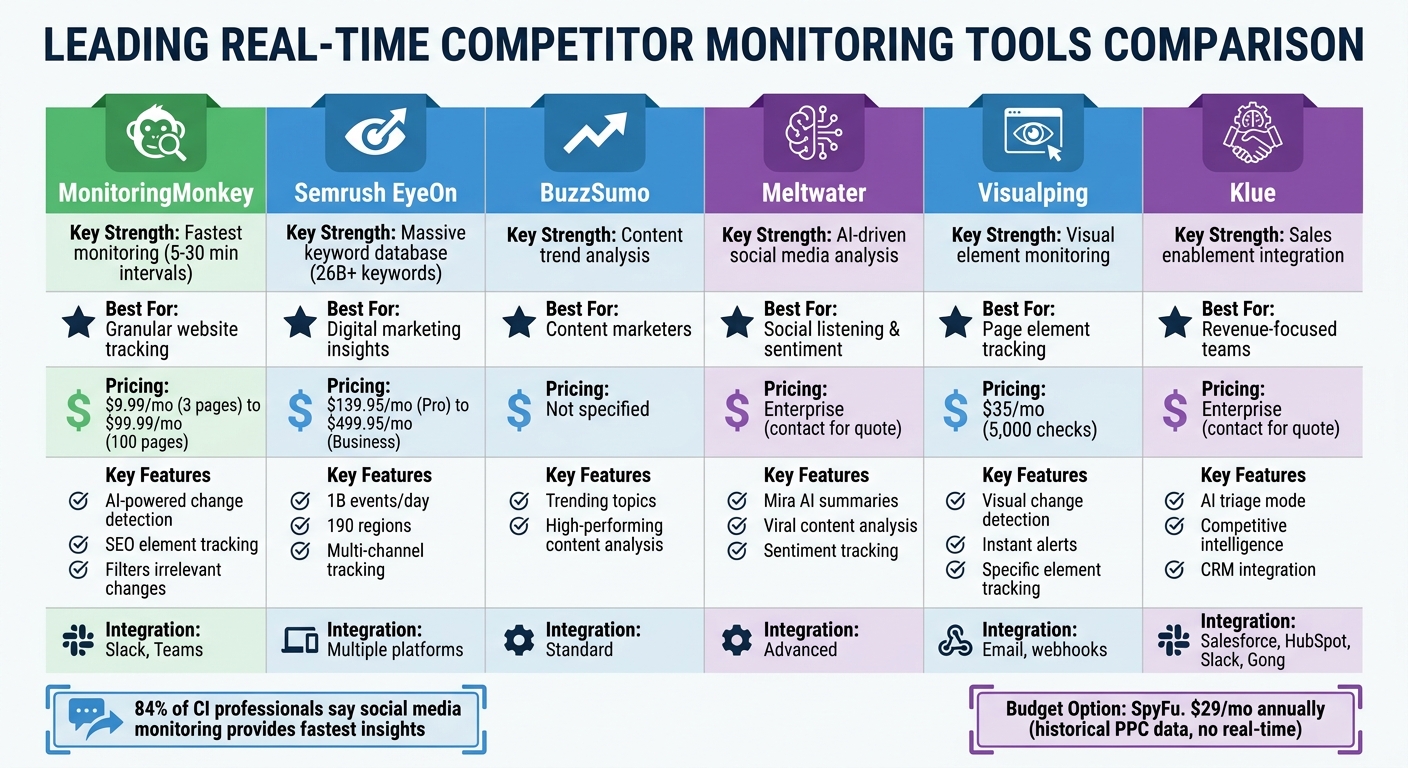
Real-Time Competitor Monitoring Tools Comparison: Features, Pricing, and Best Use Cases
When it comes to tracking competitor activity, there are several top marketing analytics tools designed to deliver timely insights. MonitoringMonkey is a standout option, using AI-powered change detection to scan competitor websites every 5–30 minutes. It monitors key updates like pricing changes and SEO elements, such as H1 tags and meta descriptions, while filtering out irrelevant tweaks (e.g., minor typos or rotating testimonials). This ensures teams only receive alerts for meaningful changes[12]. Pricing starts at $9.99/month for three pages, with enterprise plans available at $99.99/month for up to 100 pages[12].
Semrush EyeOn focuses on digital marketing insights across channels. It tracks updates like new blog posts, website edits, and ad launches, leveraging a massive research database that processes 1 billion events daily across 190 regions[13][7]. Plans range from $139.95/month for the Pro plan to $499.95/month for the Business plan[7]. For content marketers, BuzzSumo is invaluable for spotting trending topics and analyzing high-performing competitor content as it gains traction. This helps marketers stay ahead by understanding what’s resonating with audiences[14].
Meltwater takes a different approach by providing AI-driven analysis for social media. Its "Mira AI" feature offers plain-language summaries to explain why competitor content goes viral or why sentiment shifts occur[14]. On the other hand, Visualping specializes in visual monitoring, keeping tabs on specific page elements like banners or call-to-action buttons, with instant alerts. Business plans start at $35/month for up to 5,000 checks[7].
For those seeking deeper market intelligence, Klue combines competitive insights with sales enablement. Its AI-powered "triage mode" helps teams quickly review new intelligence and assess its impact on revenue. A user, Dustin Ray, Head of Competitive Market Intelligence at Huntress, shared:
"The ability to pull in competitive information closer to real time drove our win rates up... My competitive intel team output essentially tripled without adding a single bit of headcount"[15].
Feature and Benefit Comparison
Each tool has its own strengths, tailored to different needs. MonitoringMonkey offers the fastest monitoring intervals and granular website tracking. Semrush boasts a vast keyword database with over 26 billion keywords[7][16]. Meltwater excels in social media analysis with its AI-powered insights, while Klue stands out for its seamless integration with platforms like Salesforce, HubSpot, Slack, and Gong, enabling sales teams to access competitive intelligence directly during deals[15][14].
The choice often depends on whether a team prioritizes real-time notifications or comprehensive data aggregation. Tools like MonitoringMonkey and Klue integrate with workflows (e.g., Slack, Teams) and CRM systems (e.g., Salesforce, HubSpot), making them highly accessible. For budget-conscious teams, SpyFu offers historical pay-per-click data starting at $29/month annually, though it lacks the immediacy of real-time updates[14].
These tools highlight how timely insights can help teams craft proactive and effective competitive strategies.
How to Set Up Real-Time Monitoring for Competitor Analysis
Start by pinpointing 3–5 key competitors: 2–3 direct competitors, one aspirational, and one emerging threat [17]. This selection helps you focus on the most relevant players without being overwhelmed by excessive alerts.
Next, zero in on high-priority pages such as pricing, product or feature announcements, job postings, homepage content, and blogs [17]. These pages often provide early clues about strategic shifts. For instance, pricing pages tend to change 18% more frequently on Wednesdays than Sundays, and around 1 in 5 automated checks on competitor pricing pages identify noteworthy updates [17].
Adjust monitoring frequency based on the importance of each page. Pricing and product pages should be checked multiple times daily, while homepages and blogs can be reviewed weekly [30, 17]. Use specific tracking methods like numerical tracking for prices, sitemap tracking for new pages, and visual or text tracking for messaging updates [11].
To avoid irrelevant noise, apply visual selectors to focus on the key areas of a page, such as pricing tables, while filtering out distractions like ads, cookie banners, or footers [30, 17, 5]. Set up automated notifications so you're immediately alerted to changes [30, 17, 32]. Once your alerts are active, the next step is to organize this data on a user-friendly dashboard.
Creating Monitoring Dashboards
After setting up your tracking, consolidate all insights into a centralized dashboard using top analytics tools and resources. Group monitors into folders based on competitors and page types. Use pre-configured templates for different categories - like pricing, blog updates, or product features - with tailored filters and monitoring schedules [11]. AI-powered summaries can streamline the process by converting raw data into actionable insights. For example, instead of sifting through lengthy text changes, you might see a concise update like "Competitor X increased Enterprise plan pricing by $100" [11].
For pricing dashboards, focus on tracking specific details such as price changes, plan tiers, and trial terms, with updates every 2–4 hours [30, 17]. Product and feature pages should be checked every 2–3 days to catch updates like new integrations or feature announcements [17]. Job postings can also be revealing - if a competitor posts multiple roles for data engineers, it may hint at a strategic pivot or new product development expected in 6–12 months [17].
Analyzing and Using Real-Time Data
This dashboard-centric approach complements proactive strategies. Dedicate 15 minutes each week to reviewing alerts, assigning changes to relevant teams (e.g., pricing updates to sales, feature changes to product teams, and messaging tweaks to marketing), and spotting trends. For example, repeated price increases could signal a shift in market positioning [30, 17, 3]. Competitive pages in top categories update roughly every 320 days, while "best software" comparison pages refresh about every 143 days [17]. Recognizing these patterns can help you anticipate competitors’ next moves.
Use the monitoring data to perform a content gap analysis. Identify keywords and topics where competitors rank but you don’t, and create content to address those gaps [12, 1]. Companies that act quickly on competitive intelligence are twice as likely to achieve strong financial outcomes compared to slower decision-makers [17]. The faster you can turn insights into action, the better positioned you'll be to stay ahead of the competition.
Best Practices for Real-Time Competitor Content Analysis
When conducting competitor analysis, prioritize monitoring elements that directly impact your strategic decisions. Focus on high-impact areas like pricing tables, feature lists, and CTAs - these are the factors that influence decision-making the most [10]. As PageCrawl.io puts it:
"The test for any competitive intelligence tool is: does the information it provides lead to decisions or actions?" [10]
Put your metrics into context. Julia Holmqvist, Social Media Manager at Semrush, emphasizes the importance of comparison:
"If you just show numbers like, 'This month we got 5,000 engagements,' it lacks impact without context. When you compare... against competitors, you can actually tell if that number is good or bad." [18]
To understand your position in the market, track metrics like share of voice, keyword rankings, and engagement rates alongside similar data from your competitors.
Stay on top of alerts to act quickly. Set aside 30 minutes each week to review real-time alerts and delegate them to the right teams. For example, send pricing updates to sales, feature changes to product teams, and messaging shifts to marketing [10]. This regular habit ensures you stay responsive without becoming overwhelmed by notifications.
Spot content gaps by analyzing competitors' keyword rankings. Look for audience questions they haven’t addressed or topics they’ve covered superficially - these are opportunities for you to step in [18].
To streamline these practices, consider using specialized analytics platforms.
Using the Marketing Analytics Tools Directory
The Marketing Analytics Tools Directory (https://topanalyticstools.com) is a valuable resource for finding real-time analytics tools. It categorizes tools into areas like SEO, social media monitoring, change detection, and business intelligence. This structure helps you avoid wasting money on overlapping subscriptions and ensures you pick tools that align with your goals [10][19].
Start small and build a cost-effective monitoring stack. Use free tiers from tools like PageCrawl (offering 6 free monitors) or Visualping to test your setup before committing to paid plans [10]. The directory also highlights tools designed for different needs - whether you’re a solo entrepreneur or part of a large enterprise with a dedicated analytics team. This flexibility allows you to scale your monitoring system as your business grows [20][10][7].
Conclusion
Real-time monitoring has transformed competitive intelligence into an ongoing, automated process, delivering instant updates on key competitor moves like pricing changes, feature launches, or messaging shifts. This approach helps businesses stay ahead by eliminating surprises and enabling quick, informed decisions [10][4].
The best tools cut through the noise, delivering only the updates that matter. For instance, an alert about a new Enterprise tier priced at $299/month with SSO can help teams focus on crafting a strategic response instead of sorting through irrelevant data [10]. By narrowing the focus to targeted elements, businesses reduce notification fatigue and concentrate on meaningful market shifts.
Another key benefit of real-time monitoring is its role in content gap analysis. By identifying overlooked keywords and topics, businesses can create content that fills those gaps. When paired with benchmarking metrics like share of voice or engagement rates, this data offers valuable context for evaluating performance and making necessary adjustments [1].
Setting up an effective monitoring system doesn’t have to break the bank. You can start small with free tools like PageCrawl, which offers six free monitors, or Visualping, to test your setup before committing to a paid version [10]. For a more tailored approach, the Marketing Analytics Tools Directory (https://topanalyticstools.com) lists tools by specific functions like SEO analysis, social listening, or change detection. This helps avoid overlapping subscriptions and ensures your stack remains cost-effective and scalable [10][19].
Whether you're a solo entrepreneur keeping tabs on a couple of competitors or part of a larger team tracking dozens across multiple channels, the objective stays the same: turning insights into action. Those who can act quickly and strategically with the help of real-time intelligence hold the upper hand in today’s fast-paced markets.
FAQs
What should I monitor first on a competitor’s site?
To keep a pulse on your competitors, begin by observing noticeable updates that could affect their market stance. Look out for shifts in pricing, new product launches, messaging tweaks, or changes in content strategy - these often indicate strategic adjustments like pricing revisions or fresh offerings.
Beyond that, pay attention to marketing messages, job postings, and even alterations in their website structure. These can provide valuable clues about their growth ambitions or future plans.
For an edge, consider using automated tools that send real-time alerts. This way, you can stay ahead and remain informed about their evolving strategies.
How often should competitor pages be checked for changes?
To keep up with market trends, make it a habit to monitor competitor pages regularly. Check their pricing updates daily, review product and job postings every 2-3 days, and take a look at their homepage and blog content weekly. This routine helps you stay aware of any changes in their strategy or offerings.
How do I avoid alert noise and only see meaningful updates?
To keep alert noise to a minimum, fine-tune your monitoring system to highlight only the most critical updates. Concentrate on essential areas like pricing changes, product updates, or the release of new content. Set thresholds that make sense for your workflow - critical updates might need frequent alerts, while less important changes can be flagged less often. By filtering out low-priority notifications, you ensure that your attention stays where it’s needed most.