Studying your competitors on YouTube can help you create better content, grow your audience, and improve your channel’s performance. Here’s how:
- Find competitors: Look for 5–7 channels in your niche using keyword searches, YouTube Studio’s "Research" tab, and the "Channels your audience watches" report.
- Track social media analytics: Focus on average views per video, engagement rates (likes, comments, shares), subscriber growth, upload frequency, and click-through rates (CTR).
- Spot trends and gaps: Analyze what works for competitors, identify content gaps (missed topics or questions), and track emerging trends to stay relevant.
- Use tools for deeper insights: Combine YouTube Studio with third-party tools like vidIQ, TubeBuddy, and Social Blade to get advanced analytics and SEO data.
Finding Competitors and Choosing Metrics
How to Choose Competitors to Study
When narrowing down competitors to analyze, stick to 5–7 channels. Any more than that, and you'll end up with too much data to work with effectively. Competitors can be grouped into three categories: direct competitors (those offering the same products or services to a similar audience), indirect competitors (channels targeting similar audiences but with different content), and aspirational channels (industry leaders whose quality and production you aim to match). These categories will help shape a focused, data-driven content strategy using top analytics tools for business.
To find direct competitors, start with keyword searches. Plug your niche keywords into YouTube’s search bar and take note of the top-performing channels that consistently appear in the results. For example, if your niche is action cameras, searching terms like "GoPro alternatives" or "mountain biking POV" can reveal the key players in your space. A 2025 case study highlighted DJI’s reach of over 1.8 billion users - significantly outpacing GoPro’s 806 million users - despite GoPro’s longer market presence. This example shows how analyzing competitors can reveal surprising insights about market dynamics.
YouTube Studio also offers tools to identify competitors. Use the "Research" tab to explore audience search trends, and check the "Channels your audience watches" report to discover overlooked competitors. Additionally, visiting a competitor’s "Channels" tab can uncover creators they feature or follow, giving you even more leads. Once you’ve identified your competitors, focus on tracking the right metrics to better understand their strengths and weaknesses.
Which Metrics to Track
Average views per video is a crucial metric. It measures a channel's consistent reach, independent of subscriber numbers. For instance, a channel with 50,000 subscribers averaging 100,000 views per video has more impactful content than one with 500,000 subscribers but only 10,000 views per video. This metric highlights which channels resonate most with their audience.
Next, look at engagement rate, which includes likes, comments, and shares per 1,000 views. High engagement suggests strong storytelling and a deep connection with the audience. Also, track subscriber growth patterns to identify trends - pay attention to spikes in growth and see if they align with specific types of content or posting schedules.
Upload frequency is another important benchmark. Some niches thrive on daily uploads, while others perform better with less frequent but more in-depth content.
Don’t overlook click-through rate (CTR), which reflects the effectiveness of thumbnails and titles. Research shows that 90% of top-performing videos use custom thumbnails. Finally, analyze SEO metadata - the keywords in titles, descriptions, and tags - to understand how competitors optimize their content for discoverability. These insights will help you refine your own strategy and stay competitive.
Using Analytics Tools to Study Competitors
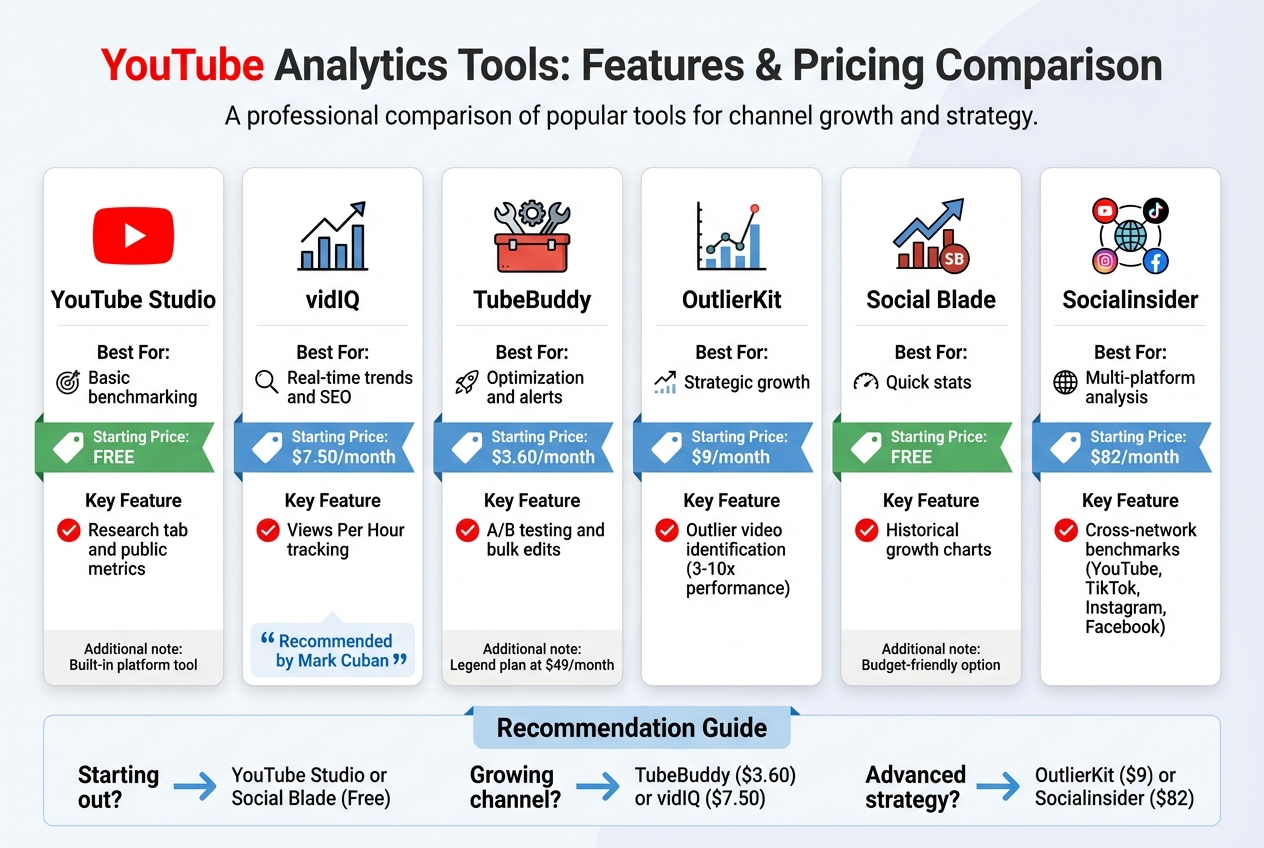
YouTube Analytics Tools Comparison: Features, Pricing, and Best Use Cases
Working with YouTube Studio Analytics and Public Data
YouTube Studio is a solid resource for gaining insights into your competitors. Through its Research tab, it provides data on upload frequency, view counts, and early performance metrics. For a manual deep dive, you can sort a competitor's channel by "Most Popular" to study their video titles, thumbnails, and descriptions. Even the comment sections can reveal content gaps or audience interests. However, YouTube Studio has its limitations - it doesn’t allow for side-by-side comparisons or advanced analytics. To fill these gaps, pairing it with top marketing analytics tools can give you a more complete picture.
Third-Party Tools for Deeper Analysis
If you’re ready to go beyond the basics, third-party tools can help you uncover detailed insights about your competitors:
-
vidIQ: Known for its real-time Views Per Hour metrics and competitor scorecards, vidIQ is a favorite among creators. Mark Cuban even said:
"vidIQ has an awesome suite of services. I recommend all of my companies use it for YouTube".
Plans start at $7.50/month. -
TubeBuddy: This tool is packed with features like A/B testing for thumbnails, bulk metadata updates, and notifications when competitors upload new content. Creator Karin Carr described it as:
"like having a YouTube expert on staff who will give you advice and direction whenever you need it".
Pricing begins at $3.60/month (billed annually), with advanced tools available in the Legend plan for about $49/month. - OutlierKit: Perfect for spotting high-performing videos, OutlierKit identifies content that performs 3–10 times better than average. It also analyzes key elements using audience personas. Subscriptions start at $9/month.
- Social Blade: For quick, no-cost benchmarking, Social Blade offers historical growth charts and subscriber trends. It’s a great option for creators on a budget.
- Socialinsider: If you need insights across multiple platforms, Socialinsider aggregates data from YouTube, TikTok, Instagram, and Facebook. It’s a pricier option, starting at $82/month, but ideal for cross-platform comparisons.
| Tool | Best For | Starting Price | Key Feature |
|---|---|---|---|
| YouTube Studio | Basic benchmarking | Free | Research tab and public metrics |
| vidIQ | Real-time trends and SEO | $7.50/month | Views Per Hour tracking |
| TubeBuddy | Optimization and alerts | $3.60/month | A/B testing and bulk edits |
| OutlierKit | Strategic growth | $9/month | Outlier video identification |
| Social Blade | Quick stats | Free | Historical growth charts |
| Socialinsider | Multi-platform analysis | $82/month | Cross-network benchmarks |
These tools can help you refine your strategy and stay ahead of the competition, whether you’re looking for SEO insights, performance trends, or multi-platform analytics.
Turning Data into Strategy
Building a Comparison Framework
After gathering insights from YouTube Studio and third-party tools, the next step is to organize your findings into a comparison framework using website analytics tools. This framework should help you uncover patterns and trends. Start by tracking 5–10 competitor channels, focusing on metrics like subscriber growth rate, average views per video, engagement rates (likes, comments, shares), upload frequency, and video length. Don’t stop there - pay attention to qualitative details too, such as thumbnail designs, hook styles, and how SEO is used in titles and descriptions.
Here’s a practical example: Samsung's YouTube channel consistently pulls in more views per video than Apple's, even though Samsung has far fewer subscribers (7.8 million compared to Apple’s 20 million). This highlights how engagement and traction can outweigh follower count.
Using this framework also helps validate your current strategy. For instance, if you increased your subscriber base by 15% last quarter while a competitor managed only 3%, it’s clear your approach is working. Another critical metric is the Views-to-Subscribers (V/S) ratio, where a healthy range is typically 20–30%. Falling below that range could mean your audience isn’t engaging with your new content. These metrics provide a foundation for making informed, strategic decisions.
| Metric | What It Reveals | Strategic Action |
|---|---|---|
| Subscriber Growth | Channel momentum and audience resonance | Compare growth trends with competitors |
| Average Views per Video | Real reach and consistent performance | Identify popular topics to replicate |
| Comment-to-View Ratio | Audience loyalty depth (>1.5% is strong) | Analyze high-ratio videos for storytelling ideas |
| Content Pillars | Themes driving engagement | Focus on formats that consistently perform |
This structured approach ensures your strategy is grounded in data.
Finding Opportunities and Weak Points
Once your comparison framework is in place, shift your focus to spotting weaknesses and untapped opportunities in your competitors' strategies. Start by analyzing engagement rates to identify friction points - videos with high views but low retention, unanswered questions in their comment sections, or topics they’ve overlooked. Marketing expert Nia Patel offers a simple but effective tip:
"Your competitors' comment sections can also be a good place to go to because they might their audience members suggesting ideas that the competitor hasn't posted yet".
Leverage tools like TubeBuddy or Social Blade to track competitors' growth surges. Pinpoint when their subscriber count spiked, and then review the specific videos they released during that period. For example, Nike saw a 15% boost in engagement by pivoting to short-form videos after analyzing competitor data. Similarly, Red Bull used vidIQ’s trending alerts to spot a surge in extreme sports content and quickly responded, generating millions of additional views.
Another way to gain an edge is by identifying content gaps - areas your competitors haven’t addressed. For example, if your niche is saturated with product reviews but lacks tutorials, that’s your chance to step in. Or, if competitors are going viral on TikTok or Instagram but haven’t adapted that content for YouTube, you could seize the opportunity to fill that void first. As ScaleLab’s Iryna Avramenko points out:
"Copying your competitors will always put you behind. Instead, analyze their playbook, spot their blind spots, and then execute a version that fits your brand".
To stay focused, limit your strategy adjustments to 3–4 actionable changes at a time and review the outcomes after 90 days. This measured approach keeps you from spreading yourself too thin and ensures you can track what’s truly driving results.
sbb-itb-5174ba0
Using Marketing Analytics Tools Directory
With the sheer volume of content uploaded every minute, finding the perfect YouTube analytics tool can feel like searching for a needle in a haystack. The Marketing Analytics Tools Directory (https://topanalyticstools.com) simplifies this process by organizing tools based on their specific strengths. Instead of wading through endless reviews, you can quickly identify tools that align with your data-driven strategies.
The directory groups tools by their primary functions. For instance, if SEO optimization is your focus, TubeBuddy (starting at $3.60/month) is a solid choice. Need to track real-time trends? vidIQ (starting at $16.58/month) offers "Views Per Hour" monitoring, helping you spot breakout content early. For agencies managing multiple clients, Socialinsider (starting at $82/month) enables cross-platform YouTube performance comparisons. Advanced features like outlier detection are also highlighted - tools such as OutlierKit (priced between $9 and $15/month) can flag videos performing 3–10x above a channel’s average, offering valuable insights for replicating success. This structured approach makes it easy to find tools that provide meaningful insights without unnecessary clutter.
The directory also helps you distinguish between tools offering basic data - like Social Blade, which provides subscriber counts - and those delivering deeper, actionable insights. You can filter tools by format, such as web-based applications or browser extensions. This is particularly useful since some browser extensions can slow down your system when multiple tabs are active. For agencies or growing creators, tools are further divided into free and paid options, making it simple to find solutions that match your budget and channel size. By streamlining the search process, the directory ensures you spend more time optimizing your strategy and less time hunting for the right tools.
Beyond these core features, the platform keeps an eye on emerging trends. For example, it highlights the rise of AI-driven tools for generating content ideas, analyzing titles, and optimizing thumbnails. It also tracks strategies like cross-platform repurposing, where creators leverage viral content from TikTok or Instagram to inform their YouTube approach. By focusing on tools that align with the future of content creation, the directory helps you stay ahead in a competitive landscape, sharpening your analysis and refining your strategy.
Conclusion
Turning insights into action is the key to standing out on YouTube, a platform where about 720,000 hours of new video are uploaded every day. Competitive analysis helps you carve out your unique space by leveraging data to guide your content strategy. As Gauri from OutlierKit explains:
"The channels growing fastest aren't guessing. They're using competitive data to inform every content decision".
By tracking essential metrics, identifying content gaps, and learning from standout performers, you can develop a strategy based on facts, not assumptions.
The tools listed in the Marketing Analytics Tools Directory offer a range of features, from SEO enhancements to real-time trend analysis, to help you make informed decisions. These tools enable you to analyze both quantitative performance metrics and qualitative insights, giving you a clearer path to differentiation. Considering that 95% of YouTube videos get fewer than 1,000 views, relying on guesswork is a risky move. The Marketing Analytics Tools Directory (https://topanalyticstools.com) simplifies the process of finding tools that suit your channel's needs, whether you're working with a tight budget or managing a larger operation.
FAQs
How can I find the right YouTube competitors to analyze?
To identify the right YouTube competitors, start by looking for channels that cater to a similar audience, produce content in your niche, and operate within your industry. A good way to begin is by researching relevant keywords and using YouTube's search tools to find channels that rank well for those terms. Another useful trick is to check which channels show up in YouTube's recommended videos alongside your content - these often share an audience with you.
Keep an eye on channels that have overlapping themes and strong engagement metrics, like high view counts, plenty of likes, and active comment sections. Tools like YouTube Studio or third-party analytics platforms can provide deeper insights into these competitors, helping you understand their strategies. By zeroing in on competitors that appeal to your target audience, you’ll be better equipped to fine-tune your content and grow your channel.
What are the key metrics to track when analyzing competitor YouTube channels?
When you're breaking down competitor YouTube channels, start by looking at video views. This gives you a clear picture of how far their content is reaching and how popular it is. Next, dive into engagement metrics - likes, comments, and shares. These numbers show how much their audience is connecting with their videos and what kinds of content spark interaction.
Another key piece of the puzzle is understanding their audience demographics. Knowing who is watching and engaging with their content can help you shape your own videos to attract a similar crowd. Don’t overlook their posting frequency, the types of content formats they use, and even their video thumbnails. These visual and strategic elements often reveal what’s clicking in your niche.
By piecing together all these details, you can sharpen your own approach and carve out a space that sets you apart.
What are the best tools for analyzing competitor performance on YouTube?
To understand how your competitors are performing on YouTube, several tools can give you a closer look at key metrics like views, engagement rates, and audience behavior. Some platforms even focus on spotting content gaps, keeping up with trends, and comparing channel performance. These insights can reveal what’s driving their success and help you fine-tune your own content strategy.
Using analytics tools, you can dig into what’s working for other creators - whether it’s understanding audience preferences or identifying the keywords that bring in the most traffic. This information can help you sharpen your approach and stay ahead in YouTube’s ever-changing ecosystem.