Syncing legacy systems with modern platforms is vital for businesses relying on outdated software that still powers critical operations. Over 70% of enterprise data is tied to legacy systems, consuming up to 90% of IT budgets. Instead of risky full system rewrites, integration offers a safer, cost-effective way to connect old systems with modern tools like real-time analytics, cloud platforms, and AI capabilities.
Key Steps to Successful Integration:
- Evaluate Your Legacy System: Document architecture, workflows, and dependencies. Identify outdated protocols and existing data issues.
- Choose an Integration Method: Options include API integration, middleware, point-to-point connections, RPA, or iPaaS solutions. Match the method to your business needs.
- Implement Gradually: Use strategies like the Strangler Fig pattern to modernize incrementally while maintaining legacy functions.
- Ensure Data Quality: Establish a single source of truth, validate data continuously, and address inconsistencies.
- Focus on Security: Encrypt data, enforce access controls, and use tools like tokenization to protect sensitive information.
- Plan for Long-Term Modernization: Gradual migration and parallel system operation reduce risks and ensure smooth transitions.
By following these steps, businesses can reduce operational costs by 20-30%, improve decision-making with unified workflows, and extend the lifespan of legacy infrastructure without sacrificing reliability.
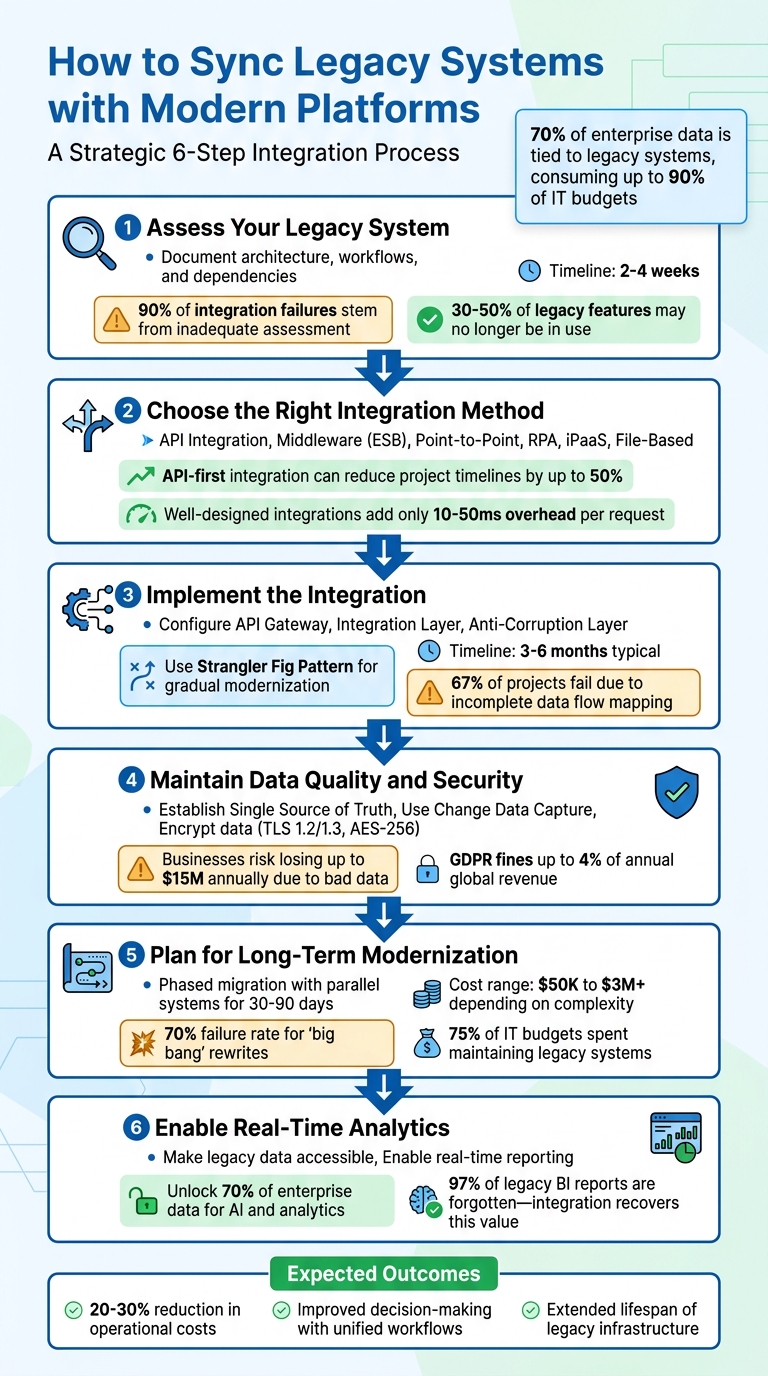
6-Step Process for Syncing Legacy Systems with Modern Platforms
Step 1: Assess Your Legacy System
Before diving into integration, take the time to carefully evaluate your legacy system. Skipping this step can lead to costly delays and rework, as 90% of integration failures stem from inadequate assessment. Typically, this process takes 2–4 weeks, but the time investment is well worth it.
"The discovery phase is not optional - it's where 90% of integration failures are prevented" – Gartner Research
Start by cataloging every technical element in your system - programming languages, frameworks, databases, message queues, and caching layers. Then, map out your existing interfaces, such as API endpoints, webhooks, SOAP/REST protocols, and file exports. Don’t overlook those informal workflows - like scripts, batch jobs, or scheduled file drops - that employees have been manually running for years. These hidden dependencies are often the reason why 67% of legacy integration projects encounter setbacks.
Document System Architecture
To get a clear picture of your system, create diagrams that illustrate how major components interact. Tools like SonarQube or CodeClimate can be helpful for analyzing code complexity and identifying areas that pose high risks if altered. Mapping dependency graphs can also help you locate circular dependencies or critical paths that could disrupt the integration process.
Pay attention to how data flows through your system - where it enters, how it’s transformed, and where it exits. Identify the "system of record" for key data entities like customers or inventory. Conduct interviews with stakeholders to align documented workflows with real-world practices. These discussions often reveal undocumented business rules that are crucial to preserve. Interestingly, 30–50% of legacy features may no longer be in use and might not need to be integrated. Once you’ve mapped your system thoroughly, shift your focus to pinpointing current integration challenges.
Find Current Integration Problems
Before choosing an integration strategy, identify existing issues like outdated protocols or poor data quality. Look for duplicate records, missing foreign keys, and inconsistent field definitions. If your legacy system relies on older protocols - such as SOAP, XML-RPC, or proprietary formats - it might not be compatible with modern REST or GraphQL interfaces .
Document mismatches in protocols, single points of failure, performance bottlenecks (like batch processing windows), deprecated libraries, and any security vulnerabilities. Pay special attention to end-of-life software versions and unsupported hardware, as these often lack critical security updates. Finally, live testing can help verify documentation and uncover any undocumented connections.
sbb-itb-5174ba0
Step 2: Choose the Right Integration Method
After assessing your legacy system, the next step is selecting an integration method that aligns with your business needs. The choice you make should address your technical environment and the goals you aim to achieve. For instance, API-first integration can reduce project timelines by up to 50%, but only if it fits your specific requirements.
Start by defining clear objectives. Instead of vague goals like "modernization", pinpoint the exact problems you want to solve - such as achieving real-time inventory tracking or automating customer data updates. This clarity helps you decide whether real-time event-driven signals are necessary or if batch updates will suffice. Keep in mind that well-designed integrations generally add only 10–50 milliseconds of overhead per request, making real-time options feasible for many scenarios. Let’s dive into the available integration methods.
Review Integration Methods
Each integration method serves a different purpose, and picking the wrong one can lead to setbacks. Here’s a breakdown:
- API Integration: This method, also known as API wrapping, modernizes legacy functions by creating REST, SOAP, or RPC interfaces. It’s a safer option compared to full system rewrites, which fail 70% of the time. API integration reduces risks by 80% and is ideal when your legacy system has stable interfaces but needs a modern access point.
- Middleware Solutions (ESB): Middleware, such as an Enterprise Service Bus, acts as a go-between for systems, handling tasks like message routing, data transformation, and protocol translation. For example, it can convert older SOAP/XML formats into modern REST APIs. While middleware supports real-time capabilities, it can be complex and expensive to maintain.
- Point-to-Point (P2P) Integration: This approach involves direct, custom-coded connections between two systems. While fast to implement, it becomes difficult to manage as the number of systems grows.
- Robotic Process Automation (RPA): RPA uses bots to mimic human interaction with a user interface, making it suitable for systems without API or database access. However, it operates at UI speed, meaning it’s slower and less reliable than API-based methods.
- File-Based Integration: This method works well for mainframes or systems reliant on batch exports. It’s limited to scheduled synchronization rather than real-time updates.
| Integration Method | Use Case | Real-Time Capabilities | Complexity | Costs |
|---|---|---|---|---|
| API Integration | Systems with existing APIs | High (Real-time) | Moderate | Moderate |
| Middleware (ESB) | Complex environments needing protocol translation | High (Real-time) | High | High |
| P2P Integration | Simple, one-off connections | High (Real-time) | Low | Low |
| RPA | Systems with no API/database access | Low (UI-speed) | Moderate | Moderate |
| iPaaS | Connecting cloud and on-premise apps | High (Real-time) | Low to Moderate | Subscription-based |
| File-Based | Mainframes or batch export systems | Low (Scheduled) | Moderate | Moderate |
When evaluating methods, don’t focus solely on licensing costs. Consider setup time, ongoing maintenance, and the availability of specialized skills. For example, finding developers familiar with older languages like COBOL or FORTRAN can be challenging and costly. Security is another critical factor - modern integration methods can enhance security by adding features like authentication, encryption, and audit logging to legacy systems. Now, let’s take a closer look at how iPaaS solutions can simplify integration.
Evaluate iPaaS Solutions
Integration Platform-as-a-Service (iPaaS) offers a streamlined way to synchronize multiple systems by bundling maintenance, updates, and pre-built connectors into a single cloud-based service. This eliminates the need for extensive in-house engineering or custom coding. Popular platforms like Zapier, Informatica, Fivetran, and Airbyte use subscription-based pricing, which scales with usage and avoids hefty upfront infrastructure costs.
When choosing an iPaaS, ensure it supports your legacy system’s protocols and formats. Beyond compatibility, assess the platform’s reliability and error-handling capabilities. Features like retry mechanisms and queue management are essential for managing issues like API timeouts or network interruptions.
For example, Gold Rush Vinyl used Zapier to automate workflows, saving over 2,000 hours annually. Similarly, Flow Digital implemented a real-time Shopify integration, boosting monthly revenue by 128%.
If you operate in a regulated industry, look for platforms with ISO certifications, HTTPS encryption, role-based access controls, and tokenization. Many modern iPaaS platforms now include AI-assisted configuration to simplify rule generation, which is especially helpful when legacy documentation is incomplete. Start by identifying 2–3 high-impact integrations to showcase immediate benefits.
Step 3: Implement the Integration
Now that you've chosen the best integration method in Step 2, it's time to implement and test the solution. This stage focuses on configuring and validating the integration to ensure smooth communication between systems. Did you know that legacy integrations fail 67% of the time due to incomplete data flow mapping? That's why careful planning is crucial.
Spend 2–3 days mapping undocumented dependencies to uncover hidden connections - these are often the culprits behind up to 90% of failures. Start with non-critical systems to test your processes and build confidence before tackling mission-critical data.
Configure Integration Layers
Setting up your integration architecture starts with creating distinct layers that work together seamlessly. Here's how you can structure it:
- API Gateway: This acts as a single entry point, managing tasks like authentication, rate limiting, and routing requests to the right systems. It's particularly useful for shielding legacy systems from modern traffic surges.
- Integration Layer: This layer handles protocol translation and data mapping. For instance, you might convert older formats like SOAP/XML into REST APIs or transform mainframe records into JSON. Wrapping legacy systems in a modern API layer essentially treats them as backend services.
- Anti-Corruption Layer: Use this layer to map data transformation rules, keeping your modern platform's logic clean even when dealing with messy legacy data structures. Connect to legacy databases (e.g., Oracle, SQL Server, AS/400, IBM z/OS) using custom adapters or pre-built iPaaS connectors.
To gradually modernize, apply the Strangler Fig Pattern, which routes new workflows through the modern layer while keeping legacy functions active. This phased approach avoids the risks of an all-at-once cutover. For critical operations, implement saga patterns with compensation logic to maintain data consistency and handle failures gracefully.
Once these layers are in place, the next step is to validate your setup with thorough testing.
Test and Monitor Synchronization
Testing and monitoring are essential to ensure reliable communication between systems. Use a mix of unit tests, integration tests, and end-to-end scenarios to catch issues before full deployment. Running both systems in parallel during testing helps verify data integrity before making a complete switch.
Set clear success metrics, such as integration latency, error rates, recovery time, and reductions in manual processes. Implement real-time monitoring with automated alerts to catch problems early. Your tools should include retry mechanisms and message queue management to handle network interruptions or temporary downtime without losing data.
Roll out the integration in phases, starting with non-critical functions or pilot groups. This staged approach allows you to identify and fix anomalies before scaling up. After the initial synchronization, perform rigorous validation checks by comparing data between systems to ensure accuracy and completeness. Always have a rollback plan and reliable backups ready in case something goes wrong.
"Organizations that successfully integrate legacy systems can reduce operational costs by 20–30% while maintaining system reliability."
- Enterprise Integration Report
With 70% of enterprise data still residing in legacy systems, a careful and methodical approach to implementation ensures a robust and secure integration process.
Step 4: Maintain Data Quality and Security
Once integration is complete, the focus shifts to keeping your data accurate and secure. Without proper measures, poor synchronization can lead to hefty losses - businesses risk losing up to $15 million annually due to bad data, with 45% of customer information becoming outdated each year. To avoid these pitfalls, it’s crucial to implement automated systems that catch and prevent issues before they spread.
Set Up Data Validation Processes
Data validation isn’t a one-time task - it should run continuously. Start by creating a Single Source of Truth (SSOT) for each data field. This means assigning one system as the ultimate authority for specific types of data. For instance, your legacy ERP might handle product pricing, while your modern CRM oversees customer contact details.
To ensure accuracy, use Change Data Capture (CDC). This tracks row-level changes in database logs, providing a detailed view of updates while reducing API strain. Techniques like checksums and row counts act as digital fingerprints, helping you verify that no records were lost or corrupted during transfers. For example, comparing total account balances or record counts across systems can quickly highlight discrepancies.
Establish a shared vocabulary across platforms. If terms like "customer" have different meanings in your ERP versus CRM, it can lead to operational chaos. An anti-corruption layer can help by translating outdated data structures into formats that align with your modern system’s logic.
Automated alerts are another must-have. These notify you instantly of sync failures or schema mismatches. Additionally, cleaning up data before migration - removing duplicates, fixing foreign key errors, and standardizing code sets - can cut migration time by 25% to 40%.
Once data quality is under control, the next priority is safeguarding that data.
Create Security Protocols
Data security needs to be comprehensive, covering transport, applications, and the integration pipeline. Encrypt data both in transit (using TLS 1.2/1.3) and at rest (with AES-256 encryption). Given that GDPR fines for breaches can reach up to 4% of annual global revenue, strong security measures are non-negotiable.
Implement Role-Based Access Control (RBAC) and require Multi-Factor Authentication (MFA) to enforce strict access controls. Tokenization is another effective strategy - replace sensitive data with random strings to protect it during sync processes. Similarly, PII masking ensures compliance by hiding personally identifiable information.
To minimize exposure, configure systems to output generic error messages instead of detailed stack traces.
"Integration security works as a shield that fortifies the bridges between systems, ensuring data remains safe and reliable."
- Teja Bhutada, Integration Security Expert, Exalate
Asynchronous sync queues are another smart safeguard. These ensure that if one system goes offline, data isn’t lost - the sync picks up exactly where it left off once the system is back online. Finally, implement rate limiting to protect against API abuse and denial-of-service attacks by capping the number of requests allowed in a given timeframe.
Step 5: Plan for Long-Term System Modernization
Integration is just the beginning. A staggering 75% of enterprise IT budgets are spent maintaining legacy systems rather than investing in new capabilities. This makes it crucial to have a clear modernization strategy to phase out outdated infrastructure. The goal? Move forward carefully and avoid the risky "big bang" approach, which has a 70% failure rate for large-scale rewrites.
Build a Phased Migration Plan
Gradual migration is the way to go. Instead of overhauling everything at once, develop new functionality alongside your legacy system. Use tools like a routing layer - such as a proxy or API gateway - to slowly redirect traffic to the updated platform. Start with low-risk, high-impact modules to test the waters before tackling core components.
Running both systems in parallel is key. Operate them side by side for 30 to 90 days, comparing outputs to ensure everything works as expected before retiring the old system. For example, in September 2025, Expert Soft helped a French cosmetics retailer migrate from a JSP-based system to a Composable Storefront (Spartacus). They launched new child sites while maintaining legacy parent sites, merged daily order exports into a single ERP file, and ensured seamless customer logins - all while avoiding SEO issues and maintaining financial operations.
Don’t forget to budget realistically. Costs can range from $50,000 for a simple rehost to over $3,000,000 for a complete rebuild, with timelines spanning 1 to 24 months. Also, prepare for a temporary dip in productivity - teams may need 2 to 4 weeks to adapt to the new system. Most importantly, always have a rollback plan in place. If the new platform encounters issues during cutover, you should be able to revert to the legacy system within hours.
Once your migration plan is in motion, the focus shifts to monitoring and optimizing system performance with website analytics.
Monitor and Optimize Performance
When the phased migration begins, constant monitoring becomes essential. Start by establishing performance baselines - track all entry points like APIs and cron jobs, and analyze actual traffic patterns to define what "normal" looks like. Use canary deployments to gradually shift traffic (starting with just 5%) to the modernized system while keeping an eye on error rates and latency.
Set clear rollback conditions. For instance, revert immediately if error rates exceed 0.5% or if p99 latency increases by more than 20% from the baseline. In 2025, a financial services firm partnered with Expert Soft to modernize its data pipeline. They replaced a nightly batch ETL process, which handled over 60 million records, with AWS DMS to stream changes into Kafka and MongoDB in near real-time. This reduced infrastructure costs and eliminated the 24-hour delay caused by the legacy system.
"Dual run is cheaper than downtime."
- Andreas Kozachenko, Head of Technology Strategy and Solutions, Expert Soft
Keep a close watch for 2 to 4 weeks after going live to identify defects and fine-tune performance. Pay special attention to p95 and p99 latency for critical processes like logins and checkouts. Even a small improvement - like a 0.1-second reduction in mobile load time - can lead to an 8.4% boost in retail conversion rates. Finally, wait through at least one full business cycle, such as a monthly close or quarterly report, before fully decommissioning the legacy system. This ensures you catch any edge cases that may only surface during specific events.
Using Analytics Platforms for Better Insights
With legacy systems now connected to modern platforms, businesses can tap into advanced analytics for real-time decision-making. By integrating legacy systems, long-hidden data can be unlocked and transformed into actionable insights. Considering that 70% of enterprise data resides in legacy systems, integration turns this untapped resource into a powerful tool for analysis and strategy.
Make Legacy Data Accessible
To make legacy data usable, start by decoupling it from outdated applications and moving it to modern cloud databases or data lakes. This data-first approach allows analytics teams to work with advanced BI tools without altering the legacy code. For instance, implementing a Data Access Layer (DAL) can replicate legacy data into a modern database, simplifying analysis and transfer.
Another effective method is API wrapping, which exposes legacy data without disrupting core operations. This ensures that systems remain functional while making historical data queryable. Additionally, an anti-corruption layer can act as a translator, converting messy legacy data formats - like flat files or fixed-width records - into cleaner formats compatible with modern tools.
Legacy reports often hold hidden insights but are frequently overlooked. In fact, 97% of legacy BI reports are forgotten and never used again. Integration efforts can recover this "dark data", unlocking valuable reports, intelligence, and customer insights that can guide current business strategies.
Once legacy data is accessible, the next step is to leverage it in real time.
Enable Real-Time Analytics and Reporting
Real-time data pipelines are replacing traditional overnight batch exports, offering instant insights. Change Data Capture (CDC) enables streaming data flows that keep dashboards updated with the latest transactional information.
Taking this a step further, event-driven integration publishes state changes from legacy systems as real-time signals to BI tools. This eliminates data silos and provides a unified, real-time operational view.
When selecting an analytics platform for your integrated setup, the Marketing Analytics Tools Directory (https://topanalyticstools.com) is a helpful resource. It lists solutions that support real-time analytics, business intelligence, reporting dashboards, and enterprise tools. Look for platforms optimized for both REST APIs and legacy protocols to ensure smooth integration.
"The CIOs that we're meeting are starting to recognize the need for an integration platform-as-a-service to bring all of these services together to work as a coordinated whole."
- Ben Scowen, Business Lead, Capgemini
Focus your integration efforts on high-impact data first. Prioritize areas that deliver the most business value, such as real-time inventory tracking or customer behavior analysis, instead of trying to migrate everything at once.
Conclusion
"Legacy integration builds bridges, not burns them." Achieving success in this area requires careful planning, step-by-step execution, and a strong focus on maintaining data quality. Organizations that take a thoughtful approach to integration can cut operational costs by as much as 20–30%.
To make integration efforts truly effective, concentrate on the business outcomes you aim to achieve. Clearly define priorities - such as enabling real-time inventory tracking or consolidating customer data - and opt for safer, incremental methods like API wrapping or the Strangler Fig pattern. These approaches, which often take 3–6 months, are far less risky than full system rewrites, which fail 70% of the time. Additionally, mapping every dependency, including hidden scripts and batch jobs, is critical to avoid workflow disruptions during migration.
Data quality is non-negotiable. As r4.ai puts it, "A modern platform that is technically connected but operationally unreliable because of data inconsistency is worse than no integration at all". To address this, establish systems of record, enforce strict validation processes, and deploy anti-corruption layers. These measures ensure that even when legacy data structures are imperfect, the new platform remains dependable.
During transitions, running dual systems can reduce the risk of downtime. While maintaining dual environments adds some cost, it’s often far cheaper than the potential $9,000 per minute downtime expense large organizations face. Early governance standards are also essential to prevent integration sprawl, and focusing on high-impact integrations first can deliver quick, meaningful results.
The benefits of proper integration go far beyond connecting systems. It extends the lifespan of existing infrastructure, frees up IT budgets, and unlocks advanced capabilities like AI-powered analytics. In fact, 85% of organizations recognize that modern platforms are crucial for supporting AI initiatives. With a well-thought-out strategy, legacy systems can evolve from being roadblocks to becoming key assets.
FAQs
How do I know if I need real-time sync or batch updates?
Deciding between real-time sync and batch updates comes down to your business priorities and how quickly you need access to updated information. If instant data availability is crucial - think customer interactions or live inventory tracking - real-time sync is the way to go. On the other hand, batch updates work well when slight delays are acceptable, like for scheduled reporting or backups. The key is to align your approach with your workflows, performance targets, and operational needs to keep everything running smoothly.
What’s the safest way to modernize without replacing everything?
The best way to modernize legacy systems without completely replacing them is to take a gradual approach, such as the strangler pattern or API wrapping. This method allows you to integrate modern solutions over time while keeping essential business logic intact. For instance, you can implement a routing layer that directs requests to either the old system or the new one. By migrating features one at a time, you can minimize disruptions and ensure your operations continue running smoothly during the transition.
How do I prevent bad legacy data from breaking new systems?
To keep outdated or flawed legacy data from interfering with new systems, it's crucial to focus on careful planning and rigorous validation throughout the data migration process. Start by cleaning the data to remove errors or inconsistencies, then restructure it to fit the requirements of the new system. Finally, validate the data to ensure its quality and accuracy.
Adopting a data-first approach can help reduce risks and maintain the stability of your systems. By thoroughly preparing and validating data before integration, you can prevent problematic information from being introduced into modern platforms. This proactive effort safeguards both the performance and reliability of your new systems.