Attribution fails when your data does not line up. If ad platforms, website analytics tools, CRM, and finance each use their own IDs, timestamps, and conversion rules, you can end up with 3 systems claiming the same deal and budget going to the wrong channels.
Here’s the short version: if I were building attribution connectors, I would do 5 things first:
- Use 1 schema for touchpoints, conversions, spend, and customer or revenue data
- Keep identity tied together with layered keys like cookie ID, click ID, hashed email, contact ID, and account ID
- Store event time separately from load time so late cost and revenue records can be fixed the right way
- Map funnel events once - from
page_viewtoclosed_wonandrenewal - Protect the data with deduping, null-safe upserts, reconciliation checks, and a dead-letter queue
A few numbers make the point. The article notes that platform reporting can inflate pipeline by up to 3x when each platform claims the same conversion. It also cites cases where up to 60% of spend was misallocated before teams moved to multi-touch attribution.
If you want attribution that holds up in revenue and EBITDA reporting, the connector layer has to do more than move data. It has to preserve IDs, preserve timestamps, bring in spend and revenue, and stop partial syncs from wiping out good source data.
Data Model Basics: Identity Keys, Events, and a Common Schema
Use one attribution schema across ad clicks, web sessions, CRM records, and revenue outcomes. That gives you one model for joins, reporting, and revenue views instead of a patchwork of source-by-source logic. Using top analytics tools for business ensures these models maintain high data quality standards.
Identity Keys That Hold the System Together
No single ID covers every source, so the model needs layered identity. Persist a visitor ID, capture the click ID on landing, store it in first-party storage, pass it through the form submit, and join it to the CRM with hashed email.
In B2B, roll contact IDs up to Account ID so buying-committee activity lands on one deal, not scattered records.
That identity layer is what lets ad, web, CRM, and revenue systems join cleanly.
| Identity Key | Stability | Privacy-Friendly | Offline Matching | Typical Availability |
|---|---|---|---|---|
| CRM Contact / Account ID | High | High | Strong | Known users only |
| Hashed Email | High | High | Strong | Known users only |
| GCLID / FBCLID | Unstable | Medium | Moderate (via import) | Paid search/social |
| First-Party Cookie ID | Medium | High | Weak | Anonymous and known users |
| Internal User ID | High | High | Moderate | Logged-in users |
Standardized Conversion Events Across the Funnel
Map every source to one fixed event taxonomy. At the schema level, define events like page_view, form_submit, demo_requested, lead_qualified, opportunity_created, closed_won, and renewal, then map each source system into those definitions. Do not let source-specific labels leak into the model [4][5].
Add a self-reported attribution field as well. That helps you capture dark-funnel influence that click data will miss.
This event taxonomy also keeps revenue rollups and downstream reporting consistent.
Core Tables and Required Fields
The full attribution model rests on 4 tables: touchpoint, conversion, spend, and customer/revenue. Each table has a clear job, and each one needs a fixed set of fields.
| Table | Required Fields | Primary Purpose |
|---|---|---|
| Touchpoint | Timestamp, Visitor ID, UTM Source/Medium/Campaign, GCLID/FBCLID, Page URL | Tracks the anonymous-to-known journey |
| Conversion | Timestamp, Customer Key, Event Type, Revenue Amount (USD, when applicable), Attribution Model, Lookback Window, Run Date | Links marketing actions to business milestones |
| Spend | Date, Channel, Source, Campaign ID, Spend Amount (USD) | Calculates ROI and CAC at the campaign level |
| Customer | CRM Contact ID, Account ID, Lifecycle Stage, Original Source, Self-Reported Source | Maintains the commercial record of truth |
2 rules matter most here.
- Record event time - the moment the user action happened - not ingestion time, which is just when the data reached the warehouse [1].
- Lock CRM Original Lead Source so sales cannot overwrite first-touch data [5].
Once the schema is fixed, each connector has a simple job: translate its source data into these fields.
sbb-itb-5174ba0
Connector Design by Source System
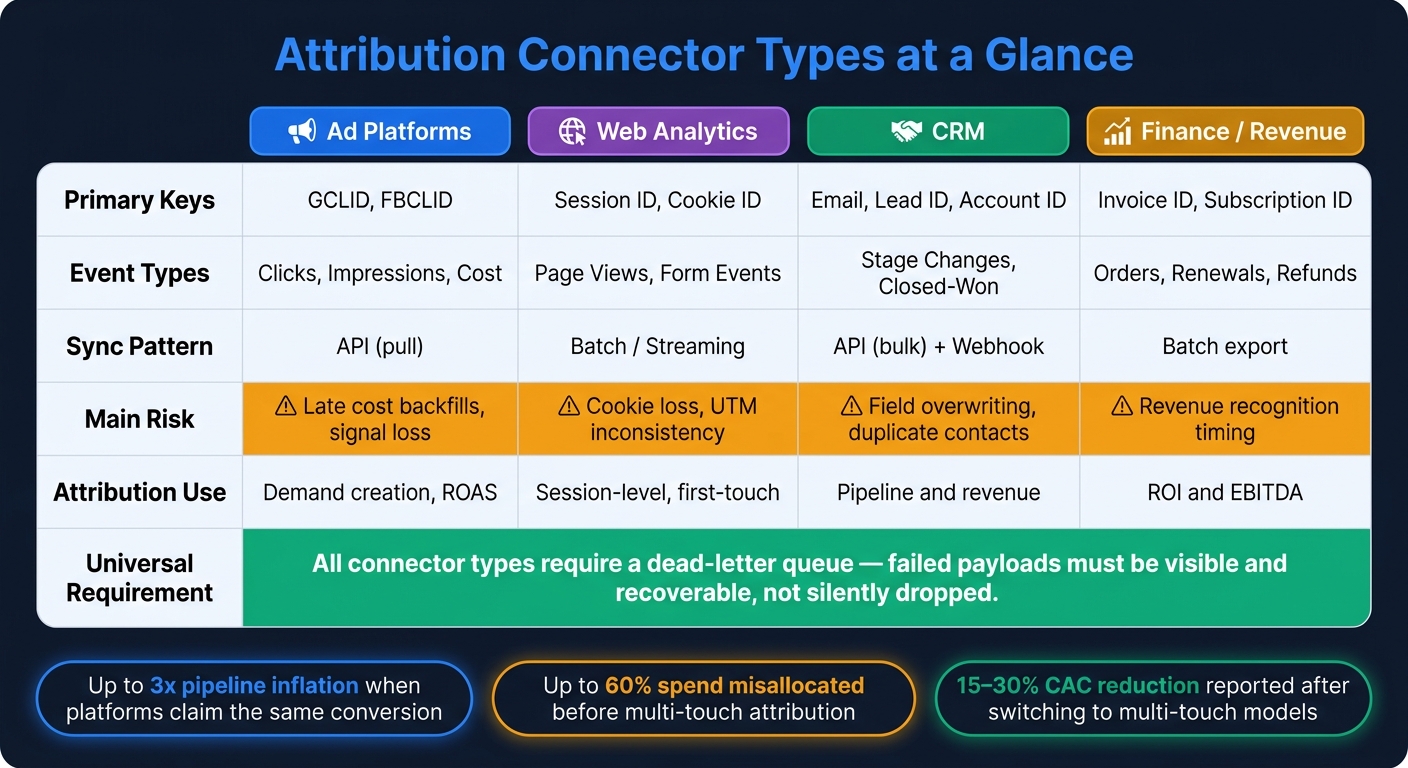
Attribution Connector Types: Sync Patterns, Risks & Use Cases
Once the schema is set, the hard part is the connectors. Each one has to pull the right fields, map them into the shared schema, and load them without breaking identity or wiping out good data. Ad and web connectors supply touchpoints and spend. CRM and revenue connectors supply conversions and revenue. The mapping changes by source, but every connector has to keep identity, timing, and revenue truth intact.
Ad and Web Connectors: Clicks, Sessions, UTMs, and Cost Data
Ad connectors pull from platform APIs like Google Ads, Meta, and LinkedIn. They should capture impressions, clicks, cost, GCLID or FBCLID, and campaign metadata. Capture click IDs on the first landing-page load before redirects or consent changes strip them. If those IDs are lost, you cannot rebuild them from campaign labels [4].
Web connectors should capture session IDs, landing pages, page views, referral sources, and first-party identifiers like cookies or local storage IDs. Keep source timestamps unchanged. Convert to local reporting time only in reporting using top marketing analytics tools [1].
UTMs need one controlled vocabulary across source, medium, campaign, content, and term. Even small differences in casing or shorthand can split channel reporting and make the data messy [4].
These fields populate the touchpoint and spend tables described above.
CRM and Revenue Connectors: Leads, Opportunities, Orders, and Renewals
Ad and web connectors show the path. CRM and revenue connectors tie that path to commercial results.
CRM connectors should map lifecycle milestones - MQL, SQL, Opportunity Created, Closed-Won, and Renewal - as separate timestamped events that line up with marketing touchpoints. Pull lead status changes, opportunity stages, close dates, and stable identity fields like email, lead ID, contact ID, and account ID.
Revenue connectors should capture invoice records, subscription start and end dates, and refund or credit note events as negative revenue adjustments. Skip those, and revenue attribution will not reconcile to finance [1][4].
Use null-protected, idempotent upserts so partial syncs do not erase valid UTMs or create duplicate records [1].
These fields populate the conversion and customer/revenue tables.
Connector Patterns by System Type: A Comparison
Different sources need different sync patterns, but the schema does not change. Pick the transport pattern that keeps the source fields intact instead of altering them.
| Connector Type | Primary Keys | Event Types | Sync Pattern | Main Risk | Attribution Use |
|---|---|---|---|---|---|
| Ad Platforms | GCLID, FBCLID | Clicks, Impressions, Cost | API (pull) | Late cost backfills, signal loss | Demand creation, ROAS |
| Web Analytics | Session ID, Cookie ID | Page Views, Form Events | Batch / streaming | Cookie loss, UTM inconsistency | Session-level, first-touch |
| CRM | Email, Lead ID, Account ID | Stage Changes, Closed-Won | API (bulk) + Webhook | Field overwriting, duplicate contacts | Pipeline and revenue |
| Finance / Revenue | Invoice ID, Subscription ID | Orders, Renewals, Refunds | Batch export | Revenue recognition timing | ROI and EBITDA |
All connector types need a dead-letter queue so failed payloads can be reviewed instead of disappearing. Silent failures create attribution gaps [1].
Model Settings: Lookback Windows, Attribution Logic, and Data Quality Controls
Model settings decide which touchpoints get counted and how credit gets assigned. After the schema is set, this is the layer that controls how far connector data reaches into the funnel.
How to Set Lookback Windows by Sales Cycle
Match the lookback window to the sales cycle. If you use a short window for a long B2B cycle, you cut out most of the journey. A 30-day window, for example, will miss much of the activity in longer sales motions. Use 7-30 days for short-cycle demand and quarter-length windows for enterprise. For time-decay models, use a 7-14 day half-life for fast-moving deals and a 30-60 day half-life for enterprise pipelines [3].
| Attribution Model | Recommended Window |
|---|---|
| First-Touch | Full sales cycle or unlimited |
| Last-Touch | 1-30 days |
| Linear | 30 days to unlimited |
| Position-Based (U/W-Shaped) | Full sales cycle |
| Time-Decay | 7-14 days (short cycle) / 30-60 days (enterprise) |
| Data-Driven | Dynamic, based on historical patterns |
Connectors should support configurable windows from 1 day to unlimited. If they don't, you're stuck with a platform default that may not fit how your business actually sells [2].
But even a well-set window has limits if every platform is using a different clock.
Platform Windows vs. First-Party Attribution Windows
Platform attribution and warehouse attribution do different jobs. Treat them that way. Use top analytics tools to read channel behavior, CRM data to track revenue, and first-party events to run your own model. Those numbers will not match, and they are not supposed to. Trying to force them into one figure usually creates more noise than clarity.
Custom connectors make this split workable because they pull all 3 data types into the warehouse with the original timestamps preserved. That lets you run attribution logic apart from what the platform says. Use GA4 for behavioral acquisition data, CRM for commercial outcomes like pipeline and revenue, and self-reported fields for offline or dark-funnel influence [5].
That setup falls apart fast if the connector layer lets duplicates, nulls, or late-arriving records slip through.
Controls That Protect Model Accuracy
Bad inputs lead to bad budget calls [1]. A few controls do most of the heavy lifting here:
- Deduplication: Enforce canonical IDs and merge logic at ingestion so multi-touch models don't overcount touches or misassign credit.
- Null protection: Make the original lead source field immutable in connector logic so partial syncs can't replace valid UTM data with empty values [1][5].
- Late-arriving data reconciliation: Late-arriving data needs a reconciliation window, not silent overwrites. Run nightly row-count and aggregate checks, and flag variance above 1% [1]. Pair that with a dead-letter queue so failed payloads stay visible and can be recovered.
- Data contracts: Define fields, latency, success rates, and idempotency for each sync with data contracts [1].
These controls make attribution steady enough to use in revenue and EBITDA reporting.
Revenue and EBITDA Reporting with Attribution Outputs
Once the connector layer is stable and model settings are fixed, attribution data stops being just a marketing report and becomes a finance input. That change takes a few planned joins and clear rules for what each number stands for.
From Touchpoints to Revenue and Contribution Margin
Attribution is ready for finance when touchpoints connect to revenue records through transaction, account, or opportunity IDs. That only works if shared identity keys and event timestamps from the schema stay intact from start to finish. Add campaign-level spend from ad connectors, join it to attributed revenue, and finance gets a view it can use: channel-level CAC, gross profit by source, and contribution margin by campaign - not just ROAS.
Companies that move to multi-touch models report a 15-30% reduction in CAC and up to 40% ROI improvement [3]. The gain comes from shifting budget away from channels that look good in platform dashboards but show weak contribution once you join them to actual revenue data.
Reconciling Attribution with Finance and Executive Reporting
The main gap is timing. Marketing counts a win when a deal closes. Finance may record revenue at contract start or based on its revenue recognition policy. Same deal, different dates, different numbers.
Your connector logic should carry both timestamps - close date and revenue recognition date - so each team can filter to the view that fits its reporting period.
Use the same source keys, but keep marketing, sales, and finance views separate. Here’s the clean way to map them:
| Reporting Layer | System of Record | Primary Metric | Connector Requirement |
|---|---|---|---|
| Marketing | CRM + Ad Platforms | Pipeline influenced, CAC, ROAS | Cost joins, UTM-to-opportunity mapping |
| Sales | CRM | Win rate, sales velocity, revenue | Opportunity stage history, close dates |
| Finance | ERP / Finance System | Recognized revenue, contribution margin, EBITDA | Revenue recognition dates, COGS fields |
Keep these 3 views separate but linked, not forced into one "correct" number. Attribution cuts across all 3, but finance reporting should anchor to the CRM and ERP layer.
For EBITDA discussions, attribution data also needs to join operating cost data. In plain terms, you need COGS and the right operating expense fields from the finance system so the output moves from channel ROAS to channel-level EBITDA contribution. That join depends on a defined data contract between RevOps and finance that spells out which cost fields map to which campaign or channel groupings.
Conclusion: What to Build First and How to Evaluate the Stack
Start with a common schema and stable identity keys. Without them, downstream joins fail. Next, standardize conversion events, set lookback windows to match the actual sales cycle, and build the cost joins that tie ad spend to revenue and contribution margin. That order gives you a system finance can trust, not just dashboards marketing uses inside the team.
FAQs
When do you need custom attribution connectors?
You need custom attribution connectors when ad, web, CRM, and revenue data live in separate systems and block a single view of the buyer journey.
They matter most when you need to:
- connect anonymous ad clicks to pipeline records
- match identity across multiple stakeholders
- support logic off-the-shelf integrations can’t handle
- keep lookback windows intact for long sales cycles
- protect data quality for revenue and EBITDA reporting
How do custom connectors improve identity matching?
Custom connectors improve identity matching by pulling fragmented identifiers from ad platforms, web analytics tools, and CRM systems into one mapped view.
They connect anonymous visitors to known contacts and accounts through deterministic and probabilistic matching. With a canonical ID layer and deduplication at ingestion, they cut duplicate records and keep interaction history consistent across devices and sessions.
How do attribution connectors tie marketing to revenue?
Attribution connectors link marketing activity to revenue. They connect ad platforms, website analytics, and CRM systems so teams can see one customer journey tied to closed deals.
In practice, that means pulling together touchpoints like ad clicks, content downloads, and email opens, then matching them to the same person or account. From there, they sync data, resolve identities, standardize fields such as campaign IDs and UTM parameters, apply attribution models, and map marketing activity to CRM stages, opportunities, and closed-won revenue.