Most teams do not need the deepest reporting stack - they need the right level of reporting at the right monthly cost. In this comparison, I look at 6 tools - Klaviyo, HubSpot Marketing Hub, Mailchimp, MailerLite, Brevo, and ActiveCampaign - based on dashboards, metric depth, attribution, exports, pricing, and setup effort.
If I were narrowing the list fast, I would sort it like this:
- HubSpot Marketing Hub - best when you need email data tied to CRM, pipeline, and revenue in one place
- Klaviyo - best for e-commerce teams that need store and campaign revenue views
- ActiveCampaign - best for automation reporting without moving to a full CRM stack
- Mailchimp - best for familiar campaign reporting and broad small-business use
- MailerLite - best for lower-cost email reporting with a lighter setup
- Brevo - best when you want email plus sales/CRM features at a lower entry price
What I would check first:
- Dashboard fit - can you see the right KPIs without extra tooling?
- Attribution depth - does it stop at opens and clicks, or tie to revenue?
- Export access - can your analyst pull the data cleanly? You can also save top analytics resources to help your team track cross-channel performance.
- Price path - what happens to cost as contacts, sends, or seats grow?
Best Email Marketing Software 2026 (All 10 Ranked by What They Actually Bill You For)
sbb-itb-5174ba0
Quick Comparison
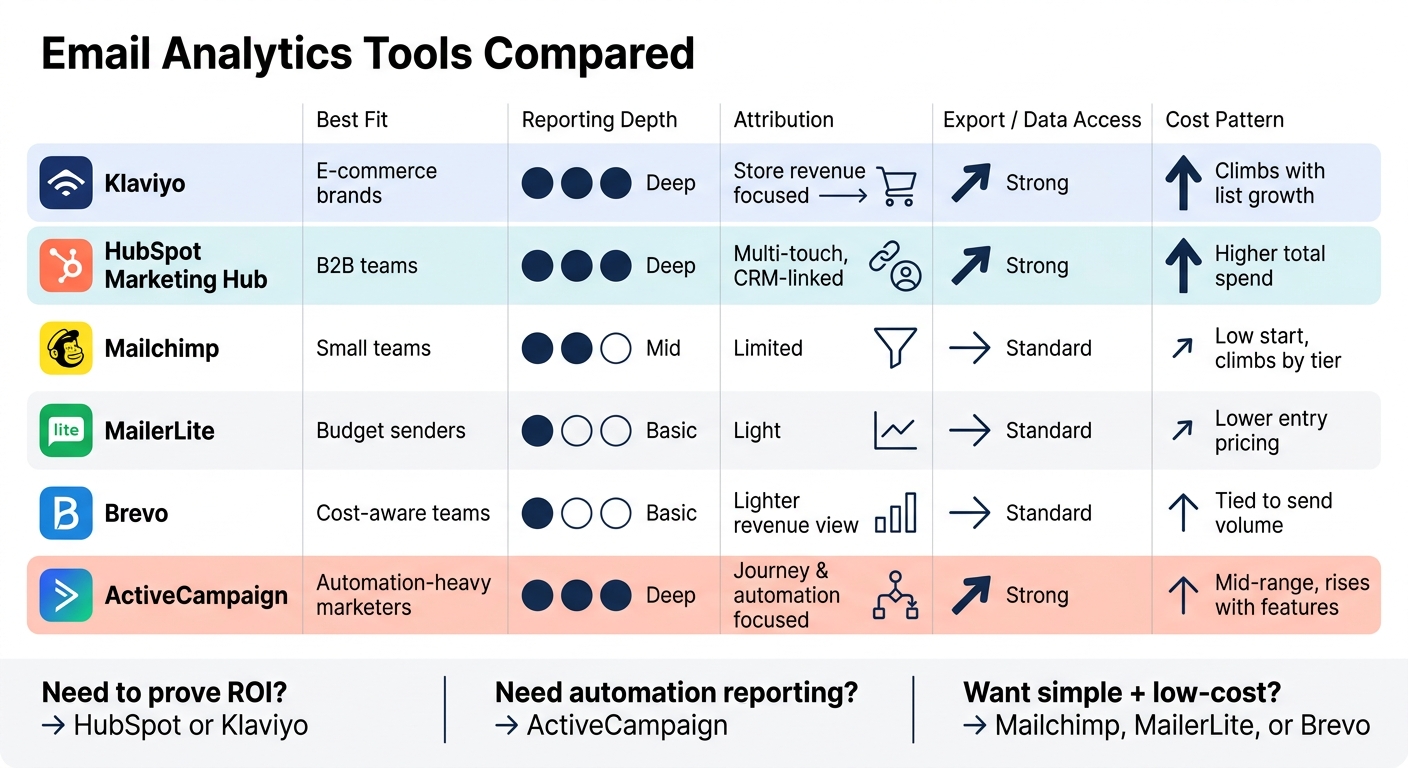
Email Analytics Tools Compared: Features, Reporting Depth & Pricing
| Tool | Best fit | Reporting depth | Attribution | Export/data access | Cost pattern |
|---|---|---|---|---|---|
| Klaviyo | E-commerce brands | Mid-to-deep | Store revenue focused | Good for marketing use | Often climbs with list growth |
| HubSpot Marketing Hub | B2B teams, operator-led orgs | Deep | Multi-touch, CRM-linked | Strong built-in reporting and exports | Higher total spend |
| Mailchimp | Small teams, general use | Basic-to-mid | Limited by plan and setup | Standard exports | Low start, can climb by tier |
| MailerLite | Budget-focused senders | Basic | Light | Standard exports | Lower entry pricing |
| Brevo | Cost-aware teams needing email + CRM | Basic-to-mid | Lighter revenue view | Standard exports and integrations | Often tied to send volume |
| ActiveCampaign | Automation-heavy marketers | Mid-to-deep | Journey and automation focused | Good export support | Mid-range, rises with features |
Bottom line: if you need to prove ROI, start with HubSpot or Klaviyo. If you need to improve automations, look at ActiveCampaign. If your main goal is to keep email reporting simple and lower-cost, check Mailchimp, MailerLite, or Brevo first.
I wrote this to help you cut through feature lists and match the tool to your business analytics needs, team type, and budget.
Tool-by-tool comparison: dashboards, metrics, attribution, and exports
The main question is simple: is the platform’s built-in reporting enough, or will you need a separate reporting layer on top?
HubSpot Marketing Hub
HubSpot Marketing Hub is an all-in-one marketing automation platform with built-in analytics and attribution [2]. Its dashboard ties email performance directly to contact-level CRM data. That means owners can see revenue tied to a specific campaign, marketers can follow funnel movement from click to close, and analysts can pull multi-touch attribution reports without adding a separate BI layer. In practice, it’s easier to connect email performance to revenue in one dashboard [2].
The tradeoff is cost and setup time. The same depth that helps analysts also adds more moving parts, and smaller teams may not need all of it.
ActiveCampaign
ActiveCampaign goes deeper on automation reporting than basic email tools, but without the added weight of a full CRM [1][2]. HubSpot connects email data to a full contact and deal record. ActiveCampaign, by contrast, puts more focus on automation sequences and engagement scoring.
That gives owners a clearer read on which automations lead to conversions. Marketers can track split-test results across sequences. Analysts can export data, but they get fewer built-in attribution models than they would in HubSpot. It fits teams that want automated attribution without a larger suite.
The matrix below shows which tools handle dashboards, attribution, and exports natively.
Side-by-side matrices: feature depth and integration fit
Use these labels to split the 2 deepest platforms.
Basic covers opens and clicks. Moderate links those events to revenue or CRM data. Advanced adds predictive reporting and cross-channel views. On integrations, basic leans on CSV exports, moderate adds standard APIs plus common CRM and sales links, and advanced adds automated pipelines and data cleaning.
Dashboard, metrics, attribution, and integration matrix
This matrix looks at the 2 deepest reporting platforms. It shows where each tool stays in reporting mode and where it starts tying email work to revenue.
| Tool | Dashboard Style | Core Metrics | Advanced Metrics | Attribution Depth | Integration Depth | Best User Type |
|---|---|---|---|---|---|---|
| HubSpot Marketing Hub | Advanced - single dashboard across marketing, sales, and service | Email, web analytics, and contact activity | Multi-touch attribution and revenue reporting | Advanced attribution reporting | Automated pipelines and data cleaning | Analysts, owners/operators |
| ActiveCampaign | Moderate-to-advanced - automation and lifecycle reporting | Behavioral segmentation and conversion funnel analysis | Automation attribution and conversion scoring | Journey-level attribution | Standard APIs and CRM/sales integrations | Marketers |
Choosing the right tool by team and buying situation
Pick the tool based on who will use it and what the business needs to prove. That’s the cleanest way to cut through feature lists.
Best fit by role: owners, marketers, and analysts
Start with the person using the report. If the depth is wrong, the tool won’t stick.
| Role | Primary need | What to prioritize |
|---|---|---|
| Owners | High-level ROI and margin impact | Dashboards and revenue attribution |
| Marketers | Campaign performance and user behavior | Segmentation and conversion funnel analysis |
| Analysts | Custom modeling and data integrity | Multi-channel data integration and export flexibility |
The pattern is simple: owners want ROI, marketers want campaign visibility, and analysts want data they can export and model.
Role tells you who needs the report. Business model tells you what that report has to prove.
Best fit by business model: e-commerce, B2B, and PE-backed operators
Buying motion shapes reporting needs. A tool that works for a Shopify brand may fall short for a B2B team with a long sales cycle.
- E-commerce teams should put native Shopify revenue attribution first, along with one view of marketing and revenue data.
- B2B teams need tools that tie leads to CRM revenue and show the full pipeline journey.
- PE-backed and mid-market operators should focus on marketing mix modeling tied to cash flow, EBITDA, and valuation.
Where to keep comparing tools
For broader comparisons, use the Marketing Analytics Tools Directory.
Conclusion: matching the tool to your reporting depth and pricing model
The main trade-off here is simple: reporting depth vs. total cost over time.
A low starting price can look good at first, but that doesn't always mean lower spend over the life of the tool. Costs often climb based on contacts, user seats, and the plan level needed to get attribution, deeper reporting, or export access.
Before you decide, check current U.S. pricing and plan limits on the vendor's site.
Start with the report the tool needs to deliver. Owners usually care about ROI and attribution. Marketers tend to need segmentation and funnel reporting. Analysts usually need dependable exports and access to data across social and email channels.
From there, narrow the list by role, business model, and the level of reporting you need right now.
FAQs
Which tool is best for proving email ROI?
To prove email ROI, use tools that tie email touchpoints to pipeline and revenue. HubSpot Sales Hub is the clearest fit here because it connects attribution to closed deals and customer lifetime value.
If the buyer journey is more complex, ThoughtMetric supports multi-touch attribution across channels. For e-commerce teams, MailerLite gives real-time order and revenue tracking.
How fast does pricing increase as my list grows?
It comes down to how the tool bills you.
Some platforms, like Moosend, use tiered pricing based on subscriber count. That means your cost goes up as your list grows - from $16/month for 1,000 subscribers to $160/month for 25,000 subscribers.
Others, like ThoughtMetric, scale pricing based on traffic volume, such as pageviews.
Tools like GMass don’t charge by contact count or email volume. That can make costs easier to forecast as your list gets bigger.
One thing to watch: overage fees. A low starting price can change fast if you go past the plan limits.
Do I need a separate BI tool for deeper reporting?
It comes down to how you report and how far you need to dig. Many modern marketing platforms already offer strong, customizable dashboards for campaign performance, attribution, and real-time metrics.
A separate BI tool makes sense when your team needs deeper drill-through analysis, anomaly detection, or a way to combine disconnected data sources that sit beyond your current platform’s limits.