An Enterprise Service Bus (ESB) is middleware that simplifies communication between multiple systems in a business. Instead of creating direct connections between applications, each system connects to the ESB, which handles tasks like routing, data transformation, and protocol conversion. This reduces complexity, especially in environments with diverse or legacy systems.
Key Features of an ESB:
- Routing: Sends messages to the correct destination using rules.
- Data Transformation: Converts data formats (e.g., CSV to JSON).
- Protocol Mediation: Bridges communication gaps between protocols (e.g., HTTP to FTP).
- Service Orchestration: Manages workflows involving multiple services.
- Centralized Governance: Oversees security, authentication, and monitoring.
Benefits:
- Simplifies integration by reducing point-to-point connections.
- Centralizes control for easier management and monitoring.
- Enables legacy systems to work with modern applications.
Challenges:
- Can become a single point of failure if not properly managed.
- May introduce latency due to processing overhead.
- Requires specialized skills and can lead to vendor lock-in.
ESBs are ideal for organizations with complex, large-scale integrations, especially when connecting legacy systems with modern platforms. However, for simpler or cloud-native setups, lighter solutions like APIs or integration frameworks might be more suitable.
What Is an Enterprise Service Bus (ESB)?
Plain-Language Definition of ESB
An Enterprise Service Bus (ESB) acts as a middleman for your applications, managing how they communicate with each other. Instead of having each system connect directly to every other system, each application plugs into the bus. The ESB then handles the heavy lifting - like routing, translating, and managing those communications.
"Think of an ESB as a translator or mediator that lets various systems - regardless of their platforms, languages, or protocols - communicate and share info in real time." - Trent Fowler, Zapier
This setup allows systems to exchange information seamlessly, without needing to understand the inner workings of one another.
Key Characteristics of ESB
An ESB achieves its functionality through several core features:
| Characteristic | What It Does |
|---|---|
| Routing | Ensures messages are sent to the right destination by using content or business rules. |
| Data Transformation | Converts data formats between systems, such as changing CSV into XML or COBOL into JSON. |
| Protocol Mediation | Bridges communication gaps between protocols like HTTP, JMS, and FTP. |
| Service Orchestration | Coordinates multiple services to complete complex tasks or workflows. |
| Centralized Governance | Oversees security, authentication, and monitoring for all connected systems. |
One of the standout features of an ESB is its ability to work across different platforms and technologies. For example, it can link systems built with Java and .NET or running on entirely different operating systems, all without requiring changes to the systems themselves. This makes it a great fit for large organizations with diverse technology ecosystems.
Another important feature is loose coupling. Applications don’t need to worry about where their messages are going or how the receiving system expects the data to be formatted. They simply send their data to the bus, and the ESB handles the rest. This design ensures that changes to one system won’t disrupt the entire network.
Finally, ESBs are typically stateless. This means the transaction’s state is stored within the messages themselves, not the bus. By doing so, the ESB remains lightweight, focusing on its primary tasks - like routing and transforming data - without getting bogged down by storing information.
sbb-itb-5174ba0
How an Enterprise Service Bus Works
The Central Bus Model
At its core, an Enterprise Service Bus (ESB) simplifies how applications communicate. Instead of creating direct, individual connections between every system, an ESB acts as a single, shared communication hub.
"The core concept of the ESB architecture is that you integrate different applications by putting a communication bus between them and then enable each application to talk to the bus." - MuleSoft
Without this centralized model, businesses often face a chaotic web of custom, point-to-point connections. As more systems are added, managing these connections becomes a nightmare. The ESB eliminates this complexity by providing a structured layer where each application connects to the bus, not to each other.
Applications communicate with the bus using adapters. These adapters handle translating data formats and protocols, so the applications themselves don’t need to change how they operate. The bus also includes a service registry - a directory that keeps track of available services, their locations, and how to access them. This is particularly helpful for integrating older, legacy systems, allowing them to work seamlessly with modern applications without requiring changes to their architecture.
This centralized setup lays the groundwork for several key functions, which are explained below.
Core Functions of ESB
When a message is sent to the bus, the ESB performs several tasks to ensure it reaches its destination in the correct format:
- Routing: The ESB examines the message’s content or headers and uses predefined rules to send it to the correct destination.
- Data Transformation: If the sending and receiving systems use different data formats, the ESB converts the message. This often involves mapping fields from one schema to another, with many systems relying on a universal format like XML.
- Protocol Conversion: Messages sent using one protocol, such as HTTP, can be converted to another, like JMS or FTP, ensuring compatibility between systems.
- Message Enrichment and Orchestration: If a message is missing critical information, the ESB can fetch the required data from another service or database before delivering it. For more complex workflows, the ESB can manage a series of tasks across multiple services, treating them as a single, coordinated process.
This combination of features ensures smooth communication between diverse systems, making it easier for businesses to manage and scale their operations.
Core Capabilities of an ESB
Message Routing and Data Transformation
At the heart of every ESB (Enterprise Service Bus) deployment are two fundamental functions: routing and data transformation.
Routing determines where a message should go. The ESB analyzes the message's content and headers, applying predefined rules to decide its destination. This approach eliminates the need for the sending system to know the specifics of the receiving system, like its location or structure.
Data transformation tackles the issue of incompatible data formats between systems. For example, one system might generate data in CSV, while another requires JSON. Or, a legacy mainframe might use COBOL copybooks, whereas a modern API expects XML. To solve this, many ESBs implement a canonical data model - a standardized internal format that acts as a shared language across connected systems.
"An ESB performs transformations of data models, handles connectivity, performs message routing, converts communication protocols and potentially manages the composition of multiple requests." - IBM
These capabilities form the foundation of an ESB, enabling more advanced features like service orchestration and protocol bridging.
Service Orchestration and Protocol Bridging
ESBs do more than just move data - they also coordinate complex interactions and bridge communication gaps between different systems.
Service orchestration comes into play when a single request needs data from multiple systems. Instead of the requesting application managing multiple calls, the ESB handles the entire workflow. It fetches data from one system, passes it to another, and combines the results into a cohesive response. MuleSoft describes this as "composing several existing fine-grained components into a single higher order composite service."
Protocol bridging ensures that systems using different communication protocols can still work together. The ESB translates messages between these protocols before passing them along. This is particularly valuable when integrating older, on-premises systems with modern, cloud-based applications.
Benefits and Trade-Offs of Using an ESB
Advantages of ESB
One of the biggest perks of an ESB (Enterprise Service Bus) is decoupling. Instead of creating a tangled web of direct, point-to-point connections between applications, each system connects to the bus. This setup simplifies integration, making it easier to manage and scale large systems without the headache of maintaining fragile connections.
Another key benefit is centralized control. With an ESB, IT teams can manage security policies, compliance rules, monitoring, and error handling all in one place. This approach reduces the chaos of scattered configurations across multiple custom integrations. As Ashok Rout, Chief Technology Officer at Social Interest Solutions, explains:
"The beauty of ESB is that it allows you to be agnostic to the technology platform."
This platform flexibility means developers can work more efficiently. Pre-built communication tools and standardized interfaces cut down on the need for custom coding, speeding up the time it takes to roll out new integrations.
That said, while ESBs offer these clear advantages, they also come with challenges that need thoughtful management.
Potential Trade-Offs
The centralization that makes an ESB so effective can also be its Achilles' heel: a single point of failure. If the bus goes down, communication across all connected systems grinds to a halt. IBM sums it up well:
"The centralized integration hub of an ESB can make troubleshooting problems easier than identifying the cause within your microservices. However, without fault tolerance, the ESB can also be a single point of failure for the whole enterprise."
The typical solution is to deploy redundant ESB instances, but this adds to the overall cost and complexity of the infrastructure.
Another challenge is performance latency. Every message that travels through the bus must be inspected, transformed, and routed. While this process ensures smooth communication, it also introduces delays. As the number of endpoints grows, this overhead can create bottlenecks. Additionally, ESBs often require teams with specialized skills to configure and maintain the system. Relying on proprietary adapters can also lead to vendor lock-in, making future migrations both pricey and complicated.
| Trade-Off | Impact | Mitigation |
|---|---|---|
| Single Point of Failure | System-wide outage if the bus fails | Deploy redundant, high-availability ESB instances |
| Performance Overhead | Increased latency as endpoints multiply | Use lightweight runtimes; minimize complex transformations |
| Vendor Lock-in | High cost and technical debt when migrating | Adopt standard protocols (HTTP, JMS) and canonical data models |
| Specialized Skills Required | Slow implementation and high maintenance burden | Assess team expertise before adoption |
ESB Introduction | An Overview of Enterprise Service Bus Concepts
When Should You Use an ESB?
Deciding whether to implement an Enterprise Service Bus (ESB) depends on your integration needs and the complexity of your systems. Let’s break down a few scenarios where an ESB can be a game-changer.
Scenarios Best Suited for ESB
An ESB shines when you’re managing complex, large-scale integrations. If you’re dealing with three or more systems that rely on diverse communication protocols - like FTP, HTTPS, JMS, or TCP - an ESB can streamline the process. For simpler setups, though, a lightweight API or integration framework might do the trick. The ESB’s strengths in routing, transformation, and centralized control make it a go-to solution for environments with diverse systems or legacy integration challenges.
Speaking of legacy systems, this is another area where ESBs excel. Many enterprises juggle hundreds, if not thousands, of applications - yet only about 29% of these are integrated. This lack of connectivity often leads to inefficiencies and missed opportunities. By bridging the gap between legacy and cloud systems, an ESB can help businesses save millions annually - all without overhauling outdated infrastructure.
For example, in October 2013, Social Interest Solutions, a nonprofit based in Sacramento, used a Microsoft BizTalk Server–based ESB to help Arizona comply with Affordable Care Act requirements. The ESB enabled real-time analytics tools for income and eligibility verification by connecting state and federal databases, all without altering the underlying government systems.
In industries like banking and healthcare, where regulatory compliance is non-negotiable, an ESB becomes indispensable. It provides centralized control, enforces strict security policies, and offers end-to-end traceability. Built-in features like centralized auditing make it easier to navigate the demands of regulated sectors. That said, if your primary focus is on rapidly scaling small, independent services, you might find that a microservices architecture serves your needs better than a centralized ESB.
ESB vs. Related Integration Approaches
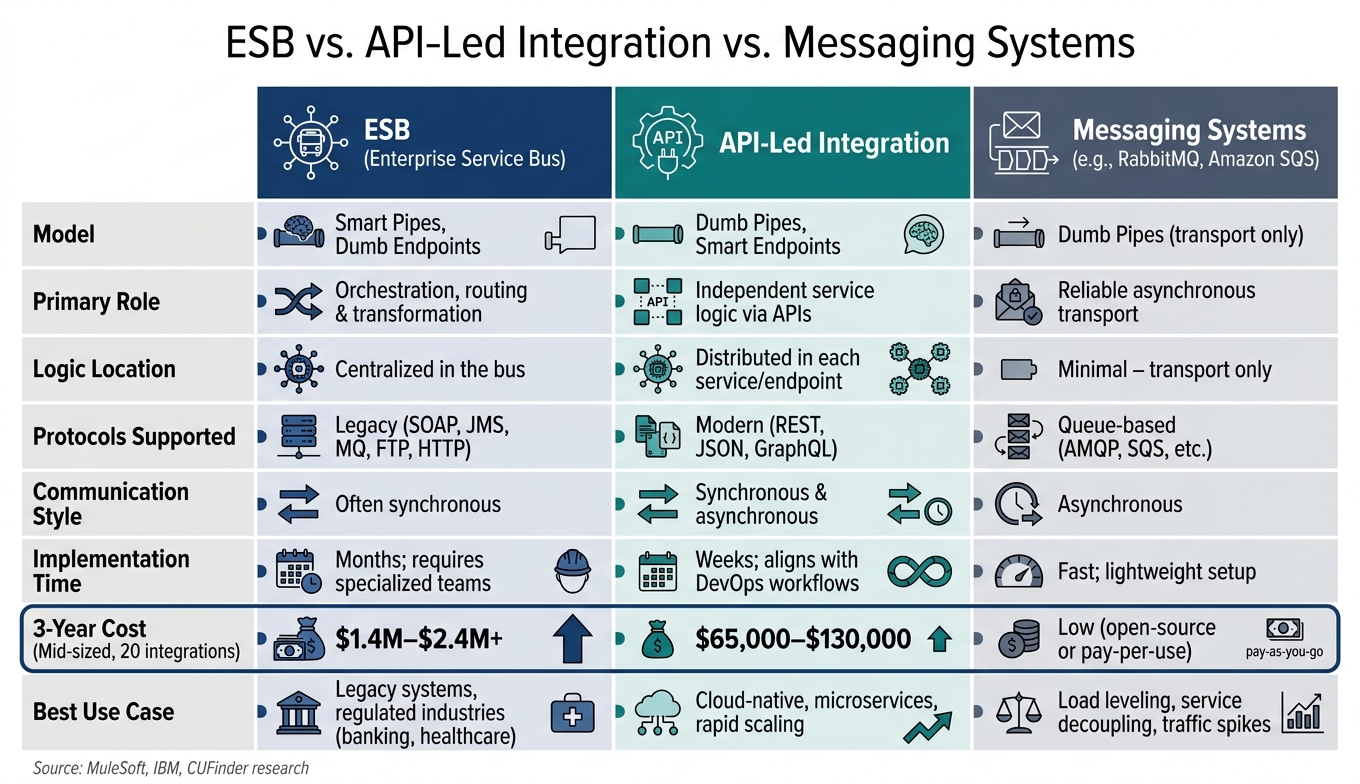
ESB vs. API-Led Integration vs. Messaging Systems: Key Differences
Let’s take a closer look at how ESBs stack up against other integration methods. These comparisons highlight the unique role ESBs play in connecting diverse enterprise systems.
ESB vs. API‐Led Integration
ESBs operate on a "Smart Pipes, Dumb Endpoints" model. This means the core tasks - like routing, transformation, and protocol mediation - happen within the central bus itself. On the other hand, API‐led integration flips the script with "Dumb Pipes, Smart Endpoints", where each service handles its own logic independently.
"The ESB model states that logic belongs in the pipe, while microservices advocate for dumb pipes and smart endpoints." - Hadis Mohtasham, Marketing Manager, CUFinder
ESBs are well-suited for legacy protocols like SOAP, JMS, and MQ. In contrast, API‐led solutions work with modern formats such as REST, JSON, and GraphQL. Another key difference? Implementation time and cost. ESBs often require specialized teams and months to set up, while API‐led platforms align with DevOps workflows and can be up and running in weeks. Financially, the gap is stark: a mid-sized enterprise with 20 integrations might spend $65,000–$130,000 over three years on an iPaaS solution, compared to a hefty $1.4M–$2.4M+ for a traditional ESB.
For large organizations, a hybrid strategy often makes sense. They might keep the ESB for stable, on-premises legacy systems while routing newer cloud and mobile traffic through an API gateway or iPaaS layer.
"ESB is a good foundation bedrock to enable that. Layering on API capabilities on top of that is extremely important to reach all the requirements of the enterprise." - Ross Mason, Founder and VP of Product Strategy, MuleSoft
Now, let’s see how ESBs differ from messaging systems when it comes to handling data.
ESB vs. Messaging Systems
Messaging systems like RabbitMQ or Amazon SQS focus on reliable, asynchronous data transport. These systems act as "Dumb Pipes", simply moving data without interpreting or transforming it. ESBs, however, go a step further by validating, enriching, transforming, and routing messages - following what’s known as the VETRO pattern (Validate, Enrich, Transform, Route, Operate).
Interestingly, many ESBs are built on top of messaging systems. They use these systems as the transport layer but add orchestration, transformation, and protocol mediation capabilities. Here’s a quick comparison:
| Feature | ESB | Messaging System (MQ) |
|---|---|---|
| Primary Role | Orchestration, routing & transformation | Reliable asynchronous transport |
| Logic Location | Centralized in the bus | Minimal – transport only |
| Communication Style | Often synchronous | Asynchronous |
| Best Use Case | Legacy systems & regulated industries | Load leveling & service decoupling |
When should you pick one over the other? Go with a messaging system if your main goal is to decouple services or manage traffic spikes. But if you need complex workflows, protocol conversion, or centralized control, an ESB is the better choice. These distinctions underline how ESBs fit into the broader integration landscape.
Conclusion and Key Takeaways
To wrap things up, an ESB plays an essential role in integration architecture, especially in bridging the gap between disparate enterprise applications.
At its core, an ESB functions as a centralized middleware hub, managing tasks like message routing, data transformation, and protocol mediation. Its primary advantage is replacing the tangled "spaghetti code" of point-to-point integrations with a more streamlined approach.
That said, an ESB is best suited for complex, legacy-heavy environments - think mainframes, SAP systems, or COBOL-based applications - where modern SaaS platforms need to communicate with older systems. On the other hand, for cloud-native or microservices-driven setups, lighter options like API gateways or iPaaS solutions are often quicker to implement and easier to manage.
The centralized nature of an ESB offers both benefits and challenges. It provides a unified point for governance, security, and monitoring, but it also introduces the risk of becoming a single point of failure. This makes redundancy planning a critical part of ESB design.
Looking at industry trends, many companies are shifting toward agile integration models, moving away from monolithic ESBs to more decentralized systems. They're also exploring event-driven architectures with tools like Amazon EventBridge or Apache Kafka. Meanwhile, legacy products like Microsoft BizTalk Server are being phased out, with plans to sunset by the end of the decade. While ESBs remain vital for on-premises legacy integration, the rise of agile and decentralized approaches signals a changing landscape for enterprise integration.
FAQs
Do I need an ESB or just APIs?
Choosing between an Enterprise Service Bus (ESB) and APIs comes down to the structure of your infrastructure. An ESB serves as a centralized hub for handling tasks like protocol conversion, data transformation, and message routing, making it a solid option for integrating older, legacy systems. On the other hand, APIs provide a more lightweight and adaptable way to connect systems, especially suited for modern, cloud-based environments. If your setup includes numerous diverse systems requiring standardized integration, an ESB could be the better fit.
How do you prevent an ESB from being a single point of failure?
To prevent an Enterprise Service Bus (ESB) from turning into a single point of failure, it's critical to put high availability and disaster recovery measures in place. Here are some essential steps to consider:
- Set up load balancing and failover routing: This ensures traffic is distributed efficiently and services remain accessible even if one component fails.
- Use circuit breakers: These help handle overloaded services by temporarily halting requests to prevent further strain.
- Implement automated retries and dead-letter queues: Failed messages can be retried or redirected for later processing, minimizing data loss.
- Test fault tolerance: Conduct testing during implementation to uncover and address potential weak points early.
These strategies help keep the system stable and running smoothly, even during unexpected disruptions.
What’s the best way to migrate off an ESB without breaking integrations?
To transition away from an ESB without causing disruptions, it's crucial to keep integration behavior consistent throughout the process. The key is to replace the ESB gradually while maintaining its core functionalities - like routing, protocol mediation, and message transformation. This approach ensures that no unexpected changes occur. Handle the migration one route or service at a time, sticking to the same standards and contracts already in place. Additionally, use the ESB to monitor message flows and oversee the process, helping to reduce potential interruptions.