If you want psychographic data that your team can use, start with recruiting, not software. The stack is simple: recruit the right people, run the session in a tool that records well, turn the discussion into clean transcripts, code themes, and move the results into a place your team can search later.
I’d break the market into 5 tool groups:
- Recruiting - Respondent, User Interviews, Great Question, Suzy, Recollective
- Session hosting - Recollective, Discuss, Forsta, Zoom, Lookback
- Transcription - Otter.ai, Sonix, Rev, Descript, Fireflies.ai
- Coding and research storage - NVivo, Dovetail, Looppanel
- Reporting and dashboards - Recollective, Dovetail, QuestionPro
A few facts stand out fast:
- User Interviews gives access to 6,000,000+ participants
- Suzy uses a 1,000,000+ U.S. panel aimed at motives and purchase drivers
- Recollective supports up to 25 people in a live session
- Great Question starts at $49/month
- User Interviews can run at about $20 per participant
- NVivo ranges from $130 to $1,005 per user per year
If I were choosing a stack, I’d keep the rule simple:
- One-off groups on a tight budget - User Interviews + Zoom + Otter.ai or Sonix
- Repeat studies with the same cohort - Recollective, Fuel Cycle, or QuestionPro Communities
- Deep coding across many studies - NVivo or Dovetail
- Enterprise controls and compliance - Forsta, Recollective, or Great Question
The main point is straightforward: the best tool set depends on how often you run groups, how much coding depth you need, and how formal your reporting has to be. The rest of the article walks through each part of that stack in order.
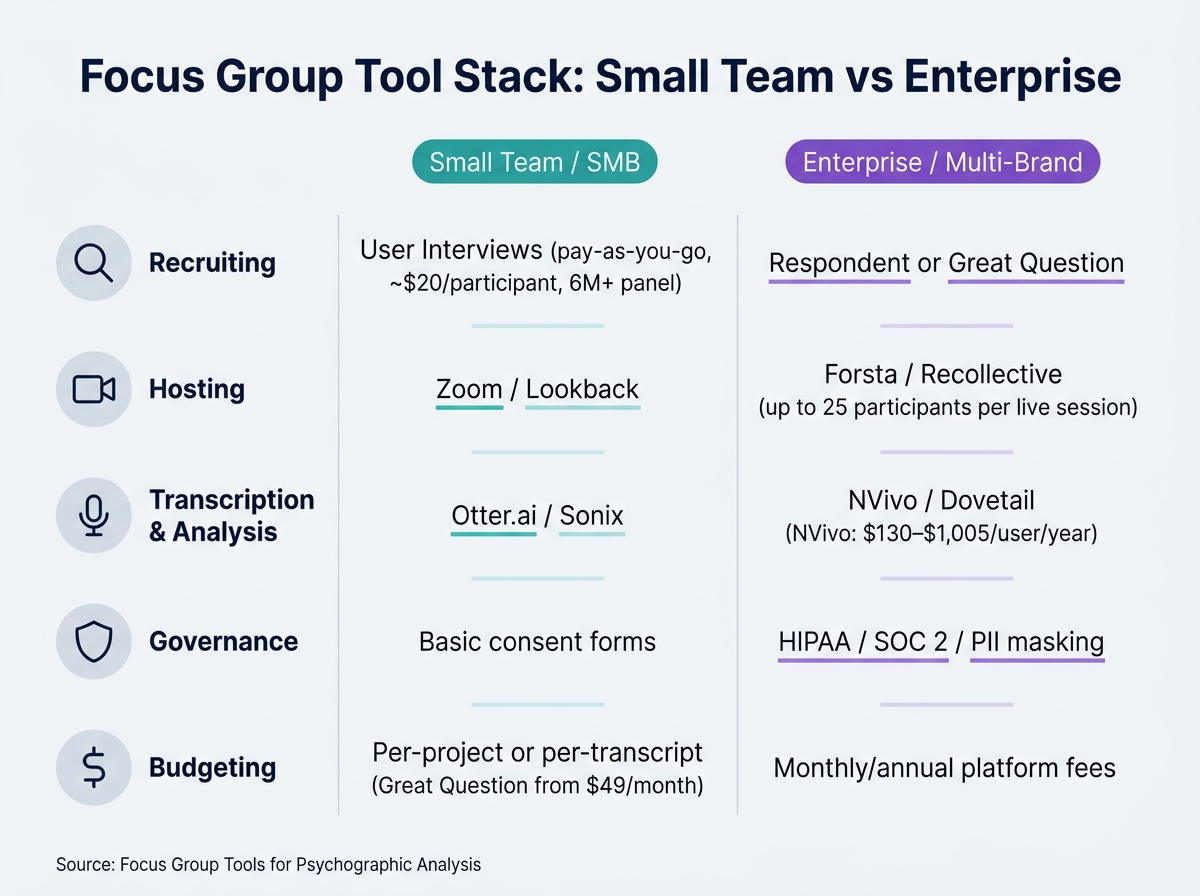
Focus Group Tool Stack: Small Team vs Enterprise Comparison
How to Collect and Analyze Focus Group Data
Once you have collected your data, you can use top marketing analytics tools to integrate these qualitative insights with your existing performance metrics.
sbb-itb-5174ba0
Quick Comparison
| Category | Best fit | Main tools | What to look for |
|---|---|---|---|
| Recruitment | Finding screened participants | Respondent, User Interviews, Great Question, Suzy | Panel size, screening depth, incentives |
| Community research | Repeat sessions with the same people | Recollective, Fuel Cycle, QuestionPro Communities | Multi-session support, diary tasks, discussion boards |
| Hosting | Running and recording groups | Recollective, Discuss, Forsta, Zoom, Lookback | Observer view, recording, async options |
| Transcription | Converting sessions to text | Otter.ai, Sonix, Rev, Descript, Fireflies.ai | Speaker labels, live vs. post-session, edit tools |
| Coding | Turning comments into themes | NVivo, Dovetail, Looppanel | Tagging depth, team use, cross-study reuse |
| Reporting | Sharing findings with stakeholders | Recollective, Dovetail, QuestionPro | Libraries, summaries, clips, dashboards |
Recruiting Tools for Finding the Right Focus Group Participants
Psychographic recruiting works best when your screener checks motivations, habits, and beliefs - not just age, income, or job title. That upfront filtering shapes the quality of the motive, values, and lifestyle data you collect later.
Respondent and User Interviews for screened participant recruitment
Respondent is built for one clear job: source participants, screen them, schedule sessions, and send incentives in the same workflow. That means less tool-switching and less admin drag for the research team. [4]
User Interviews is a strong fit when you need reach. It organizes studies by session and gives teams access to a verified panel of more than 6,000,000 participants. [7]
Great Question makes sense if you also want a research CRM. Starting at $49/month, it brings together recruitment, scheduling, incentive payouts, and access to the User Interviews panel. It also supports HIPAA and SOC 2 compliance. [7]
For psychographic work, Suzy is especially useful because it is built to surface purchase triggers, pain points, and motivations, not just demographic traits. Its proprietary U.S. Crowdtap panel includes more than 1,000,000 members, and subscriptions start at around $150/month. [3]
When panel-based platforms like Recollective or Fuel Cycle fit better
Use a community platform when you need to come back to the same cohort more than once. That setup is better for multi-session work, where attitudes, habits, and motivations need to be tracked over time.
Recollective is built for that kind of study. It supports up to 25 participants in a live video session and also handles discussion boards and diary tasks, which makes it a good match for longitudinal psychographic research. Fuel Cycle serves a similar role with an always-on research community, so teams can keep engaging the same participants and watch how views and motivations shift. QuestionPro Communities is another option if repeat engagement with a set group matters. [4] [2]
| Tool | Best For | Key Feature |
|---|---|---|
| Respondent | End-to-end screened recruiting | Integrated recruitment-to-session delivery [4] |
| User Interviews | Large-scale participant sourcing | 6,000,000+ verified participants [7] |
| Great Question | Research CRM + incentives | Recruitment, scheduling, incentives, and User Interviews panel access [7] |
| Suzy | Psychographic discovery | 1,000,000+ U.S. Crowdtap members [3] |
| Recollective | Longitudinal community studies | Up to 25 participants per live session [2] |
If you need one round of focus groups, tools like Respondent or User Interviews are usually the better pick. If you need the same people across multiple sessions, go with a community platform. From there, the next decision is simple: choose the tool that will host and record the discussion.
Platforms for Running, Recording, and Reviewing Focus Groups
After you recruit the right people, the platform matters a lot. It shapes how well you capture motivations, how smoothly the session runs, and how easy it is to review later.
Research-specific platforms: Recollective, Discuss, and Forsta
Recollective is built for teams that need both live sessions and async work in one system. Live video sessions support up to 25 participants, and moderators can preload stimuli before the session begins. Observers get a private backroom with a separate audio channel, which lets clients react in real time without interrupting the discussion. Its async discussion boards also help when you want more than quick reactions. Participants can think through values, habits, or motivations over several days. [2]
Discuss is a good fit for teams running live qual at scale. It merged with Voxco in November 2025. [3] Its built-in AI assistant, Genie, creates real-time theme summaries and sentiment analysis during live sessions. Observers get a virtual backroom with instant clipping, and the platform accepts uploaded MP4 files from Zoom or Teams for review in one place. [2]
Forsta is the enterprise pick. Its InterVu product supports online focus groups with breakout rooms, simultaneous translation, and an invisible observer view. Digital Diaries adds longitudinal mobile ethnography, so participants can submit video and photos over a period of weeks. Both tools run in the browser, which means participants do not need to install software. [2]
General video tools and UX research options: Zoom and Lookback
Zoom is the low-cost option for one-off sessions. Most participants already know how to use it, so setup is simple. It covers the basics with screen sharing and polls, but it does not include dedicated observer spaces or deeper analytics. [2]
Lookback is a better match for moderated UX research. It includes observer mode, screen sharing, and timestamped clips, which makes review easier when the goal is product or usability feedback. [6]
Comparison table: hosting and recording tools
| Platform | Best Use Case | Observer Tools | AI Support | Best Fit |
|---|---|---|---|---|
| Recollective | Hybrid live + async community studies | Private backroom + separate audio channel | Automated transcription and video clips | Ongoing |
| Discuss | Scalable real-time qualitative research | Virtual backroom with instant clipping | Genie AI for summaries | Moderate multi-session |
| Forsta | Enterprise multi-method research | Invisible observer view + translation | AI-assisted coding and reporting | Longitudinal |
| Zoom | Ad hoc, budget-limited sessions | None dedicated | Basic transcription only | One-off |
| Lookback | UX and usability testing | Live listening dashboard | Timestamped highlight clipping | One-off to moderate |
Once you have the recording, the next step is turning raw discussion into usable themes through transcription and coding.
Transcription and Coding Tools That Turn Conversations Into Themes
After the sessions wrap, the job shifts to two practical steps: get the conversation into a clean transcript, then code it into themes the team can use.
Transcription tools: Sonix, Rev, Otter, Descript, and Fireflies.ai
For focus groups, speaker labeling matters more than raw speed. If you can tell who said what without fixing the transcript line by line, coding gets much easier.
Otter.ai works well for live sessions because it integrates with Zoom and provides live transcription with speaker labels. That makes later coding less messy. It runs on a subscription model. [7]
Sonix is a good fit for post-session transcription. It supports automated transcription in multiple languages and includes an in-browser editor, so teams can fix speaker labels and clean up the transcript before coding. [3]
Rev gives teams two paths: AI transcription and human transcription. The human option helps when audio quality is poor or speakers talk over each other, since automated transcription tends to slip in those cases. It costs more, but the output is cleaner for complex multi-speaker sessions. [3]
Descript does more than transcription. You can edit audio and video by editing the transcript text, which is handy when you need to pull highlight reels from focus group recordings for stakeholder review. [3]
Fireflies.ai connects with Zoom, Google Meet, and Microsoft Teams to capture and transcribe sessions automatically. It also includes AI-generated summaries and action items, which can cut down the time spent on first-pass review right after a session. [3]
Once the transcript is cleaned up, coding tools help turn raw comments into themes the team can reuse. This process is essential for maintaining data quality when using analytics tools for business to measure qualitative impact.
Coding and repository tools: NVivo, Dovetail, and Looppanel
Clean transcripts become psychographic themes through coding.
NVivo is built for deep qualitative coding. Annual subscriptions range from $130 to $1,005 per user [3]. It also supports mixed-methods analysis, which makes it a strong choice when a team needs to map values, motivations, and decision drivers through structured, repeatable coding.
Dovetail fits collaborative research teams. Its repository lets teams reuse insights across studies [6], and its multi-level tagging helps turn verbatims into value-based segments, including value-driven or convenience-first audience profiles [1][6].
Looppanel is geared toward collaborative notes and AI-assisted tagging. That can speed up first-pass analysis after a focus group, especially when the team wants to move from transcript to rough themes fast. [4]
Comparison tables: transcription and coding platforms
| Tool | Best Use | Speaker Labeling | Accuracy Model | Pricing |
|---|---|---|---|---|
| Otter.ai | Live transcription + Zoom integration | Yes | AI | Subscription [7] |
| Sonix | Post-session transcription + editing | Yes | AI | Subscription [3] |
| Rev | High-accuracy transcription | Yes | AI + Human | Per-minute / subscription [3] |
| Descript | Transcript-based video editing + clipping | Yes | AI | Subscription [3] |
| Fireflies.ai | Auto-capture + AI summaries | Yes | AI | Subscription [3] |
| Tool | Coding Depth | Collaboration | AI Assistance | Reuse Value | Psychographic Fit |
|---|---|---|---|---|---|
| NVivo | High | Limited | AI-assisted coding | Moderate | Strong for deep qualitative coding [3] |
| Dovetail | Moderate | High | Tag suggestions | High | Strong for cross-study segmentation [6] |
| Looppanel | Moderate | High | Auto-tagging | Moderate | Good for fast first-pass coding [4] |
Once themes are coded, the next step is to move them into dashboards for stakeholder reporting and later reuse.
Dashboards, Tool Selection, and Final Takeaways
Dashboard options: Recollective analytics, Dovetail views, and QuestionPro BI
Once coding is done, the next step is simple: turn themes into outputs stakeholders can use.
Recollective is built for sharing findings fast. It supports live and async research, with automated transcription, shareable summaries, and highlight video clips that help teams move from session to readout without much extra work [1].
Dovetail is a good fit when you want findings to live beyond a single project. It turns coded transcripts into insight views and research libraries, so teams can pull patterns across studies instead of starting from scratch each time [6].
QuestionPro makes the most sense when research operations, community management, and reporting need to stay in one place. That setup can cut handoffs and keep reporting tied to participant management [4][6][1].
| Tool | Primary Use | Reporting Output | Transcript Integration | Collaboration |
|---|---|---|---|---|
| Recollective | Live/async session management | AI summaries & highlight clips | Automated transcription included | Private backroom for client observation |
| Dovetail | Research repository & thematic coding | Multi-level tags & insight canvases | Imports video/transcripts for AI tagging | Shared library across all teams |
| QuestionPro | Enterprise qualitative engagement | Moderator dashboards & community views | Panel management integration | High, with panel management |
How to choose the right stack for budget, scale, and reporting needs
The main decision is whether to buy one platform or build a stack.
For small teams, a modular setup usually keeps spend down. A common mix is User Interviews at $20 per participant [5], Zoom for hosting, Otter.ai or Sonix for transcription, and Great Question starting at $49 per month [7]. That gives you enough to recruit, run sessions, and document findings without paying for a full enterprise platform.
For enterprise or multi-brand teams, the bar is higher. Governance tends to drive the decision: role-based permissions, SSO, and compliance requirements such as HIPAA or SOC 2 matter more once more teams, brands, or sensitive data are involved. In those cases, platforms like Recollective or Forsta are often a better fit, and NVivo subscriptions range from $130 to $1,005 per user per year [3].
| Stack Layer | Small Team / SMB | Enterprise / Multi-Brand |
|---|---|---|
| Recruitment | User Interviews (pay-as-you-go) | Respondent or Great Question |
| Hosting | Zoom / Lookback | Forsta / Recollective |
| Analysis | Otter.ai / Sonix | NVivo / Dovetail |
| Governance | Basic consent forms | HIPAA / SOC 2 / PII masking |
| Budgeting | Per-project or per-transcript | Monthly/annual platform fees |
Conclusion: Match your focus group tools to your research depth and reporting goals
Pick the simplest stack that can still support the level of reporting you need.
No single tool handles every stage well. In practice, the best setup is usually a deliberate mix, with each layer chosen for a clear job. If your team runs repeated studies, centralizing findings in a repository like Dovetail can save time and cut duplicate research, while helping each study do more work over time [6].
FAQs
How do I choose between a single platform and a modular stack?
Choose a single platform if your main goal is efficiency across recruitment, scheduling, data collection, and repository management in one workflow. The upside is simple: less tool-switching and faster insight generation.
Choose a modular stack if you need specialized functionality at certain stages - like coding, psychographic tracking, or mobile diary studies. It takes more hands-on management, but it gives you more flexibility for your research methods and analysis needs.
What makes a good psychographic screener for focus groups?
A good psychographic screener defines eligibility with motivation, intent, and other meaningful psychological traits - not just demographics. It should line up with the study’s target audience and the mix of people the research needs.
It also needs to support targeted screening and eligibility tracking, so recruiters can choose the right participants and tie those results back to recorded and transcribed sessions. That traceability matters. It gives the team clear evidence for the "why" psychographics are meant to surface.
Which tool layer matters most if I need reusable insights later?
The research repository layer matters most when you want insights to stay reusable over time.
Centralized repository platforms such as Dovetail keep transcripts, notes, and coded themes in one searchable library. That makes findings traceable, taggable, and easy to share. It also keeps past work accessible, instead of letting it disappear into individual session recordings.