AI email personalization uses machine learning and customer data to create emails tailored to individual recipients. This approach improves engagement, with personalized emails achieving 29% open rates and 41% higher click-through rates compared to generic campaigns. In 2026, consumer expectations for relevant messaging are higher than ever, and email platforms deprioritize impersonal content.
Here’s what you need to know:
- Types of AI: Generative AI creates content like subject lines and body text, while Predictive AI determines who gets emails and when.
- Data Preparation: Clean, unified, and privacy-compliant data is essential. Suppression lists and real-time updates prevent errors.
- Segmentation: Dynamic, behavior-driven segments outperform static lists. Use lifecycle stages and predictive signals for better targeting.
- Content Creation: Personalize subject lines, CTAs, and product recommendations based on user behavior. Clear prompts ensure consistent AI outputs.
- Testing and Optimization: Measure metrics like revenue per recipient and click-through rates. Use holdout groups and refine workflows regularly.
- Tools and Integration: Select tools that integrate with your CRM, support compliance, and handle missing data gracefully.
Start with a 30-day data audit, test small-scale campaigns, and scale gradually. Success lies in combining AI capabilities with human oversight to deliver relevant, engaging email experiences.
Mastering email personalization: Best practices, pitfalls, and what’s next
sbb-itb-5174ba0
Preparing Your Data for AI Personalization
Before diving into AI workflows, it’s essential to get your data in shape. AI thrives on quality inputs - clean, well-structured data leads to precise personalization, while messy or incomplete data can spread errors across your campaigns.
Inventory and Organize Your Data
Start by mapping and centralizing all your data sources - whether it’s from your CRM, e-commerce platform, support channels, or behavioral tracking tools. The goal? Build a unified subscriber profile. This profile should combine key identity fields (like email address, CRM ID, or lead source) with behavioral details such as last purchase date, site visits, and engagement history. Without this unified view, AI segmentation can falter, relying on fragmented or duplicate records [10][9].
Create a field dictionary to define every data field’s source, format, allowed values, and update frequency. For example, a field like lifecycle_stage should have a clear definition (e.g., lead, customer, or churn-risk), a daily refresh schedule, and a consistent format across systems. When tools like your CDP, ESP, and CRM all interpret a field the same way, your AI workflows can make consistent, reliable decisions [10].
"AI amplifies the quality of your inputs, which means weak data or vague rules can scale bad personalization just as quickly as good personalization." - Campaigner.biz [10]
Don’t overlook the importance of a suppression layer. This is a dedicated list of contacts the AI should avoid emailing - like recently converted users, customers with unresolved support issues, or those who engage frequently and might need a break. Knowing when not to send is just as critical as knowing when to [9].
Ensure Data Privacy and Compliance
Once your data is organized, it’s time to address privacy and compliance. These aren’t optional - violations can be costly. For instance, CAN-SPAM penalties can reach $51,744 per email, and GDPR fines have surpassed €2.5 billion since 2018 [15]. The best approach? Treat consent as a dynamic data field that updates in real time, not a one-and-done checkbox.
Ensure you gather separate consent for each use case. Blanket permissions no longer meet the standards of California’s AB 2930 or EU regulations. For example, you need distinct consent for behavioral advertising, AI-driven recommendations, and automated pricing. Sync these consent statuses directly into your AI profiles so suppression logic can automatically block non-compliant emails [13].
Also, review your vendor agreements. If you’re using AI tools like OpenAI or Anthropic to generate content, make sure you have signed Data Processing Agreements (DPAs). Free or consumer-level accounts often lack the necessary DPA coverage for handling personal data legally [14]. Lastly, practice data minimization - only feed the AI the data it needs for a specific task. Extra fields not only increase privacy risks but also make debugging more complicated [11].
Assess Data Quality
Good data isn’t just about accuracy; it’s about accessibility, relevance, compliance, consistency, and timeliness [12].
Timeliness is where many teams struggle. If your data lags by 24–48 hours, those so-called ""real-time" AI recommendations may already be outdated when they reach the inbox [9]. Audit your sync schedules and set a firm rule: if a field can’t be refreshed reliably, don’t let the AI use it as a primary signal for time-sensitive campaigns [16].
Before launching, test your personalization tokens with contact records that have missing data fields. This step ensures fallback text appears correctly instead of leaving awkward placeholders in your emails [17].
Once your data is well-organized, compliant, and high-quality, you’re ready to move forward with segmentation and targeting.
Segmenting and Targeting for AI Workflows
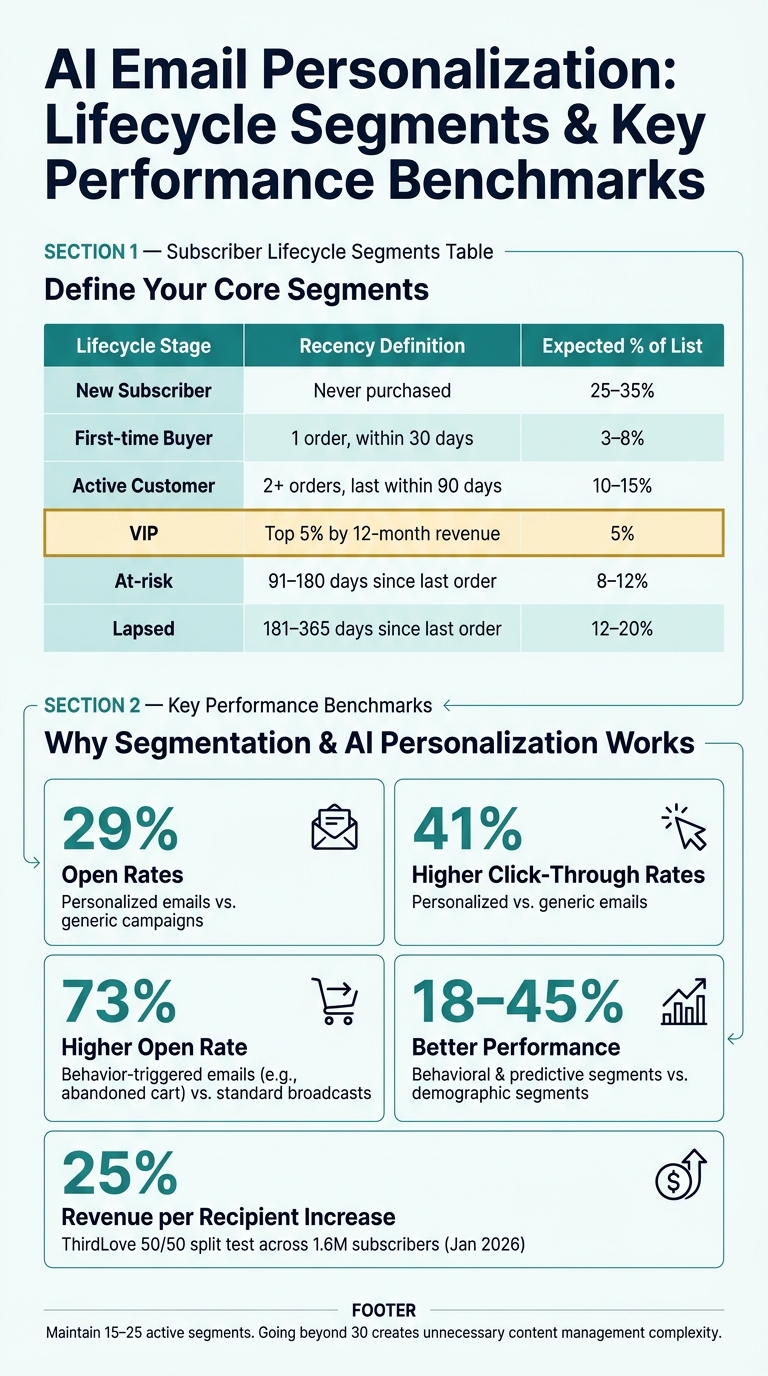
AI Email Personalization: Lifecycle Segments & Key Performance Benchmarks
Once your data is clean and compliant, the next step is to organize it into actionable segments for your AI. Poorly defined segments are a major reason why AI personalization efforts fall short - 82% of ecommerce brands fail at segmentation because they skip the essential groundwork upfront [20].
Define Core Segments
Turn your clean data into dynamic segments that adapt automatically as subscriber behavior evolves. Static lists, which require manual updates, are far less effective than dynamic ones. Start by setting clear lifecycle boundaries using measurable criteria. For instance:
- Active Customer: 2+ orders, with the last order within 90 days
- At-risk: 91–180 days since the last order
- VIP: Top 5% by 12-month revenue [20]
In addition to lifecycle stages, integrate behavioral and predictive signals. Segments based on metrics like purchase likelihood and churn risk outperform traditional demographic-based segments by 18–45% [8]. A practical guideline is to maintain 15–25 active segments - going beyond 30 often creates unnecessary content management challenges [20].
| Lifecycle Stage | Recency Definition | Expected % of List |
|---|---|---|
| New Subscriber | Never purchased | 25–35% |
| First-time Buyer | 1 order, within 30 days | 3–8% |
| Active Customer | 2+ orders, last within 90 days | 10–15% |
| VIP | Top 5% by 12-month revenue | 5% |
| At-risk | 91–180 days since last order | 8–12% |
| Lapsed | 181–365 days since last order | 12–20% |
Once your segments are clearly defined, the next step is to activate them with automated triggers.
Set Up Triggers and Workflow Rules
With your segments in place, it’s time to set up event-driven triggers to bring them to life.
Triggers based on user behavior, like abandoned cart emails, can significantly boost engagement. In fact, these types of emails see a 73% higher open rate compared to standard broadcasts [6]. But for triggers to work effectively, they need to follow well-defined rules.
Start by creating a workflow priority hierarchy to avoid conflicts. For example, transactional emails should take precedence, followed by welcome or onboarding series, and then re-engagement or promotional campaigns [18]. Pair this with frequency caps - aim for 5–7 emails per week for highly engaged users, while keeping it to 1–2 for less active contacts [20]. Also, include exit conditions in your workflows. For instance, if a subscriber completes a goal (like making a purchase), they should be automatically removed from the corresponding nurture sequence.
"The goal is to move subscribers from awareness to activation... with fewer irrelevant messages and less list fatigue." - Impression.biz [9]
Validate and Refine Targeting
Before scaling your automated workflows, take the time to validate your segments for accuracy and performance.
Ensure your segments are large enough to yield meaningful insights and that at least 50% of the contact data fields are populated [20]. Sparse or incomplete data can undermine your AI’s reliability. Monitor how contacts move between segments (e.g., from "Prospect" to "First-time Buyer") to avoid logic conflicts that could result in contradictory messaging [20].
To measure effectiveness, use a holdout group. For example, in January 2026, DTC apparel brand ThirdLove collaborated with Backstroke on a 50/50 split test across 1.6 million subscribers. By dividing the test group into four predictive clusters, they achieved a 25% increase in revenue per recipient, a 16% boost in order rates, and a 23% rise in click rates [21].
"Backstroke took (using subscriber data) a step further by helping us understand not just who to talk to, but how." - Leanne Chan, Sr. Director, Retention and Performance Marketing, ThirdLove [21]
Finally, apply exclusion logic to avoid sending messages in sensitive situations. For example, exclude contacts who are actively engaged with customer support, involved in ongoing sales negotiations, or whose personalization signals might seem intrusive. A good rule of thumb: if you can’t explain why someone is receiving a specific email in one sentence (“You’re receiving this because…”), it’s probably best not to send it [1].
Creating AI-Driven Email Content
With your audience segments identified and triggers in place, the next step is crafting email content that connects on a personal level. Even with great data, it’s easy to fall into the trap of creating robotic, template-like content - which is where many teams falter.
Define Personalization Goals for Each Email Component
Not every part of your email needs the same level of personalization. The trick is knowing what to personalize and how to use your data effectively. For example, a subject line tailored to a recipient’s behavior - like visiting a pricing page - can boost open rates by 26% [22]. Similarly, using dynamic product recommendations based on browsing or purchase history can outperform static grids by 15–25% in click-through rates [3].
Here’s a breakdown of how you can personalize different email components:
| Component | Personalization Strategy | Data Required |
|---|---|---|
| Subject Line | Reference specific actions (e.g., pricing page visit) | Intent data, web tracking |
| Opening Line | Mention recent company events or initiatives | News feeds, LinkedIn activity |
| Body Copy | Highlight value based on recipient’s role | CRM role/seniority field |
| CTA | Match the lifecycle stage (e.g., "Finish setup") | Lifecycle stage, product usage |
| Social Proof | Include case studies relevant to their industry | Industry, company size |
The goal is to move beyond basic {first_name} tokens and create content rooted in actual, verifiable data. As Abmatic AI explains:
"The teams winning in 2026 wire their CRM, intent platform, and enrichment data into the AI layer and pin every personalized claim to a verifiable signal." [2]
By focusing on these targeted strategies, you can amplify the engagement metrics discussed earlier.
Build Consistent Prompts for AI Models
Once you’ve nailed down your personalization strategies, the next step is to standardize how you communicate with your AI tools. Clear, structured prompts are key to keeping outputs consistent and on-brand. When creating prompts, include details like the audience segment, campaign goal, tone, required facts, and any restrictions.
| Prompt Component | Description |
|---|---|
| Audience Segment | Define who the email is for (e.g., "VP of Marketing at a B2B SaaS company") |
| Campaign Goal | Specify the desired action (e.g., "Book a demo") |
| Brand Voice | Outline tone guidelines (e.g., "Professional but approachable") |
| Required Facts | Include key data points (e.g., "Reference recent webinar attendance") |
| Prohibited Claims | Flag what to avoid (e.g., "Do not mention pricing") |
| Output Format | Set formatting rules (e.g., "Max 90 words, one CTA only") |
Save these prompt templates in a shared library so your team isn’t starting from scratch with every campaign [10]. Always include fallback instructions - if a personalization signal is missing, the AI should skip that element instead of guessing or creating inaccurate content [16].
Review and Test AI-Generated Content
Even the best AI-generated content needs a human touch. Without proper review, outputs can miss the mark and underperform by as much as 18% [4]. To maintain quality, sample 1%–5% of all AI-generated emails weekly and evaluate them from the recipient’s perspective [2]. This helps catch small errors before they snowball into bigger issues.
"AI email personalization is a pipeline, not a button. Each step can break - bad data in, irrelevant output out." - Topo.io [22]
Also, keep an eye on technical details. For instance, ensure your email templates stay under 102 KB in HTML size. Gmail clips emails that exceed this limit, which could cut off crucial personalized CTAs right when they’re most effective [23].
Measuring and Optimizing AI Workflows
Once you've created content, the next step is to measure how well it's performing using top analytics tools for business. The challenge? Many teams either track too many metrics or focus on the wrong ones, often because they haven't consulted a marketing analytics tools comparison guide, leading to data that doesn’t help them make better decisions.
Set Up Metrics and Tracking
To get meaningful insights, stick to key metrics like Revenue per recipient (RPR) and click-through rate (CTR) - these are expected to remain reliable in 2026. Open rates, however, are becoming less useful due to Apple Mail Privacy Protection (MPP). MPP auto-opens emails for many iOS users, inflating open rate numbers and making them less accurate.
"Open rate is directional at best. Apple Mail Privacy Protection auto-opens emails, inflating the number for anyone with a meaningful iOS audience. Optimize for click rate, conversion rate, and revenue per recipient." - Prospeo Team [25]
Besides engagement metrics, keep an eye on deliverability. Even a small drop in inbox placement for a single email provider can hurt your campaign, even if your overall numbers look fine.
| Metric | Healthy Signal | Red Flag |
|---|---|---|
| Revenue per recipient | Lift without audience fatigue | Lift driven by only a tiny segment |
| Click-through rate | Improves alongside conversions | Clicks rise but conversions fall |
| Complaint rate | Stable or declining | Any increase |
| Unsubscribe rate | Consistent with baseline | Spike after personalization change |
| Inbox placement | Stable across major providers | Drop for one domain or cohort |
These metrics provide a strong foundation for testing and improving your campaigns.
Test AI-Personalized Campaigns
When testing AI-driven campaigns, focus on one variable at a time [24]. Always compare your results to a static baseline group to measure lift accurately. Before running any test, set clear performance thresholds. This way, if complaint rates spike or inbox placement drops, the test can pause automatically to prevent further issues.
A helpful testing strategy is the "staircase" method. Start by testing broader elements like segment-level relevance. Then, move on to smaller details like subject line optimization, and finally, test dynamic content blocks [26]. This step-by-step approach keeps your results clear and avoids the confusion that comes from testing too many factors at once.
Iterate and Improve Workflows
Optimization isn’t a one-time task - it’s an ongoing process. Tie everything together by regularly reviewing and refining your workflows. For example:
- Weekly: Check email tone and data accuracy.
- Monthly: Assess how well your segments are performing.
- Quarterly: Audit your data quality to ensure everything is up to date.
"Personalization works at scale when content, data, and delivery logic share the same source of truth." - Alex Sventeckis, HubSpot [1]
Another crucial step? Audit the "signal layer" - the CRM fields and intent data that feed your AI. If a lifecycle stage is mislabeled or a critical signal (like a web visit) is outdated, the AI will amplify these errors across every email in that segment [16]. Keeping your data inputs clean is just as important as fine-tuning your prompts.
Tools and Integration for AI Email Personalization
Delivering personalized email content at scale requires the right tools and proper integration. The difference between a smooth workflow and one that constantly breaks lies in selecting the right stack and ensuring everything connects seamlessly.
Evaluate AI Email Personalization Tools
To achieve scalable AI-driven workflows, choose tools that integrate directly with your data sources. For example, platforms with native CRM connections, like HubSpot, allow you to manage segmentation, content, and reporting in a single environment. This eliminates the need for manual exports and reduces operational complexity [1].
Here are some key criteria to consider when evaluating tools:
| Evaluation Criteria | What to Look For |
|---|---|
| Send-time optimization | Relies on click and conversion signals rather than open timestamps (impacted by Apple MPP) [8]. |
| Personalization grounding | Pins content to CRM fields or intent events rather than generic tokens [2]. |
| Optimization metrics | Tracks meaningful metrics like revenue per recipient and CTR, not just open rates [27]. |
| Fallback content | Handles missing data fields gracefully to avoid broken tags in emails [23]. |
| Compliance features | Supports GDPR, CCPA, and limits on sensitive data out of the box [2]. |
For pricing, entry-level tools like Mailchimp AI (~$20/month), Brevo (~$25/month), and Klaviyo (~$45/month) are great for smaller lists. Mid-market solutions capable of managing 5–20 million subscribers typically cost between $5,000 and $15,000 per month, including CDP and ESP integration [7][27].
"The 2026 version of personalization is one email template with 8 variable blocks... and a model that picks the right variant of each block per recipient at send time." - Ryan Whitton, Tested Media [27]
For analytics, the Marketing Analytics Tools Directory is a valuable resource. It lists tools for campaign performance tracking, audience insights, A/B testing, and reporting dashboards, helping you compare options before committing.
Integrate Tools with Existing Systems
After selecting the right tool, integration with your existing systems is essential. Start by auditing your CRM fields. If lifecycle stages or key properties are inaccurate or incomplete, the AI will amplify those errors across every email it generates [1]. Strive for at least 70% field population before enabling AI drafting [27].
Key integration steps include: data collection, normalization, enrichment, activation, and feedback [16][11]. The feedback loop - often overlooked - is critical for improving your model over time and maintaining accurate attribution.
"AI personalization is only as good as the data you feed it. Get the boring layer right." - Abmatic AI [2]
Also, ensure your dynamic email templates stay under 102 KB to avoid clipping in Gmail [23].
Assign Workflow Ownership and Document Processes
Clear ownership is vital to prevent AI workflows from drifting. Assign specific roles: one person for the data layer, another for content and prompts, and a third for compliance approvals. Advanced teams treat personalization as a product, complete with owners, SLAs, and a roadmap, rather than a series of isolated campaigns [10][16].
Maintain a prompt library to standardize audience segments, campaign goals, brand tone, and prohibited claims. Pair this with a field dictionary that details the source, format, and update frequency of every CRM property the AI uses [10][28]. For high-risk emails - like billing, legal notices, or sensitive lifecycle transitions - ensure drafts are reviewed by a human [16]. Keep an audit trail of every AI-generated email, including its prompt, data snapshot, and approval status. This documentation is essential for troubleshooting and compliance [16][28].
With the right tools, strong integration, and clear ownership, your AI email personalization workflow will be well-positioned for long-term success.
Conclusion and Next Steps
Key Takeaways
To build a successful AI email personalization program, you need three essentials: clean data, well-defined audience segments, and a commitment to ongoing improvements. If your CRM data is messy or outdated, even the most advanced AI tools can churn out emails that miss the mark. When done right, AI-driven personalization can boost revenue by 5%–15% and deliver a marketing ROI increase of 10%–30% [1]. However, no matter how advanced the technology, human oversight is still essential to maintain your brand's voice and ensure accuracy [1][5]. Think of AI as a way to enhance human decision-making, not replace it.
Use the Marketing Analytics Tools Directory
Picking the right tools for your AI personalization stack can feel overwhelming. Fortunately, the Marketing Analytics Tools Directory makes this process easier. It provides side-by-side comparisons of tools across categories like real-time analytics, A/B testing, campaign performance tracking, and audience insights. The right tools will amplify your personalization efforts and help you hit your goals faster.
"AI-powered personalization in email marketing is no longer about generating a thousand subject lines. It is about feeding the model real signals... and letting it produce a single email that looks like a human spent 20 minutes on it." - Abmatic AI [2]
Start Small, Then Scale
Once your strategy is outlined, it's time to put it into action. Start with a 30-day data audit to clean and organize your records. Follow this with a 30-day pilot focusing on send-time optimization. In the final 30 days, scale the tactics that deliver results [2][19]. Use an 80/20 split - 80% AI-driven emails versus 20% control group - to measure the true impact.
If your pilot achieves at least a 15% improvement in key metrics like click-through rates or revenue per recipient, you’re ready to expand. Gradually introduce features like dynamic body copy, predictive segmentation, and additional triggers. Just be cautious - scaling too quickly without a solid data foundation can lead to disappointing results [7][16].
FAQs
What data do I need before starting AI email personalization?
To make AI email personalization work seamlessly, start by building a unified customer profile. This profile should pull together data from various sources like your CRM, website, support tools, and commerce platforms.
Here’s what to include:
- Identity data: Email addresses, CRM IDs, or any identifiers that link to individual customers.
- Consent status: Ensure you’re respecting privacy preferences and compliance requirements.
- Lifecycle stages: Understand where the customer stands - are they a lead, a first-time buyer, or a loyal customer?
- Segmentation details: Include information like firmographics (e.g., company size, industry) and geographic location.
To take it further, incorporate zero-party data - this is information customers willingly share with you, like their preferences or interests. Combine this with behavioral signals such as purchase history, browsing patterns, and how they interact with your emails. This mix of data helps fine-tune your personalization efforts, making your messages more relevant and engaging.
How do I keep AI-personalized emails compliant with GDPR and U.S. privacy laws?
To ensure compliance, it's essential to integrate it directly into your system's design. Start by establishing a clear legal basis for data processing and respecting opt-out requests from users. Be transparent about any AI-assisted decisions being made.
Limit data collection to what is absolutely necessary for your operations, and maintain detailed documentation of use cases in a purpose register. Avoid inferring sensitive attributes unless you have both legal and ethical grounds to do so.
When it comes to email communications, always include accurate sender details and provide a functional unsubscribe option in every message. These steps not only help meet legal requirements but also build trust with users.
How can I prove AI personalization increases revenue, not just clicks?
To show how AI personalization boosts revenue, shift the focus to its financial results instead of engagement metrics like clicks or open rates. A good way to evaluate its impact is by running a three-way test: compare a static template, a rule-based dynamic version, and an AI-driven option. The key metrics to track here are incremental revenue per recipient and conversion rates - these offer a clearer picture of how AI contributes financially. Using tools that provide unified reporting and accurate attribution can help determine if AI genuinely outperforms simpler approaches in driving real business outcomes.