If you need data in under 60 seconds, I’d use webhooks. If I need backfills, restated data, or simpler recovery after downtime, I’d use API polling. For CRM leads, payments, and other revenue workflows, I’d use both.
Here’s the short version:
- API polling checks for updates on a schedule - often every 5 minutes, 15 minutes, or 1 hour
- Webhooks send events as they happen - often within seconds
- Polling is easier to control, easier to debug, and better for bulk history pulls
- Webhooks are better for event-driven actions like lead routing, email clicks, and deal changes
- Polling can hit API caps - many platforms limit calls to around 10,000 to 50,000 per day
- Webhooks can drop events if your endpoint is down and no replay path exists
- Hybrid setups use webhooks for fast events and polling for catch-up and gap checks
If I reduce the choice to one rule, it’s this: pick polling for completeness, webhooks for low latency, and hybrid when missed data is not acceptable.
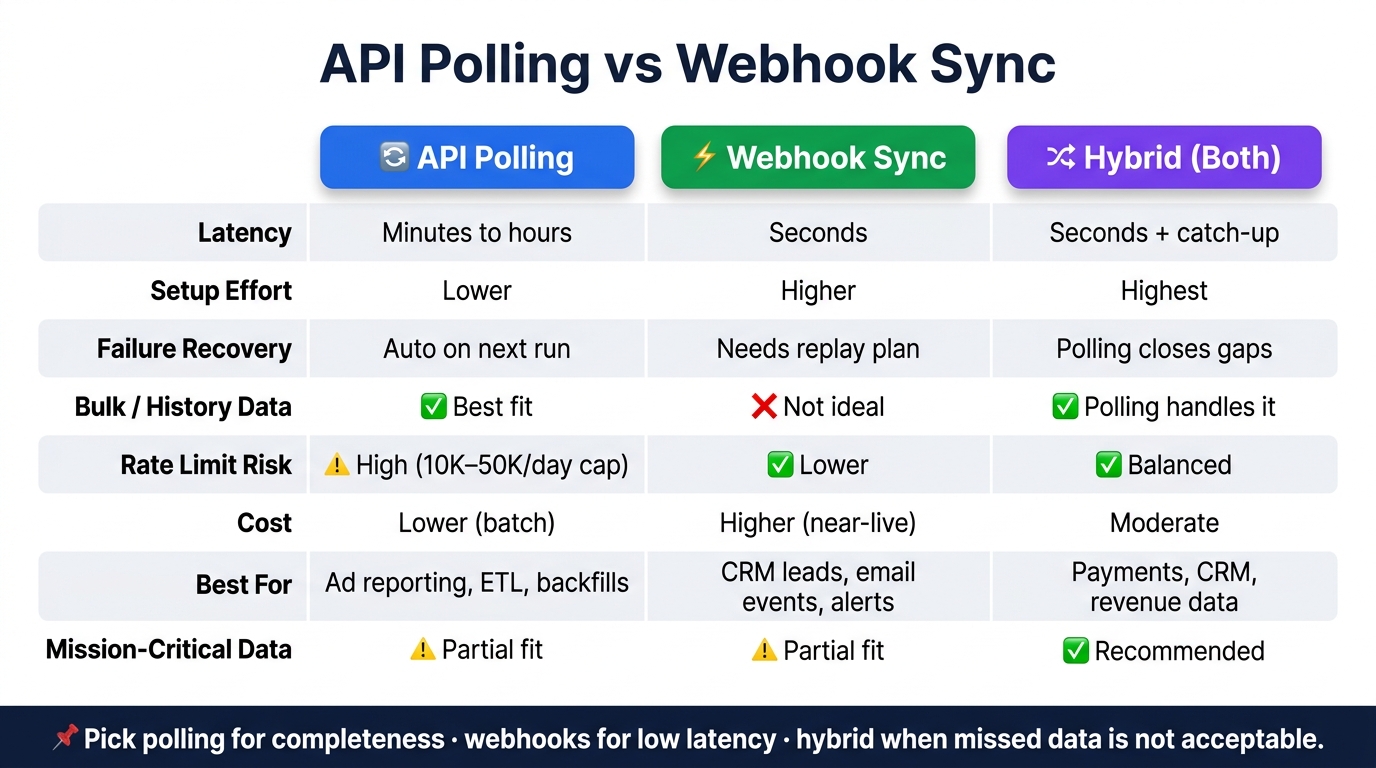
API Polling vs Webhook Sync: Quick Comparison Guide
Webhooks vs API Polling
sbb-itb-5174ba0
Quick Comparison
| Criteria | API Polling | Webhook Sync |
|---|---|---|
| Latency | Based on schedule - often minutes to hours | Usually seconds |
| Setup effort | Lower | Higher |
| Failure handling | Next run can catch up | Needs retries, storage, and replay plan |
| Bulk data | Better fit | Not ideal on its own |
| Rate limits | Main risk | Lower API pressure, but may need follow-up API calls |
| Cost | Often lower for batch jobs | Higher for near-live pipelines |
| Best fit | Ad reporting, ETL, and backfills | CRM actions, email events, alerts |
| Safest option for revenue data | Partial fit | Partial fit |
| Best answer for mission-critical sync | Use both | Use both |
Bottom line: I’d match the sync model to the job, not the tool. Fast action points to webhooks. History, restated numbers, and recovery point to polling. When you need both, combine them.
How API Polling Works and Where It Fits Best
API polling runs on a schedule. Your system pulls records that changed since the last cursor, usually the highest updated_at timestamp or sequence number from the prior run. It fits ad and attribution data well because those sources often revise data for hours or even days. Use polling when completeness, backfills, and audit trails matter more than instant delivery. Put simply, polling is the control-first option, while webhook sync is the speed-first option.
Latency, Control, and Bulk Data Access
The main trade-off is latency. Average staleness is about half the polling interval. Worst case, it is one full interval plus source indexing lag. For batch reporting, ETL, and reconciliation, that delay is usually fine.
Polling gives you more say over the sync. You decide when to run it, what date range to pull, and how to page through large result sets. That makes it a good fit for backfills and bulk pulls, especially when you need to re-collect contact, lead, or engagement history.
Cadence should match how often each system changes in practice.
| System Type | Recommended Cadence | Reason |
|---|---|---|
| CRM (HubSpot, Salesforce) | Every few minutes to hourly | Balance freshness with API quotas |
| Marketing / Ad Platforms | Hourly or slower | Data is restated by the provider over hours or days |
| Analytics / ETL | Daily or batch | Optimized for high-volume throughput |
| Email / Automation | Every 5–15 minutes | Event volume rarely justifies sub-minute latency |
Webhook sync flips that trade-off: lower latency, less control.
Rate Limits, Retries, and Cost
The biggest operating risk with polling is rate limits. Most marketing platform APIs cap requests, often between 10,000 and 50,000 requests per day [4]. Poll too often and you can hit those caps. That may force an upgrade to a higher-priced tier or throttle the integration in the middle of a run.
A practical fix is adaptive polling. Speed up during busy periods and slow down when responses come back empty. Also use ETag and If-Modified-Since headers when the API supports them. If nothing changed, the source can return 304 Not Modified, and that call costs almost nothing.
When errors happen, split them into 2 buckets:
- Retryable errors, such as
429 Too Many Requestsor503 Service Unavailable - Terminal errors, such as
400 Bad Request
Send terminal failures to a manual review queue instead of retrying them forever.
Cost is usually lower with polling, but frequency still drives the bill. real-time analytics tools runs 3–5× more expensive than daily batch extraction [4]. That is why most analytics and reporting workflows use scheduled pulls instead of continuous extraction. It is also easier to debug. Each request gives you a status code and a log entry.
How Webhook Sync Works and Where It Fits Best
Webhooks flip the polling model. Instead of your system asking for updates on a schedule, the source sends an event to your endpoint the moment something changes. A form submission, lead creation, deal stage change, or bounce can trigger an HTTP POST to your endpoint. That matters most when the next action needs to happen right away. [1][2]
Real-Time Event Delivery and Channel-Specific Use Cases
Webhooks work well for email and CRM events like opens, clicks, unsubscribes, bounces, lead routing, and deal stage changes. Website analytics tools and ad platforms are a different story. They often still lean on polling because attribution numbers can restate over hours or days, so scheduled pulls are usually the better fit there. [1][2]
One catch: many webhook payloads include only the event type and record ID. In practice, that means your handler often needs to hydrate the full record with an API call before it can do anything useful. [1]
Fast delivery helps, but only if you can trust the payload, prevent duplicate work, and recover when something breaks.
Endpoint Security, Duplicates, and Replay
Treat webhook endpoints like any public-facing API. Verify signatures, require HTTPS, and enforce shared secrets. [1][2][3]
Webhooks are at-least-once, so duplicate delivery is part of the deal. The safe pattern is:
- Use idempotent upserts
- Handle out-of-order events based on event time
- Store raw payloads durably
- Return
200 OKfast - Send repeated failures to a dead-letter queue [1][2]
You should also pair webhooks with a reconciliation poll. If your consumer goes down, webhook delivery does not auto-recover the missing events on its own. Polling closes that gap and helps catch anything missed during downtime. [1][2]
That’s why webhooks fit event-driven channels best, rather than every source in your stack. For a broader view of how to integrate these sources, explore top analytics tools for cross-channel data integration.
API Polling vs Webhook Sync: Side-by-Side Comparison
Seeing both models side by side makes the trade-offs easier to judge. The choice changes how you debug issues, recover from failures, and handle scale.
Technical and Operational Comparison Table
This table focuses on the areas that usually matter most in practice. Use it to match each trade-off to the way your stack works.
| Dimension | API Polling | Webhook Sync |
|---|---|---|
| Interaction Model | Pull (consumer-initiated) | Push (provider-initiated) |
| Data Access | Full CRUD capabilities | Event-only delivery; hydrate data separately [1] |
| Debugging | Easier (standard logs and tools) | Harder (requires request inspection and replay) |
| Primary Risk | Rate limiting and throttling [1] | Missed events after retries expire [1] |
| Recovery | Next scheduled run catches up automatically | Requires reconciliation poll to close gaps [1] |
Polling is usually simpler to inspect because the consumer controls the request cycle. Webhooks move faster, but they add more moving parts when something breaks - retries, signature checks, dropped requests, and replay handling all come into play.
Use Case Fit by System Type
The right fit depends on how fast the data needs to move and what the source system can support. Some workflows can wait an hour. Others need action right away.
| Use Case | Better Fit | Why |
|---|---|---|
| Daily ad reporting | API Polling | Attribution data restates over 24–48 hours |
| CRM lead routing | Webhook Sync | Immediate action required |
| Email engagement events | Webhook Sync | Triggers real-time automation |
| Warehouse backfills | API Polling | Bulk transfer and historical consistency |
| Audience sync | Hybrid | Webhooks handle individual adds; polling catches records missed during downtime [1] |
| Real-time dashboards | Webhook Sync | Minimizes lag between event and display |
Audience sync is the clearest hybrid example. Webhooks push the add or update right away, while a reconciliation poll picks up anything lost during downtime [1].
When to Use a Hybrid Model
Hybrid is the safest choice when speed matters but gaps are not acceptable. You get fast event delivery from webhooks and a fallback path from polling.
| Model | When to Use | Primary Benefit |
|---|---|---|
| Polling only | Analytics ETL, ad reporting, systems without webhook support | Simplicity and automatic recovery after downtime |
| Webhooks only | Low-stakes notifications, messaging tools like Slack | Low cost and near-zero latency |
| Hybrid (both) | CRM syncs, payment events like Stripe, any mission-critical revenue data [1] | Speed of webhooks plus the reliability of polling |
A simple way to think about it:
- Use polling only when delayed data is fine and catch-up matters more than speed.
- Use webhooks only when fast alerts matter and missing an occasional event is not a major business problem.
- Use hybrid when the workflow touches revenue, customer records, or anything else you can't afford to lose.
Ad reporting, CRM routing, and analytics pipelines each have different latency and recovery needs. That's what should drive the model choice.
How to Choose the Right Sync Model
Decision Checklist for Ad, CRM, Email, and Analytics Stacks
Use the same criteria from the comparison above - latency, volume, cost, and failure handling - to make the call.
Pick based on latency, volume, and failure tolerance. If your workflow needs updates in under a minute, webhooks are usually the better choice. If you're pulling large sets of past data, or dealing with systems that restate data for hours or days, polling gives you more control and lower risk.[1][2]
Before you build a custom sync, check for a native connector first. Vendor-supported integrations usually mean less maintenance and fewer breakpoints.
Here’s the quick stack-by-stack view:
| Question | Points Toward |
|---|---|
| Do you need updates in under 60 seconds? | Webhooks |
| Are you syncing bulk or historical records? | API Polling |
| Are you working against strict API quotas? | API Polling |
| Is this mission-critical data like payments or CRM leads? | Hybrid |
| Does the source restate data for hours or days? | API Polling |
Key Points to Remember
If you want the shortest version, use this:
- Polling fits bulk sync, backfills, and restated data.
- Webhooks fit near-real-time triggers, but need signatures, idempotency, and replay handling.
- Hybrid fits critical data that needs both speed and recovery.
FAQs
How do I choose a hybrid sync model?
Choose a hybrid sync model: use webhooks for real-time updates, then back them up with scheduled API polling for reconciliation. That gives you low-latency event handling without leaving gaps when events arrive out of order or get missed.
If native integrations fit your setup, use them. If you need a custom build, add idempotency, observability, dead-letter queues, and clear ownership from day 1 so failures, retries, and backfills don’t turn into a mess.
What happens if a webhook fails during downtime?
If your webhook endpoint goes down, you can lose events after the provider runs through its retry limit. That’s the trade-off with webhooks: unlike polling, they don’t come back later and fill in gaps from your downtime.
The fix is pretty simple. Use webhooks for speed, then back them up with a reconciliation poll to catch anything that slipped through. Also, write incoming requests to durable storage as soon as they arrive so you can queue and process them even if the rest of your system has issues.
How should I set the right polling interval?
Balance data latency, API rate limits, and cost first. Poll more often when the data is time-sensitive. Use slower intervals for routine health checks or ETL jobs.
A simple way to improve this is to use adaptive intervals. When a source is quiet, lengthen the gap between requests. When activity picks up, shorten it. That keeps traffic in check without waiting too long for updates.
It also helps to use exponential backoff after empty responses. If nothing has changed, there’s no point hammering the API. And when the API supports it, prefer cursor-based requests or ETag headers so you fetch only changed data. That cuts wasted calls and helps reduce throttling.