Most teams do not need paid journey software on day 1. I’d use free whiteboards for workshops, paid CX mapping tools when maps need rules and shared ownership, and website journey analytics tools when leadership wants proof tied to conversion, retention, or revenue.
Here’s the short version:
- Free tools are best for early drafts, workshops, and small teams
- Freemium journey tools add templates, personas, and basic map structure
- Paid CX mapping tools add version control, roles, shared libraries, and better exports
- Paid business analytics tools add event data, funnels, path analysis, cohorts, and drop-off reporting
- The switch point is simple: does your map stay a workshop file, or does it become a reporting asset?
I’d frame the choice around 4 buying criteria:
- Limits - maps, users, or event volume
- Collaboration - comments, roles, version control, shared workspaces
- Data support - manual fields vs live behavior or VoC data
- Exports - PDF/PNG vs PPTX, CSV, Excel, or BI connections
A few numbers from the article set the range:
- Smaply Free: up to 10 maps and 10 personas
- JourneyTrack trial: 3 maps, 3 personas, 3 workshops
- Smaply paid: from $423/year per editor for Repository, up to about $1,074/year per editor for Governance based on listed euro pricing
- JourneyTrack: from $35,000/year for Journey Mapping and $45,000/year for Journey Management
- Pendo: 4.5/5 from 238 reviews on GetApp
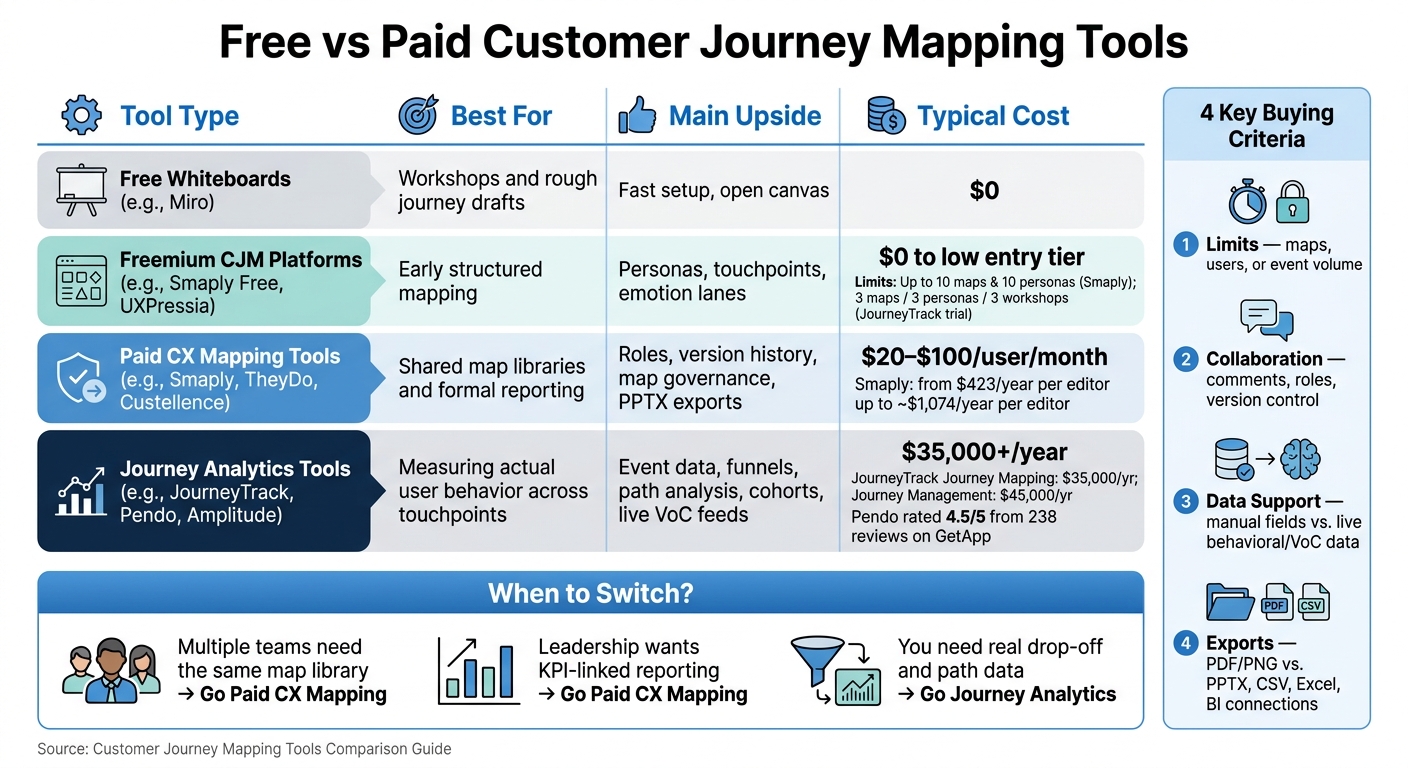
Free vs Paid Customer Journey Mapping Tools: Quick Comparison Guide
Customer Journey Mapping (+ FREE Template & Examples)
sbb-itb-5174ba0
Quick Comparison
| Tool type | Best for | Main upside | Main limit | Typical cost |
|---|---|---|---|---|
| Free whiteboards | Workshops and rough journey drafts | Fast setup and open canvas | No live data, weak controls | $0 |
| Freemium CJM platforms | Early structured mapping | Personas, touchpoints, emotion lanes | Tight caps on maps, exports, and sharing | $0 to low entry tier |
| Paid CX mapping tools | Shared map libraries and formal reporting | Roles, version history, map governance, PPTX exports | Many metrics still need manual updates | $20-$100/user/month |
| Journey analytics tools | Measuring what users do across touchpoints | Event data, funnels, paths, cohorts, VoC feeds | Higher setup load and high annual spend | $35,000+/year |
If I were buying today, I’d keep it simple: use free tools to map, paid mapping tools to govern, and analytics tools to measure.
Free Customer Journey Mapping Tools: Best for Workshops and Early Journey Design
Free tools fit into 2 buckets: whiteboards for fast sketches and freemium platforms for more structured maps.
Free Whiteboard and Diagramming Tools
Miro, Microsoft PowerPoint, and Visio are common picks when a team needs to map a journey fast. Miro works well for shared whiteboard sessions. PowerPoint is familiar, but it lacks journey-mapping features and gets awkward when you need to print large formats. Lucidchart's free tier works for basic diagrams, but it can't connect map elements to live CRM or spreadsheet data.[1][7]
These tools make the most sense for one-off workshops and early drafts. Teams get a lot of freedom, which is great at the start. The trade-off is that they don't give you the built-in templates or structured data views you get from dedicated journey-mapping software.
Most free whiteboard plans also cap exports at images or PDFs.
When a team wants more structure, freemium journey platforms start to fill that gap with templates and role-based fields.
Freemium Journey Mapping Platforms
UXPressia and Smaply give teams more structure from the start - personas, emotion curves, and set touchpoint lanes instead of a blank canvas. Smaply's free plan supports up to 10 maps and 10 personas, but team collaboration is limited to 1 shared map at a time.[2][4]
The limits show up fast. Smaply's free plan only allows PDF exports, and UXPressia's free version does not include PPTX exports or custom branding. JourneyTrack's entry-level trial is capped at 3 maps, 3 personas, and 3 workshops.[2][7][5]
Where Free Tools Work and Where They Fall Short
Free tools work well for one-off workshops, early-stage startups, and small teams that just need a quick flow map. They start to break down when the map needs to stay current, support version control, connect to live data, or show impact on KPIs. That's usually the point where paid CX mapping and journey analytics tools start to make sense.
Paid Tools: Better Governance, Better Exports, and Real Journey Data
Paid tools split into 2 buckets: CX mapping platforms and event-driven analytics tools. That matters because they solve different problems. One helps teams manage journey maps at scale. The other shows what users actually do.
Paid CX Mapping and Journey Management Platforms
Tools like UXPressia, Smaply, Custellence, and TheyDo add the structure most free plans lack. With paid plans, teams get a central journey repository, version control, audit trails, and persona ownership tracking. That makes it much easier to manage maps as working assets across the company instead of leaving them buried in a slide deck or whiteboard export.[5]
Smaply is a good example. Its paid plans start at €390 per editor per year for the Repository tier and go up to €990 per editor per year for the Governance tier. Those plans add granular user roles, SSO, portfolio management, and unlimited maps.[2]
At the enterprise end, JourneyTrack sits in a different price band. It earned a Forrester Wave Leader designation in Q4 2025 and starts at $35,000 per year for its Journey Mapping tier. Journey Management starts at $45,000 per year and adds live VoC integrations with Qualtrics, Medallia, and Forsta, plus AI-generated executive summaries.[5]
If your main job is map governance, cross-team alignment, and portfolio oversight, this category fits better.
Event-Driven Journey Analytics Tools
If you need behavior data, analytics tools and resources are the better fit.
Heap, Mixpanel, Pendo, and Amplitude do not depend on workshop inputs alone. They track user behavior through events embedded in the product or website.[3][5] So instead of a static journey diagram, you get funnels, path analysis, cohort analysis, and drop-off detection.
That shift changes the kind of questions you can answer. A product team can look at where trial users leave before conversion, which paths lead to activation, or which cohorts stay active over time.
A few data points help frame the market:
- Pendo holds a 4.5/5 rating across 238 reviews on GetApp.[3]
- Amplitude is used for cohort-based retention analysis.[3]
These tools are less about documenting the intended journey and more about measuring the actual one.
What Paid Plans Change Day to Day
The day-to-day shift is simple: paid plans turn a static file into a living asset.
Exports improve first. Teams move from basic PDFs to high-resolution branded exports and PPTX files. Access control improves too, with role-based permissions that let stakeholders view maps without changing them. On higher tiers, vendors also add compliance standards like SOC 2 Type II and ISO 27001.[5][6]
Those differences show up most clearly in a few areas:
- limits
- collaboration
- exports
- data support
That’s usually where free tools start to break once more teams, more maps, and more review cycles get involved.
Free vs. Paid: Side-by-Side Comparison by Limits, Collaboration, Data, and Export Options
As teams grow, the job changes. At first, you're just mapping a journey. Later, you need to manage it, share it across teams, and connect it to customer behavior. That’s where the split between free and paid tools shows up fast: limits, governance, data, and exports.
Comparison Table: Free Visualization vs. Paid CX Mapping vs. Paid Journey Analytics
| Tool Category | Typical Price | Map/Event Limits | Collaboration Depth | Data & Analytics Support | Export Formats |
|---|---|---|---|---|---|
| Free whiteboard and diagramming tools (e.g., Miro) | $0 | Limited boards and maps | Basic sharing; single-map collaboration | Manual only; no live data | PDF, PNG |
| Paid CX Mapping (e.g., Smaply, UXPressia, Custellence) | $20-$100/user/month | Often unlimited maps on paid tiers | Shared workspaces; comments on individual map elements; granular roles | CSV imports; KPIs; basic VoC links | PDF, PPTX, Excel, CSV, vector images |
| Event-driven journey analytics (e.g., JourneyTrack) | Custom enterprise pricing; often $35,000+/year | High-volume event data | Shared governance across teams; SSO | Live behavioral data; live VoC feeds | PDF, CSV, BI integrations |
The table gives the quick view. What matters in practice is which limits hit first.
How Free and Paid Options Differ on Key Buying Criteria
The first issue is hard caps. Free plans usually hit limits on maps and collaborators pretty fast.[4][6] That’s fine if one person is mapping a single journey or running a workshop. It gets tight once a CX team needs a working library across products, regions, or business units.
The next gap is governance. Free tools usually don’t give you version history or shared controls. Paid CX mapping tools do. For example, Smaply's Governance tier (€990/editor/year) adds customizable taxonomies, SSO, and unlimited shared workspaces.[4] In plain terms, paid plans make it easier to control who edits what and keep maps consistent over time.
The gap gets much bigger on data integrations. Free tools are fully manual. Someone has to enter every metric by hand. Paid CX mapping tools add Journey Performance Indicators and basic metric fields. Paid analytics tools go further by pulling in live behavioral and VoC data straight into the map.[5] At that point, the map stops being just a workshop file and starts acting more like a measurement layer.
Export quality changes too. Free tiers usually top out at PDF or PNG. Paid tiers add PPTX, vector images, Excel, and CSV.[6][7] That matters when the map has to hold up in an exec deck, get reused in reporting, or move into another system without falling apart.
Pros and Cons Table by Tool Category
| Tool Category | Pros | Cons |
|---|---|---|
| Free Whiteboards (e.g., Miro) | Zero cost; fast to deploy; flexible canvas; great for live workshops | No data linkage; fully manual; no version history or governance; hard to scale |
| Freemium CJM Platforms (e.g., Smaply Free, Custellence Free) | Purpose-built CX structure; persona templates; easy PDF export | Hard caps on maps and personas; no shared workspaces; branding often required on exports |
| Paid CX Mapping (e.g., Smaply Repository, UXPressia Pro) | Unlimited maps; custom branding; professional exports (PPTX); granular user roles; version control | Higher per-editor cost; most data points still require manual updates |
| Event-driven journey analytics (e.g., JourneyTrack) | Live behavioral data; live VoC integration; enterprise security | High annual floor ($45,000+); complex setup; requires clean, mature data pipelines to be effective |
The break point is pretty simple: does the map stay a workshop artifact, or does it need to work as a reporting asset?
When to Move from Simple Maps to Data-Backed Journey Views
The break point is not budget. It is what the map has to do after the workshop ends.
Signs You Need Paid Journey Management
Free tools start to fail when journey maps become a shared source of truth. The first issues usually show up in limits, ownership, and reporting. Once multiple teams need to work from the same map library, free tiers tend to fall short. Without version control, access controls, and shared workspaces, maps drift, and teams start working from different versions.[2][5]
If governance is the main problem, paid mapping is enough. If behavior data starts to matter, the next step is analytics.
Another clear trigger is executive reporting. If a customer experience leader has to walk into a quarterly business review and connect journey work to retention or revenue, a whiteboard export from a free tool will not hold up. Paid platforms add branded PDF and PPTX exports, along with permissioning built for formal reporting.[5][7]
Signs You Need Event-Driven Journey Analytics
This is the point where the need shifts from map management to measuring what customers actually do.
Paid CX mapping tools are still static unless they pull in live VoC data. That can work for stable journeys. It breaks down when you need to see where customers drop off across digital or service touchpoints, especially in SaaS and e-commerce settings where near real-time monitoring matters.
The signal is pretty simple: if your team already pulls behavioral data from a behavioral analytics stack, but that data is not tied to your journey maps, you are making decisions based on inferred paths instead of actual ones. In journey analytics platforms, tools such as JourneyTrack can ingest live data from Snowflake and BigQuery and support actual path analysis instead of workshop drafts.[5] JourneyTrack's Journey Management tier costs $45,000/year, and Journey Intelligence uses custom pricing.[5]
Conclusion: Match the Tool to Your Maturity, Data Needs, and Reporting Requirements
Use the trigger that fits your current maturity, not the tool with the longest feature list.
Free tools fit early mapping and workshops. Paid CX mapping platforms make sense when you are coordinating a growing team, need a governed map library, and have to produce boardroom-ready exports for leadership.[5] Event-driven analytics platforms make sense when you already have VoC or behavioral infrastructure and need to tie journey changes to measurable business outcomes with a clear audit trail.[5]
FAQs
When should I upgrade from a free tool?
Upgrade when the free tool starts slowing the team down or keeping you from seeing the full customer journey.
The usual signs are pretty clear: you’ve hit user caps, you need deeper CRM or analytics integrations, or your team is spending too much time on manual mapping. It also makes sense to move up when you need advanced analytics, portfolio management, real-time collaboration, and tighter governance as your data and operations grow.
Do I need mapping software or journey analytics?
It depends on your goals and scale. Free mapping tools are usually enough for startups or small teams that need basic contact tracking and simple visualizations.
Move to journey analytics when you need to bring cross-channel data into one place, cut manual entry, support real-time collaboration, connect with CRMs and analytics platforms, or link customer behavior to business outcomes.
What features matter most when choosing a tool?
Start with the basics: team size, budget, and goals. That usually tells you more than a feature checklist ever will. If your team just needs a place to sketch ideas, a simple whiteboarding tool may be enough. If you need deeper planning and reporting, look for a data-backed platform that connects to the systems you already use, like your CRM or analytics tools.
It also helps to check for real-time collaboration, especially if your team works across functions or in different locations. And if you expect your customer journeys to get more layered over time, choose a tool that can handle multi-channel mapping without forcing you to switch platforms later.