If you need tight control, pick Tealium or Adobe. If you need privacy-first controls, look at Piwik PRO, Commanders Act, or Ensighten. If you need the fastest path to launch, GTM is still the default.
I’d boil the full review down to 3 buying questions: who can publish, how consent is enforced, and whether server-side routing matters for your stack. This comparison looks at 7 tools - GTM, Adobe, Tealium, Ensighten, Piwik PRO, Commanders Act, and Segment - across 6 buying areas: governance, deployment, consent, APIs, server-side options, and reporting.
If you’re sorting through top website analytics tools and tag managers, here’s the short version:
- GTM - best for speed, low entry cost, and broad team familiarity
- Adobe Tags - best for Adobe-first companies that want tighter publish control
- Tealium iQ - best analytics tools for business and large teams with strict review flows
- Ensighten Manage - best when enforcement and security controls come first
- Piwik PRO - best when consent controls need to sit inside the analytics stack
- Commanders Act - best for multi-country consent and policy-based routing
- Segment - best when event governance matters more than classic tag management
The main pattern is simple: lighter tools help teams move fast, while heavier tools add more checks, routing control, and privacy enforcement. For many U.S. companies dealing with CCPA/CPRA, that trade-off matters because consent and data routing are no longer side issues.
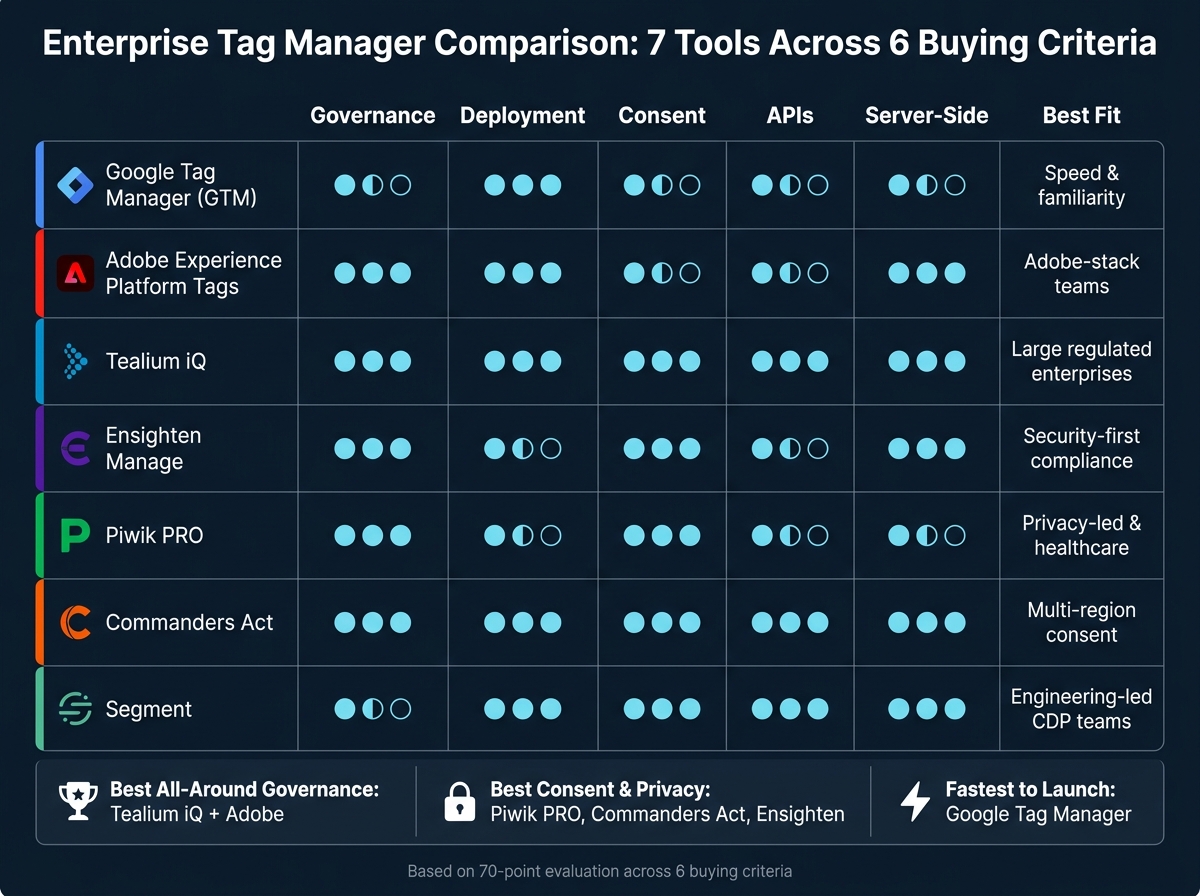
Enterprise Tag Manager Comparison: 7 Tools Across 6 Buying Criteria
Quick Comparison
| Tool | Best fit | Governance | Consent | Server-side | Main trade-off |
|---|---|---|---|---|---|
| Google Tag Manager | Mid-market and Google-centric teams | Basic in standard GTM, stronger in GTM 360 | Good with CMP + Consent Mode | Yes | More process-driven than tool-driven control |
| Adobe Experience Platform Tags | Adobe stack users | Strong | Good | Yes | Best fit mostly inside Adobe |
| Tealium iQ | Large, regulated, multi-brand teams | Very strong | Very strong | Yes | More setup and ownership needed |
| Ensighten Manage | Security and compliance-led teams | Strong | Very strong | Yes | Higher overhead and smaller talent pool |
| Piwik PRO Tag Manager | Privacy-led teams, healthcare, public sector | Strong | Very strong | Limited native depth | Less native server-side tagging depth |
| Commanders Act | Multi-region privacy programs | Strong | Very strong | Yes | Lower U.S. market familiarity |
| Segment | Engineering-led CDP users | Strong for event governance | Strong | Yes | Not a classic TMS; needs developer input |
Bottom line: if you run one main vendor stack, the native tool often makes sense. For those building a custom stack, exploring top analytics tools can help identify the right integrations. If you run a mixed stack, work across regions, or face tighter compliance demands, a dedicated enterprise TMS usually gives you more control where it counts.
sbb-itb-5174ba0
1. Google Tag Manager (including Server-side)
Google Tag Manager is the baseline tool here, and its main edge is simple: teams know it, teams can move fast with it, and most common tag changes do not need engineering support.
At the standard tier, Google Tag Manager is free. Marketing and analytics teams already know how it works, which cuts ramp time. It also handles most day-to-day tag deployment needs without turning every update into a developer ticket.
Governance
GTM splits account roles from container permissions: Read, Edit, Approve, and Publish[17][21][24][25][26]. For bigger teams that need tighter release control, GTM 360 adds Approval Queues and Zones, which help with delegated access and stricter publishing rules[16][18][19][20][22][23].
That said, GTM does not enforce discipline on its own. If your team has weak review and release habits, the tool will not fix that for you. In large companies, governance usually depends on internal change-management rules layered on top of GTM.
Deployment
Workspaces let multiple teams work at the same time without stomping on each other's changes. Environments such as development, staging, and production let teams test tags on non-production traffic before release[16]. Version history also makes rollback fairly simple.
In practice, this makes GTM easy to standardize across teams. But it is not fully self-policing. The platform supports a clean release process, yet the process still has to come from the operator side.
Privacy and Consent
GTM works with a CMP to block non-essential tags until consent is given. With Server-side GTM, events go first to a server container you control - often on a first-party subdomain - and then get forwarded to vendors[5][6][7][3][8][9][11].
Paired with Consent Mode, sGTM can change tag behavior based on granular consent signals, which helps teams handle privacy and regulatory requirements with more control[10][2].
APIs
The server-side setup includes APIs for transforming events, handling requests and responses, and connecting with Google services[4]. On the admin side, GTM APIs cover account, container, version, and workspace actions, which supports automated setup, auditing, and DevOps-style release pipelines[12][13][14][1][15].
The trade-off is flexibility versus structure. GTM gives teams room to shape their own setup, but more complex data-layer orchestration still takes more custom work than in enterprise tools with stricter built-in patterns.
GTM is the easiest option here to get into and scale across teams, but enterprise-grade control comes more from process than from platform guardrails.
2. Adobe Experience Platform Tags
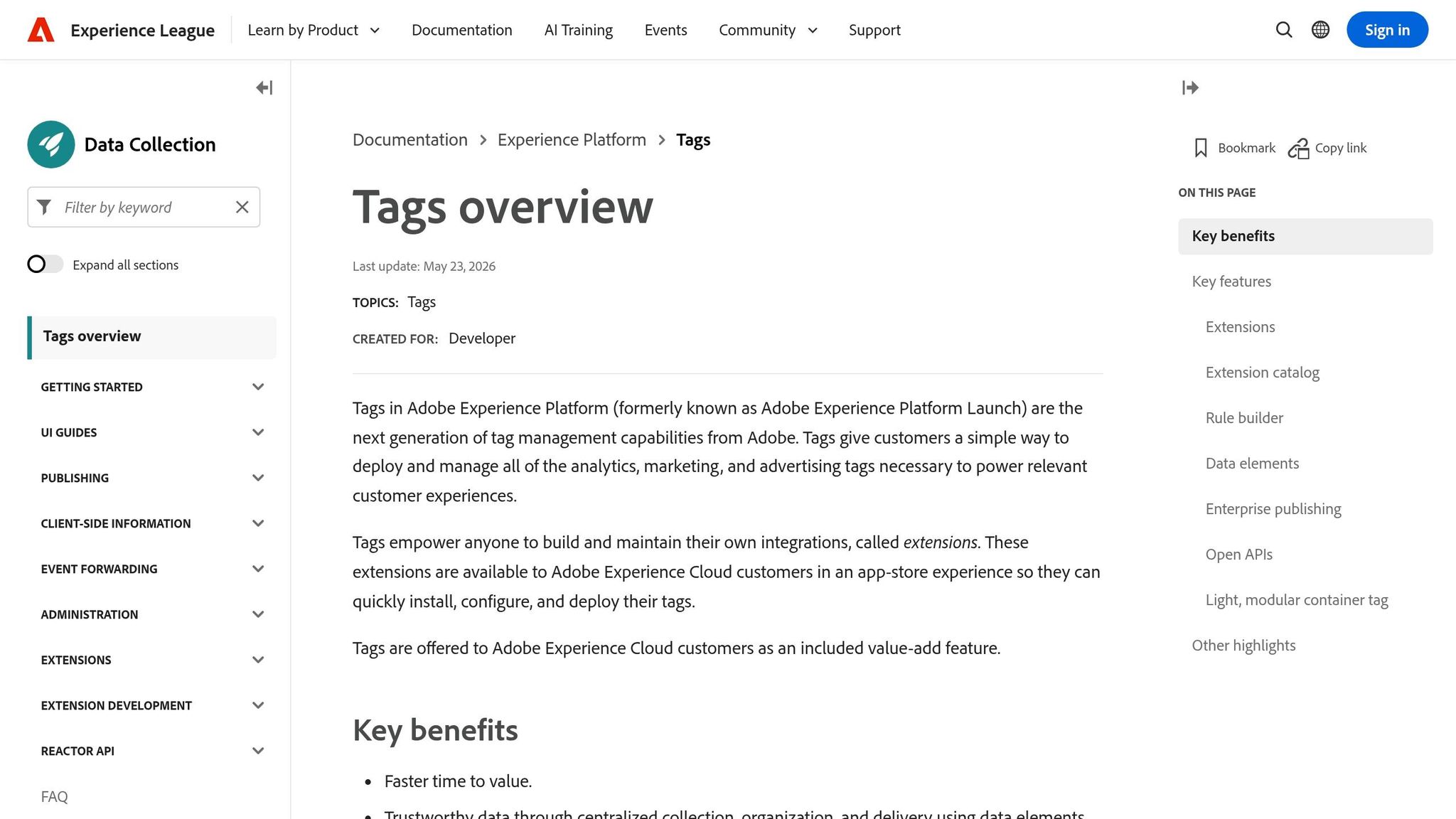
Adobe Experience Platform Tags trades speed for control. It fits best inside the Adobe stack, especially for teams already using Adobe Analytics, Adobe Target, or Adobe Experience Platform. If you're not already in that world, it's a weaker standalone pick. You can also explore other top analytics tools and resources to find a better fit for your stack.
Governance
Adobe handles governance through Adobe Admin Console product profiles. Rights are split across Platforms, Properties, Property Rights, and Company Rights.[27] That setup lets admins limit access at the property level by name, such as keeping US and EU sites separate, instead of giving broad account access.[27]
Adobe also includes unlimited development environments. On top of that, only approved users can merge libraries into staging and production.[36] That matters in big teams, where too many hands on production can turn into a mess fast.
Deployment
Deployment is built around extensions, data elements, rules, and libraries. Teams bundle changes into libraries, then move those libraries through development, staging, and production. Each step depends on the user's permissions.[36]
Only users with production publish rights can send a library live.[36] In practice, that gives teams a clear approval path instead of a free-for-all.
Privacy and Consent
Adobe Tags supports consent enforcement through CMP integrations and the Web SDK's setConsent. That updates consent state across Adobe Experience Platform and downstream tools.[28][29]
For Adobe Target, optinEnabled=true in targetGlobalSettings holds back firing until consent is collected.[33] Adobe does not include its own CMP, but its rule-based firing controls give teams a workable way to enforce whatever the CMP collects.[33][35]
APIs
The Reactor API handles programmatic management of properties, rules, libraries, and environments.[30][32] API access is limited to authorized organizations, and every request needs enterprise authentication headers. That keeps automation inside the same rights model as the UI.[32]
Common use cases include:
- creating new tag properties when a new brand or microsite launches
- tying tag deployment into CI/CD pipelines
- running bulk audits across many properties to check which third-party scripts are active[30][32]
Event Forwarding is Adobe's server-side option. It sends data through Adobe Edge Network before delivery to third parties. That cuts client-side load and puts PII filtering in one place.[31][34][36]
Tealium pushes governance and deployment control further.
3. Tealium iQ Tag Management
Tealium leans more than Adobe into governance, consent, and hybrid tagging. Tealium iQ is Tealium's client-side tag manager. It uses a Universal Data Object (UDO), which is a standard data layer fed by query strings, first-party cookies, JavaScript variables, and page metadata.[39] In plain terms, teams can keep data aligned across tags without rebuilding the same logic for each vendor.
Governance
Tealium iQ gives admins permission controls at the account, profile, and configuration levels. Workflow Management adds an approval step before production, and each publish creates a versioned audit trail.[50][52] For regulated sectors like healthcare and financial services, that level of change control is a strong plus.
Deployment
Tealium iQ supports dev, QA, and production environments. Teams can also create custom environments when the release process gets more involved.[38][50] The universal tag, utag.js, loads asynchronously, which helps avoid blocking page rendering in normal use.
For server-side collection, the Tealium Collect tag sends browser events from iQ into EventStream and AudienceStream.[47][48][49] That setup matters most when consent rules need to govern both browser tags and server-side collection.
Privacy and Consent
Tealium iQ includes a native Consent Manager.[40] Teams can define consent categories like analytics, advertising, and functional, then map them straight to tag firing rules.[45] The platform also supports do_not_sell signals and geo-based consent policies, so U.S. visitors can see a notice plus a Do Not Sell or Share link, while EU/UK users can be sent to explicit opt-in flows.[45]
It can also enforce consent decisions from external CMPs across tags and server-side connectors.[42][43][45] That matters if your consent setup lives outside Tealium but still needs to control what fires and what gets sent downstream.
APIs
Tealium offers v2 and v3 management APIs for controlling profiles, tags, mappings, and environments programmatically.[41][44][51] In practice, enterprise teams use them to clone and standardize profiles for new brands or microsites. They also use them to support warehouse-based reporting and attribution workflows.
That control comes with more implementation and operating overhead than simpler tag managers.
4. Ensighten Manage
Ensighten Manage is built for control first. While Adobe and Tealium split the difference between control and ecosystem breadth, Ensighten leans harder into server-side governance and privacy enforcement. Its server-side Tag Delivery Network (TDN) checks page context and returns only the tags that match. That hybrid client/server setup helps keep sensitive data out of the browser.[53][56]
Governance
Governance is one of Ensighten’s main strengths. Admins can set role-based permissions for creating, editing, approving, and publishing tags.[58] Spaces let teams separate sites, regions, or business units without giving up central oversight. Audit trails also line up well with enterprise permissioning and change control.[57][58]
For teams working under SOX controls or internal IT governance reviews, that traceability fits the process instead of fighting it.[58]
Deployment
Deployment follows a controlled workflow. Teams set up Spaces for each domain, then define rule-based conditions for when tags should fire.[55][57][61][66] Editors can stage changes, and approvers handle publishing.[55][57]
On mobile, tag updates do not require an app recompile or app store resubmission.[64] Ensighten also includes more than 1,100 tag templates.[65] That matters when release control and consent enforcement carry more weight than making fast changes.
Privacy and Consent
Privacy controls are a core part of the product, not an add-on. Ensighten scans deployed tags for PII collection and unexpected data destinations, then flags issues before they hit production.[60] Consent signals from CCPA/GPC or GDPR workflows map straight to tag firing rules. Because enforcement happens server-side, client-side script changes cannot sidestep those controls.[60][54]
For healthcare use cases, it supports HIPAA-oriented deployments when PHI is excluded.[61] Google Consent Mode is also supported, with internal privacy categories mapped to storage types such as analytics_storage and ad_storage.[62]
APIs and Tooling
Its tooling centers on a server-side tagging library managed through the central Manage Apps interface.[54] A first-party domain can run multiple server-side tags through a single library instance.[54] Integrations with Meta's Conversions API and Google Tag Manager through gateway publish paths also support hybrid setups alongside other tools.[54][59]
Browser tools help with debugging across both client-side and server-side setups.[63] The trade-off is simple: you get tighter control, but you take on more operational overhead than you would with lighter tag managers.
5. Piwik PRO Tag Manager
Piwik PRO puts consent at the center of tagging. After Ensighten’s control-heavy model, it shifts the focus to consent-led setup. Tag Manager sits alongside Consent Manager and Analytics in the same stack, so consent status and firing rules live in one place.[78][80][71]
Governance
Piwik PRO includes RBAC, SSO, granular permissions, and audit logs. That lets teams split creation, review, and production access cleanly.[68][75]
Deployment
Each tag is assigned a consent category such as analytics, A/B testing, conversion, marketing, remarketing, feedback, or custom. That category decides whether the tag can fire.[70] If a tag needs consent, it stays off until the visitor opts in. Tags that do not need consent can fire without that step.[70][72]
Piwik PRO also supports first-party data collection and can send data into server-side GTM, but it does not include a native server-side tag manager.[74][76][81] So the fit is clear: strong consent control, less depth on native server-side use.
Privacy and Consent
Piwik PRO supports GDPR, CCPA/CPRA, and HIPAA on Enterprise. It also includes geo-targeted consent, IP masking, cookie controls, and automated disclosure reports.[69][77][79] "Do Not Sell" functionality is included out of the box for California-focused deployments.[69] If a team already uses an external CMP, that works too. An outside "Analytics" toggle can map to Piwik PRO’s internal consent category.[72]
Rules, Templates, and Scale
Piwik PRO uses templates, custom code tags, and a rules engine to handle firing logic, conditional triggers, and back-end integrations.[71][73] Business and Enterprise plans start at 1 million monthly actions, and Enterprise scales to 4 billion.[78][79]
For teams that want privacy controls built into the tagging stack from day 1, that setup will stand out.
6. Commanders Act
Commanders Act goes further than Piwik PRO on server-side enforcement and rule-based governance. It fits best when consent, governance, and server-side delivery need to work as one system.
Governance
The governance model centers on rules, constraints, and zones that decide when tags can fire and how data gets handled - based on consent category, country, or device type.[87][89][94] Teams can also limit publish permissions, restrict destinations, and use built-in tag expiration with default windows of 3, 6, or 12 months, plus optional email alerts.[87][89][94]
That setup helps stop orphaned campaign pixels from collecting data after a campaign has already ended, a common issue when managing top social media analytics tools and tracking scripts.
Deployment
Commanders Act supports client-side, server-side, and hybrid deployment.[91][93] In hybrid setups, the web container manages browser-side signals, while higher-impact or privacy-sensitive tags - like GA4 or Meta Conversion API - run through a first-party server-side endpoint.[91][93]
Reporting and logs help teams keep control across both layers. That matters in practice because browser tags and server-side destinations should follow the same consent logic, not two separate sets of rules.
Privacy and Consent
Commanders Act's CMP is Google Consent Mode-recognized and IAB TCF 2.2-compatible.[86][87][91] The main difference here is how consent is passed through the system. Each event carries consent as a user.consent_categories property, and server-side destinations get data only when the user's consent categories match that destination's rules.[85][87]
In other words, enforcement happens at the data layer, not only at the tag layer.[85][87]
A built-in Cookie Scanner and Consent Analysis Dashboard support compliance monitoring over time, including detection of cookies dropped before consent.[98][99]
APIs
APIs sit at the center of the platform. The onsite Consent API lets developers read and update consent status in real time and listen for lifecycle events - consent_ready, consent_updated, and consent_revoke - so they can trigger custom actions without a page reload.[90][92]
REST endpoints also support programmatic management of containers and tags.[97] For teams that want consent logic and delivery controls in the same place, that makes Commanders Act a control-first option.
Pricing is custom. There is no public rate card or self-serve trial.[95][88]
7. Segment
Segment is built for event governance and routing first. It is a Customer Data Platform (CDP), not a classic tag manager, but it belongs in this group because it handles event collection, consent, and downstream routing at enterprise scale.[122][117] The setup is simple in concept: instrument 1 tracking library, standardize events once, and route them to downstream tools from a single control point.[100][105]
Governance
Segment handles governance through workspace roles and resource-level roles tied to specific sources, destinations, tracking plans, and Engage spaces.[116][120][118] In practice, that means you should keep Workspace Owner access limited and use scoped roles for day-to-day control over changes.[116]
Advanced governance sits behind Business-tier plans. That includes Protocols, which cover schema enforcement and tracking plan versioning.[114][115] Protocols check event schemas, flag mismatches, and version tracking plans through release cycles.[120] If your team wants tighter control over what gets sent downstream, this is the part that does the heavy lifting.
Deployment
Segment supports device-mode from browser to destination, cloud-mode through Segment, and Reverse ETL from warehouse to destination.[109][113] The routing model matters more than it may seem at first glance. Client-side routing gives teams less control, while server-side and warehouse routing put enforcement in a more central place.[109][111]
That has a direct effect on consent handling and destination access. If you need stricter control, server-side and warehouse-based paths usually give you a firmer grip.
Privacy and Consent
Segment’s Privacy Portal detects and classifies personal data across the workspace, then builds a live data inventory with real-time alerts.[119][123] On the consent side, Segment requires event-level consent data and blocks destinations that do not match the declared purposes.[102][110][112] That’s a big deal if your stack includes many downstream tools and you do not want consent rules handled one by one in each system.
The deletion API supports up to 5,000 user IDs per call, which helps teams run GDPR and CCPA deletion workflows at scale without manual work in each tool.[121] Segment is also positioned as a HIPAA-eligible platform, which makes it a fit for healthcare customers and other regulated industries.[101][104]
APIs
Segment exposes several API surfaces for the main operating jobs.[103][105][106][107]
- The HTTP Tracking API handles event ingestion and includes a pixel endpoint for non-JavaScript environments.[105][108]
- The Public API manages sources, destinations, tracking plans, and transformations. That is useful for automating environment promotion and wiring governance into CI/CD pipelines.[105]
- The Regulations API handles deletion and suppression requests by code, which fits well with internal privacy ticketing systems.[121][101]
- The Events API tracks workspace event volumes with defined rate limits, helping teams watch throughput and spot anomalies before they turn into data-quality issues.[106]
That makes Segment a strong fit when tag governance sits inside a broader customer-data stack.
Strengths, Trade-Offs, and Best-Fit Scenarios
No tool wins across every criterion. The right pick comes down to governance depth, compliance burden, stack fit, and team capacity. The comparison below turns those factors into vendor-level trade-offs.
GTM leans toward speed. Adobe leans toward access control. Tealium leans toward governance. Ensighten leans toward enforcement. Piwik PRO leans toward consent. Commanders Act leans toward policy routing. Segment leans toward event governance.
GTM works best for teams that need speed first. The downside shows up when governance rules tighten. If you need stricter user rights and more control over releases, Adobe Experience Platform Tags is the next step up.
Adobe Experience Platform Tags sits at the high-control, high-cost end of the market. It makes the most sense for teams already standardized on Adobe. If governance and workflow control matter more than Adobe alignment, Tealium iQ goes deeper.
Tealium iQ makes sense for large, multi-brand enterprises in regulated industries. It stands out when you need audit trails and structured approval chains across many tools.
If privacy is the first filter, the field gets smaller fast. Piwik PRO focuses on consent-first stack integration. Ensighten focuses on security-first governance and template depth.
Commanders Act is built for privacy-by-design delivery control in privacy-heavy, multi-country operations. Its trade-off is a thinner U.S. bench of known practitioners. Segment is a CDP-first routing and schema governance platform, and it needs developer input to pay off fully.
The table below condenses the clearest buying signals.
| Tool | Best For | Main Advantages | Main Limitations | Buying Trigger |
|---|---|---|---|---|
| Google Tag Manager | Mid-market, Google-centric teams | Free core product, fast deployment, large community | Thin governance, no native approval workflows | Need for speed; GTM 360 when zones and SLAs matter [37][96][127] |
| Adobe Experience Platform Tags | Large enterprises on Adobe Experience Cloud | Native Adobe integrations, strong RBAC, bundled into existing contracts | Not sold standalone; complex implementation | Already paying for Adobe Experience Cloud [37][96] |
| Tealium iQ | Multi-brand enterprises with strict governance needs | Granular permissions, 1,300+ integrations, consent tooling [46][126][83] | High cost, 6-12 week implementation, requires dedicated owner [13][46] | Regulated industry with audit and approval requirements [46][129] |
| Ensighten Manage | Security- and compliance-first enterprises | More than 1,100 tag templates, enterprise security layer, privacy governance [65][67] | Smaller talent pool, perceived as specialist or legacy | Governance depth and enforcement are non-negotiable [65][67] |
| Piwik PRO Tag Manager | Regulated industries, especially healthcare and public sector | Native consent-tag integration, private cloud hosting, integrated analytics stack [84][68][124] | Smaller ecosystem; requires adopting Piwik PRO analytics suite [84][68][78] | HIPAA or state-level privacy compliance from day one [68][78] |
| Commanders Act | Privacy-heavy, multi-country operations | Mature consent management, strong data routing, privacy-by-design [82][83][96] | Lower U.S. brand recognition, fewer local practitioners [82][96] | Complex multi-region consent and delivery control |
| Segment | Engineering-led, CDP-first organizations | Centralized event routing, server-side enforcement, strong APIs [82][125][96][128] | Requires developer involvement; priced as a CDP, not a tag manager [82][125][128] | Event governance and schema enforcement across a broad destination stack [125][128] |
Final Verdict
No platform wins every one of the 70 evaluation points. The right pick comes down to what matters most to your team: governance, privacy, routing, or reporting. This ranking uses the same 6 criteria covered throughout the review: governance, deployment, consent, APIs, server-side options, and reporting.
Tealium iQ is the best all-around enterprise option for governance-heavy teams. GTM is still the fastest way to get up and running.
- Governance leaders: Tealium iQ and Adobe Experience Platform Tags
- Consent-first leaders: Piwik PRO, Commanders Act, and Ensighten Manage
- Server-side leaders: GTM Server-Side, Tealium EventStream, and Segment
- Best for debugging and reporting: GTM, Tealium, and Piwik PRO
| Category | Top Picks | Why |
|---|---|---|
| Governance & permissions | Tealium iQ, Adobe Experience Platform Tags | Deep RBAC, audit logs, multi-environment controls |
| Approval workflows | Tealium iQ, Adobe Experience Platform Tags | Structured staging, QA, and production gates |
| Consent & privacy | Piwik PRO, Commanders Act, Ensighten Manage | Native consent controls, privacy-first routing, tag scanning |
| Server-side flexibility | GTM Server-Side, Tealium EventStream, Segment | First-party domains, region-specific hosting, data routing control |
| Debugging & reporting | GTM, Tealium, Piwik PRO | Tag Assistant, Tealium Trace, analytics-integrated visibility |
The decision is pretty simple. If you run a single-vendor stack, the native tool usually makes more sense. If you manage a multi-vendor setup, operate across regions, or deal with regulated data, a dedicated TMS is the better fit.
If your main need is control, go with Tealium or Adobe. If it is compliance, look at Piwik PRO, Commanders Act, or Ensighten. If it is speed, GTM is the clear pick.
FAQs
How do I choose the right enterprise tag manager?
Start with your operating needs. Define your rules for governance, permission setup, approval flows, and compliance support, including GDPR and CCPA.
Then compare tools based on how well they fit your current tech stack and whether they cover the core functions you need, such as:
- automated QA testing
- version control
- real-time monitoring
Those basics help you keep data accurate and cut down on errors.
When does server-side tagging actually matter?
Server-side tagging matters when you want tag processing handled on your server, not in the visitor’s browser. The main upside is simple: it takes work off the user’s device while keeping tracking more consistent.
It also gives you more control over what gets passed through. On the server, you can filter for approved parameters only, which helps as your setup grows and keeps data more structured for better insights.
Which tools are best for strict consent requirements?
Prioritize enterprise-grade platforms that include built-in compliance features and work with tag management. Piwik PRO and Matomo are strong choices for enterprise analytics. Matomo also offers on-premise hosting if you need full data control. Fathom Analytics is another privacy-first, GDPR-compliant option.
It’s also important to connect a CMP such as OneTrust or Cookiebot with Google Tag Manager. That setup keeps tracking paused until the user gives explicit consent.