If I had to cut this down to 1 line: Heap is the better pick for fast product-journey analysis, while Adobe is the better pick for cross-channel analysis with tighter control.
If you need answers fast, light setup, and self-serve product analysis, I’d look at Heap first. If you need to tie web, mobile, CRM, and offline data into one view across brands or business units, I’d start with Adobe Customer Journey Analytics.
Here’s the short version:
- Heap fits teams that want to start with 1 script, review user behavior fast, and define events after data is in.
- Adobe CJA fits teams that can invest more time up front in schemas, identity setup, and admin work.
- Heap is stronger for product and growth use cases.
- Adobe is stronger for cross-channel reporting and enterprise controls.
- Heap has a free tier up to 10,000 monthly sessions.
- Adobe is usually a high-cost enterprise buy with custom pricing.
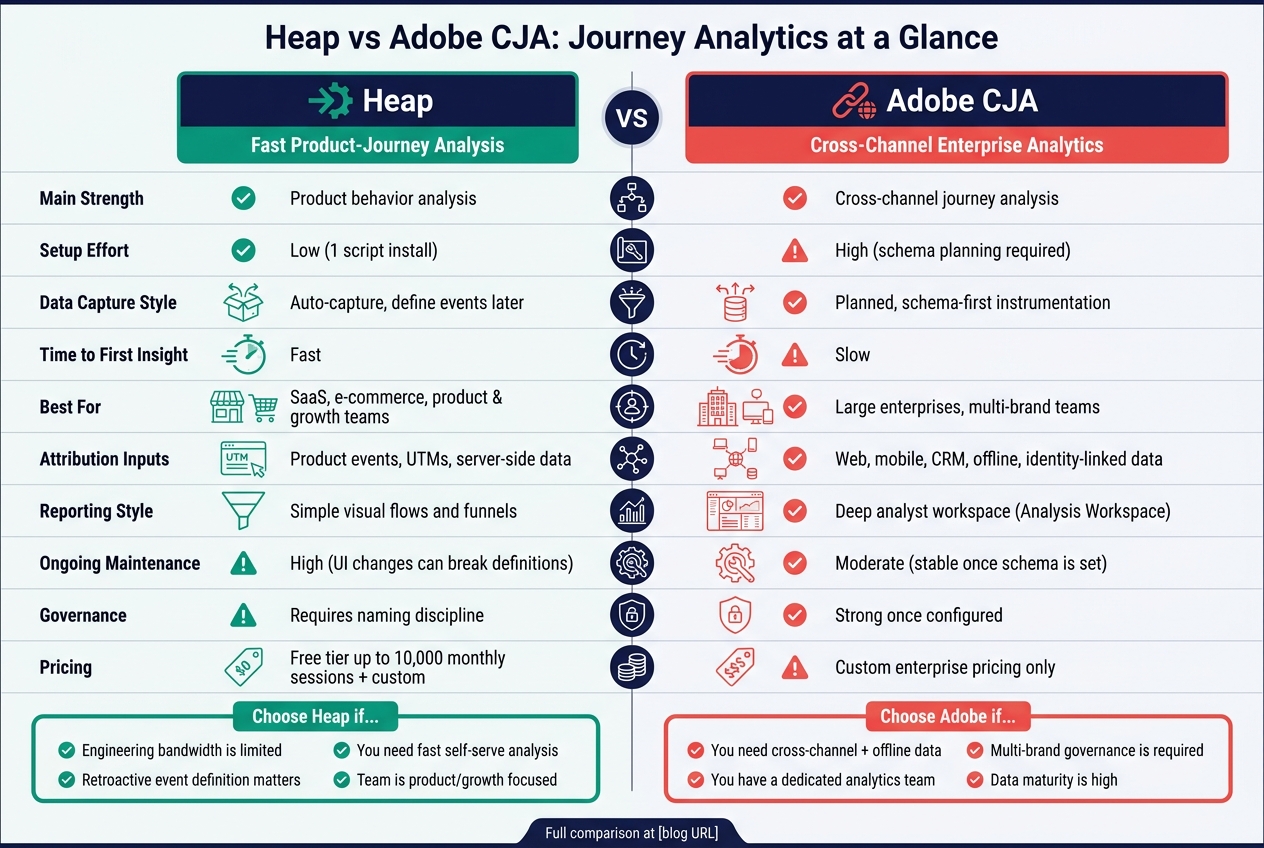
Heap vs Adobe CJA: Journey Analytics Feature Comparison
Best Product Analytics Tools (2026) - My Honest Review
Quick Comparison
| Criteria | Heap | Adobe CJA |
|---|---|---|
| Main strength | Product behavior analysis | Cross-channel journey analysis |
| Setup effort | Low | High |
| Data collection style | Auto-capture with later event setup | Planned schema-first setup |
| Time to first readout | Fast | Slower |
| Best for | Product, growth, SaaS, e-commerce | Large enterprises, multi-brand teams |
| Attribution inputs | Product events, UTMs, server-side data | Web, mobile, CRM, offline, identity-linked data |
| Reporting style | Simple visual flows and funnels | Deep analyst workspace with more controls |
| Main tradeoff | More cleanup and event QA over time | More setup, admin load, and learning curve |
| Pricing | Free tier + custom pricing | Custom enterprise pricing |
My take: choose Heap if your main problem is getting data into the hands of product and growth teams without much engineering help. Choose Adobe if your main problem is keeping journey reporting consistent across many channels, teams, and data sources.
The rest of this comparison breaks down where each tool fits, where each one gets hard to use, and what those tradeoffs look like in practice.
Heap: Fast behavioral journey analysis with auto-capture
Heap is built for speed. With one snippet, it auto-captures clicks, pageviews, and form submissions without manual tagging [4][3]. That changes the workflow from plan every tag up front to capture first, analyze later.
Auto-capture and retroactive event definition
The biggest upside is retroactive analysis. Heap lets analysts define "virtual events" after the fact and apply them to historical data [4][2]. In plain terms, teams can ask new questions without waiting on engineering to add tracking.
There’s a catch. Auto-capture can lead to data bloat and messy naming if teams don’t keep a close handle on governance [2][5]. Selector-based event definitions can also break after front-end refactors [9]. If your product team ships UI changes all the time, you’ll want a QA process around event definitions.
Once that data is flowing, Heap turns it into funnels, journey maps, and conversion analysis.
Journey maps, funnels, and attribution inputs
Heap leans into visual behavioral analysis. Its journey tools include flow diagrams, journey maps, and funnel reporting. It also has an AI-powered feature called Illuminate, which surfaces the interactions that most affect conversion [2][8].
That works well for in-product analysis. But if your team wants deep custom filtering or heavy chart customization, Heap is lighter than specialized BI tools [2][4]. It’s more about getting answers fast than building deeply tailored reports.
For attribution, Heap pulls from digital behavioral events, UTM campaign parameters, and server-side data passed into the platform [3]. It also connects with tools like Marketo and Optimizely so teams can line up in-product behavior with marketing campaigns [2]. Where it falls short is cross-channel and offline journey stitching, where Adobe is stronger [2][6].
Reporting, data controls, and who Heap fits best
Heap’s reporting covers the basics many teams care about most: funnels and journey analysis. For a lot of SaaS and e-commerce teams, that’s enough. The weak spot is dashboard and chart customization, which trails dedicated BI tools [2][4].
Cost can also become an issue as usage grows, so data governance can’t be an afterthought [2][5]. More captured data sounds nice at first, but if no one manages it, the bill and the mess both grow.
Heap fits best for SaaS and e-commerce teams that need fast answers and don’t have much engineering bandwidth. It works well when the tracking plan keeps slipping down the backlog and retroactive analysis matters more than strict governance [9].
The tradeoff is pretty clear: fast behavioral analysis, lighter governance, and less enterprise depth. Teams that need deep cross-channel data, offline integration, or heavily customized reporting will run into limits.
That speed-first model is the clearest contrast with Adobe’s more planned, governance-heavy approach.
sbb-itb-5174ba0
Adobe: Cross-channel journey analytics with enterprise controls
Adobe Customer Journey Analytics (CJA) is built for teams that need governed, cross-channel journey analysis at enterprise scale. It runs on top of Adobe Experience Platform (AEP), which brings together behavioral, transactional, and identity data from web, mobile, and offline sources into one journey graph [10][11]. That shared model gives teams a single view across channels, but it also means more setup work up front. You see that most in capture, pathing, attribution, and governance.
Data ingestion, schema planning, and capture approach
Adobe does not rely on auto-capture. Instead, it uses planned, schema-based ingestion, so teams need to agree on data structures and governance before data collection begins.
That extra work pays off in one main area: cleaner, more consistent data across web, mobile, and offline sources. The downside is the learning curve. Setup is hard, and most teams need dedicated analytics and data engineering support to get it right [10]. If tagging is weak or identity stitching is incomplete, journey analysis gets worse fast [11].
Pathing, data views, and attribution inputs
When the schema is set up well, Adobe CJA can support cross-device pathing and sequence analysis through identity stitching [10][11]. But there’s a catch: this only works well if your identity layer is mature. If your team doesn’t have reliable deterministic identifiers, you won’t get the full payoff from stitching.
Attribution is more flexible than standard UTM reporting. Adobe supports first-touch, last-touch, linear, time-decay, and custom attribution models [10]. That matters when one conversion needs to be read in different ways by different teams. Adobe also gives analysts the ability to adjust data views to correct tracking issues without changing the raw data [10]. For enterprise reporting, that’s a strong control point.
Enterprise reporting, governance, and who Adobe fits best
Once the data model and identity setup are in place, Analysis Workspace becomes the main working area. It uses a drag-and-drop canvas for ad hoc analysis across many dimensions, with role-based access controls and governance settings layered in [10]. Users often like the depth of segmentation and the freedom to dig into the data, though the interface can feel hard to learn at first.
Reviews are strong overall. Users point to enterprise-scale data handling and tight Adobe integration as key pluses, while cost and admin work come up as common complaints [10].
Adobe is a fit for large enterprises, multi-brand teams, and analytics groups that need governed cross-channel analysis and have the staff to handle the overhead [5][1][7]. It tends to be the better option when journey analysis has to include offline data or span multiple digital properties under one governance model.
Next: how Adobe compares with Heap on capture, pathing, attribution, and implementation effort.
Heap vs Adobe: Feature-by-feature comparison
Auto-capture vs planned instrumentation
This is the clearest difference between the two platforms. Heap auto-captures user behavior from a single script and lets teams define events later [2][9]. Adobe uses planned, schema-first data capture before collection starts [12][6]. In plain terms, Heap cuts down the tagging work at the start, while Adobe moves that effort into data model planning.
Heap usually gets teams to a first readout faster. The catch is simple: a bigger stream of captured events needs steady cleanup and tighter naming discipline if you want data people can rely on [5]. Adobe asks for more work up front, but once the schema is in place, the structure tends to stay steady.
| Heap | Adobe CJA | |
|---|---|---|
| Capture model | Auto-capture behavior | Planned instrumentation (schema-first) |
| Event definition timing | Retroactive - define after data is collected | Proactive - define before collection starts |
| Engineering lift at setup | Low; one script installation | High; requires schema planning |
| Risk | Data bloat and definitions that need ongoing maintenance | Data completeness depends on the upfront tracking plan |
Pathing, attribution scope, and reporting depth
After data capture is set, the next gap shows up in how each tool maps user journeys. Heap makes this part easier for product and growth teams. Its visual flow reports help people trace paths without writing queries. That ease comes with a tradeoff: deeper filtering is less flexible than what you'd expect from enterprise platforms [2].
Adobe is the stronger pick for cross-channel attribution. Heap is the stronger pick for product-led behavior analysis [3][4]. That split matters. If your team cares most about how users move through a product, Heap has the simpler path. If you need to tie web, media, and other channels together, Adobe has more range.
For reporting depth, Adobe's Analysis Workspace gives analysts a drag-and-drop setup for deeper analysis, along with tighter governance after setup is done. Heap is easier for non-technical users to pick up [2].
Implementation work and operational tradeoffs
The data capture model shapes the work after launch too. Heap is faster to start, but it asks for more upkeep later. Adobe is slower to set up, but steadier once the schema is locked.
Heap needs regular event maintenance as the product UI changes [5]. If buttons move, labels change, or page structure shifts, definitions may need updates. Adobe puts more weight on the front end. Setup is slower and often needs expert help plus schema planning, but once that structure is set, it tends to support long-term enterprise measurement with less drift.
| Heap | Adobe CJA | |
|---|---|---|
| Time to first insight | Fast | Slow |
| Ongoing maintenance | High; UI changes can break definitions | Moderate; stable once the initial schema is set |
| Analyst self-service | High for product and growth teams | High for experienced analysts; steep learning curve for new users |
| Governance | Requires naming conventions and event ownership discipline | Stronger governance once configured |
Heap lowers startup cost. Adobe lowers inconsistency over time at scale.
Which tool fits your team
The choice is pretty simple: Heap fits teams that want to get moving fast, while Adobe Customer Journey Analytics fits teams that need tighter control across channels and brands.
Choose Heap for speed, product journeys, and leaner implementation
Heap works best when engineering time is limited and tracking plans keep getting pushed back. It fits product managers, growth teams, and marketers who want self-serve analysis without waiting on developer support. Heap has a free tier for up to 10,000 monthly sessions, and paid plans are custom-quoted based on session volume [4].
That makes Heap a good match for teams that want to stand up analysis fast, especially for product flows and user behavior. The catch is straightforward: as usage grows, cost and governance get harder to manage.
That speed-first setup is the clearest difference from Adobe’s more governed, cross-channel approach.
Choose Adobe for cross-channel governance and enterprise scale
Adobe Customer Journey Analytics is built for organizations that need a governed view across web, mobile, CRM, and offline data. It fits multi-brand companies and teams that need standardized reporting at enterprise scale [7].
The tradeoff is heavier setup. Initial implementation usually needs expert help, and the learning curve is steep, especially around eVars and props [7]. Adobe is also a high-cost enterprise platform, so it tends to make sense for organizations with a dedicated analytics team and the budget to support it [7].
In practice, the decision comes down to 3 things:
- Team size
- Data maturity
- Implementation capacity
Final takeaway
Heap wins on speed and self-serve behavioral analysis. Adobe wins on governed cross-channel journey analytics at enterprise scale.
| Heap | Adobe CJA | |
|---|---|---|
| Best fit | Product, growth, and marketing teams | Enterprise analytics and data teams |
| Org size | Mid-market to enterprise | Large enterprise |
| Budget range | Free tier available; custom pricing scales with volume [4] | Premium enterprise; custom pricing [7] |
| Data maturity needed | Low to moderate | High |
| Key strength | Auto-capture and retroactive analysis [9] | Cross-channel governance and granular data [7] |
FAQs
How much engineering support will we need?
Heap cuts upfront engineering work. Its auto-capture model records user interactions retroactively, so teams can start with far less manual tracking.
That said, the work doesn’t disappear. Over time, teams may still need admin oversight to keep event naming in order and clean up messy data.
Adobe Analytics usually asks for more engineering support from the start. Teams often need help with implementation, data pipeline maintenance, and non-Adobe integrations. In many cases, they also need dedicated analyst support to manage a complex, high-volume setup.
Can we switch from product analytics to cross-channel reporting later?
Yes - but only with a plan. As your data needs grow, pick a platform that can handle more data sources and deeper segmentation without forcing a full rebuild.
A lot of teams start with product or web analytics. Then they expand into cross-channel reporting by adding CRM, mobile, and offline data. The best fit is usually a platform with flexible, modular upgrades that match your analytics roadmap as it changes.
What kind of team is needed to manage Adobe CJA well?
Adobe Customer Journey Analytics works best when a dedicated team owns it.
That team should cover implementation, identity resolution, data governance, schema design, data architecture, and privacy compliance. CJA gives you a lot of flexibility, but that flexibility comes with complexity. In practice, teams get the most from it when they have tight instrumentation governance and people who can handle the steep learning curve.