If you only check that your warehouse says "encrypted", you can still miss backups, exports, logs, and vendor syncs. I’d treat this review as a launch gate: map sensitive data, confirm encryption at rest and in transit, review key control, lock down service accounts, and check every copy made outside the warehouse.
Here’s the short version:
- Map the data first - PII, customer IDs, pipeline records, product usage, billing data, and revenue metrics all need clear scope.
- Check more than the warehouse itself - staging buckets, snapshots, clones, temp tables, exports, replicas, and logs often get missed.
- Verify transport paths - BI tools, ETL jobs, SQL clients, JDBC/ODBC connections, APIs, and reverse ETL flows should all require TLS 1.2+.
- Review key control - document who owns keys, where they live, how they rotate, and who can revoke or recover them.
- Limit machine access - each service account should have a narrow role, its own secret, and fixed rotation.
- Inspect downstream copies - backups, unload files, query history, audit logs, and vendor platforms can hold the same sensitive data as production tables.
- Get proof before go-live - screenshots, policy exports, KMS logs, access records, and vendor security documents should back every claim.
A simple way to think about it: if data can be stored, moved, logged, or exported, it needs an encryption check.
For BI and RevOps teams, the review usually comes down to 6 areas:
| Area | What I’d verify |
|---|---|
| Stored data | Tables, schemas, buckets, backups, snapshots, replicas |
| Data in transit | TLS on every connection path |
| Keys | Type, owner, rotation, revoke and recovery process |
| Service accounts | Least-privilege roles, secret storage, rotation |
| Logs | Query text, audit logs, ETL logs, retention, redaction |
| Vendors | Encryption, access limits, subprocessors, reports |
Bottom line: before launch, I’d want a named owner and a clear pass-or-block decision for each control area. That cuts down drift, weak setup, and missed copies of sensitive data.
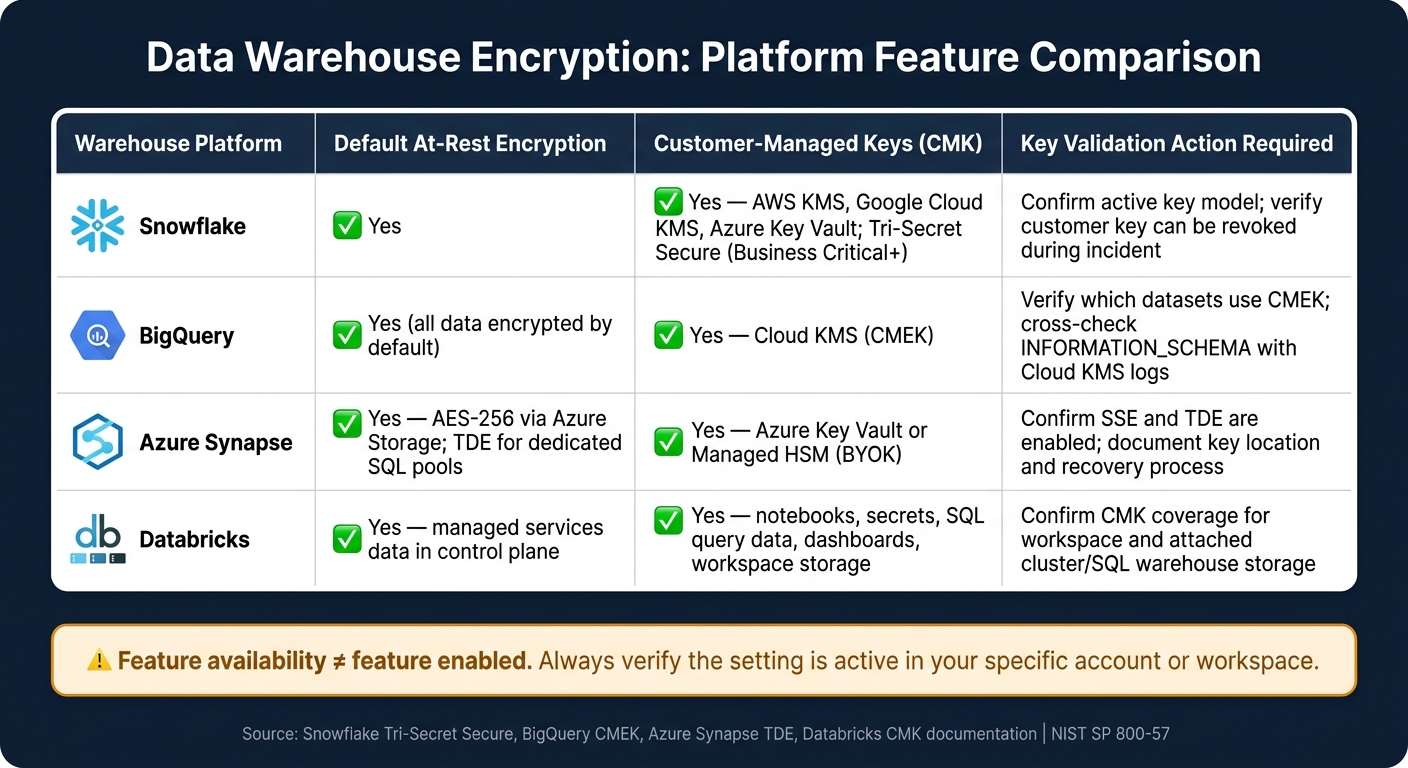
Data Warehouse Encryption Checklist: Key Controls by Platform
Episode 36 - Encrypt sensitive data in cloud platforms with sane defaults and verified outcomes
sbb-itb-5174ba0
1. Map Sensitive Data And Encryption Scope
You can't encrypt data you haven't found. Start with a plain inventory: what sensitive data you have, where it sits, and how it moves. Then match each data class to the right control.
List Sensitive Data Domains In BI And RevOps
Group sensitive data by how the team works day to day. For most U.S.-based BI and RevOps teams, that means 7 core areas: account and contact identity, lifecycle records, billing hierarchies, pipeline data, attribution data, product usage events, and financial metrics.
Use tighter controls where data is directly identifiable or carries high risk. Column-level encryption, dynamic data masking, and tokenization matter most for direct identifiers such as email addresses, phone numbers, Social Security Numbers in U.S. HR or finance feeds, credit card numbers, and bank account details. Pipeline amounts in USD are confidential, so limit access and log exports. If usage events can be tied back to a person, mask or tokenize them before broad dashboard access.
Document Where Data Lives And Moves
Build a simple inventory with these columns: Location, Type, Storage State, Data Class, Encryption Status, and Owner.
Cover each layer:
- Warehouse schemas and tables
- Staging buckets such as S3 or GCS
- ETL/ELT pipelines such as Fivetran or dbt runs
- BI tools and dashboards
- Data science notebooks and sandbox environments
- Scheduled exports or email reports
Pay close attention to less obvious locations like query history, logs, error tables, temp tables, and shared-drive exports. These places often hold unmasked copies of sensitive data, and teams miss them all the time.
Use the inventory to decide which datasets need default encryption, masking, tokenization, or tighter access.
Also flag integrations with outside marketing and analytics tools. If data is pushed to or pulled from attribution platforms or campaign tools, check whether the sync includes raw PII or detailed revenue figures. Then confirm encryption and access controls on the vendor side before you treat those connections as safe.
Assign Data Classes And Required Controls
Apply a 4-level classification model to each dataset and key column in the inventory: Public, Internal, Confidential, and Restricted. Then map each class to a set of controls.
| Classification | Example Data | Minimum Controls |
|---|---|---|
| Public | Top website analytics tools for high-level traffic trends | Default platform encryption; broad BI access |
| Internal | Total leads per month, generic funnel rates | Encryption at rest and in transit; standard role-based access |
| Confidential | Pipeline amounts in USD, account-level ARR, internal forecasts | Strong encryption; named-role access; logged exports |
| Restricted | Emails, phone numbers, SSNs, credit card numbers, bank account details, user-level event data | Column-level encryption or tokenization; strict approvals; limited or prohibited exports |
Push these labels through ETL, derived tables, and BI views. If lineage labels stop at the source, the classification model breaks down fast. Once classes are in place, you can map them to warehouse-wide and column-level encryption settings.
2. Verify Core Encryption And Key Management Settings
Start by checking the settings with engineering or security. Don’t assume the platform default matches your setup. Then make sure every storage layer and every connection path fits that same scope.
Confirm Encryption At Rest And In Transit
Review each item in your inventory - tables, staging buckets, exports, replicas, and logs - and confirm encryption is in place. Snapshots, clones, exported files, replicas, transient staging storage, backups, and object storage used for unloads and sharing need their own check because they may not inherit encryption on their own.
For data in transit, check every connection path. That includes BI tools, SQL clients, JDBC/ODBC drivers, API calls, ETL/ELT jobs, and reverse ETL pipelines. All of them should require TLS 1.2 or higher, with no fallback to older protocols. Run a simple test: try a connection with encryption turned off and make sure it fails. If it connects anyway, you’ve found a gap.
Ask for proof, not just a verbal yes:
- Configuration screenshots or policy exports that show encryption status for each storage class and network path
- A list of endpoints that can connect only over encrypted channels
After storage and transport, look at who controls the keys and how recovery works.
Review Customer-Managed Keys And Key Storage
If a warehouse uses provider-managed keys, the vendor controls them. For each environment, document key type, key owner, storage location, rotation schedule, access policy, and recovery procedure. Then confirm who can rotate, revoke, and recover keys - and whether those roles are separate from warehouse admins and data model owners.
Snowflake's Tri-Secret Secure model requires three keys - one from the customer, one from Snowflake, and one from the cloud provider - before data can be decrypted.[13][3][14] Disabling the customer key stops Snowflake from decrypting data and halts queries.[12][15] BigQuery's CMEK implementation works through Cloud KMS, where an AES-256 key hierarchy protects user data.[1]
NIST SP 800-57 warns that weak key management can undercut strong cryptography, even when AES-256 and TLS are set up correctly.[4][5] Key admins and data admins should have different roles and different approval flows, so one compromised account can’t both reach encrypted data and turn off the protection around it.
Next, compare how each warehouse handles these controls in practice.
Compare Encryption Features Across Major Warehouses
Use the table below to check what turns on by default and what needs manual setup in your environment.
| Warehouse | Default At-Rest Encryption | Customer-Managed Keys | Validation Check |
|---|---|---|---|
| Snowflake | Yes | Yes, via AWS KMS, Google Cloud KMS, or Azure Key Vault; Tri-Secret Secure is available for Business Critical and above.[13][3][14] | Confirm which key model is active and whether the customer key can be revoked during an incident.[12][15] |
| BigQuery | Yes, all data at rest is encrypted by default | Yes, via Cloud KMS (CMEK).[1] | Verify which datasets use CMEK and cross-check encryption metadata in INFORMATION_SCHEMA with Cloud KMS logs.[16] |
| Azure Synapse | Yes, using AES-256 in Azure Storage; dedicated SQL pools also support TDE.[6][7] | Yes, via Azure Key Vault or Managed HSM (BYOK).[6][7] | Confirm storage SSE and TDE are enabled and document the key location and recovery process.[6][7] |
| Databricks | Yes, for managed services data in the control plane.[8][10] | Yes, for notebooks, secrets, SQL query data, dashboards, and workspace storage.[9][11] | Confirm CMK coverage for the workspace and attached storage used by clusters and SQL warehouses.[9][11] |
Don’t stop at feature availability. Verify the setting is on in your account or workspace. A control matrix helps here: map each requirement to the actual setting and the person who owns it.
3. Lock Down Service Accounts, Backups, And Query Logs
Encrypted data is still at risk if service accounts, backups, and logs stay loose. Start with the identities that move data. Then check the copies and records they create.
Restrict Service Accounts And Secrets
BI and RevOps teams often depend on non-human identities for ETL, BI, reverse ETL, and workflow automation. Each service account has warehouse access. Each one should have its own scoped role, not a shared high-permission account.
Export the current user and role list from your warehouse access control system. For each service account, record:
- owner
- purpose
- scope
- auth method
- secret location
Then apply least-privilege access. A reverse ETL tool that reads modeled customer segments should get SELECT access on a curated mart schema only - not raw events or payments tables. In BigQuery, assign roles/bigquery.dataViewer at the dataset level, not the project level.
Passwords, tokens, and connection strings should not sit in config files. Move them into a secrets manager such as AWS Secrets Manager, Azure Key Vault, Google Secret Manager, or HashiCorp Vault. Set tools to read credentials at runtime, rotate them on a fixed schedule, and treat any credential shared across multiple integrations as a remediation priority.
Encrypt Backups, Snapshots, Exports, And Replicas
Once service accounts are locked down, check every external copy they can create or reach.
For each backup or export stored outside the warehouse, verify server-side encryption, restricted IAM, and no public access. If a dataset is highly sensitive, apply client-side encryption before the file lands in object storage. Any export sent to object storage or a third-party tool should meet the same encryption and access rules as the warehouse.
Cross-region replicas need the same review. Confirm replication traffic is encrypted in transit, target regions meet your data residency rules, and replicas inherit the same IAM and key controls as production.
Test restores in non-production. Then confirm encryption, access controls, and role restrictions survive recovery. Document the date, environment, responsible owner, and outcome.
Secure Query History, Audit Logs, And Monitoring Logs
Logs can leak the same data you just worked to protect, so check them with the same care.
Query history can expose sensitive data when SQL text includes literal email addresses, customer IDs, or order totals in WHERE clauses. BI tools may log full query text and filter values. ETL tools sometimes capture sample records from source systems.
Encrypt audit logs at rest and limit access to security and platform engineering roles. Review logs and roles for access drift during scheduled audits. Enable cloud audit logs, export them to centralized logging, and review them for anomalies and access drift. Set retention by log type and compliance need. Shorten or pseudonymize logs that contain identifiers. Redact PII, credentials, and sensitive values before logs are written to storage.
Once internal copies and logs are under control, check that connected vendors follow the same standards.
4. Review Vendor Controls And Final Pre-Launch Sign-Off
After you lock down warehouse keys, service accounts, and logs, check every connected vendor against the same encryption bar. If a vendor stores, processes, or logs your data, it sits inside your encryption boundary and needs to meet the same control standard.
Check Encryption Controls In Connected Vendors
Start with the data map. Use it to confirm which vendors store, process, or log in-scope data. Then verify that each one uses encryption at rest with AES-256 and encryption in transit with TLS 1.2+ or 1.3. That check should cover more than the main product layer. Review caches, debug logs, exports, and staging layers too.[2][19][20]
SOC 2 alone is not enough. Ask for a current SOC 2 Type II report, an ISO 27001 scope statement or certificate that covers your data, and the vendor’s subprocessor list.[17][18][21] If the vendor can’t provide recent evidence, treat that as a pre-launch blocker.
Credential handling needs the same level of scrutiny. Vendor service accounts should follow least privilege, stay unique by environment, and live in a secrets manager - not in spreadsheets, code, or notes inside the vendor UI.[2]
If you're reviewing new analytics or BI vendors during this process, the Marketing Analytics Tools Directory is a practical place to research connected analytics, BI, and attribution vendors before integration.
Build A Go-Live And Review Sign-Off Sheet
Use the sign-off sheet as the final launch gate, not paperwork added after approval. It should list each major control area, the named approver, current status, and the go-live decision. Include any vendor-connected copies or logs that may hold raw data, identifiers, or secrets, along with access limits and retention limits.
| Control Area | Owner | Status | Decision |
|---|---|---|---|
| Sensitive data map complete | Data Engineering | ✅ / ❌ | Approved / Blocked |
| Encryption at rest and in transit | Security | ✅ / ❌ | Approved / Blocked |
| Key storage and rotation documented | Platform Engineering | ✅ / ❌ | Approved / Blocked |
| Service accounts scoped and rotated | Data Engineering | ✅ / ❌ | Approved / Blocked |
| Backups, snapshots, exports, and replicas encrypted | Security | ✅ / ❌ | Approved / Blocked |
| Query and audit logs reviewed | Security / BI Lead | ✅ / ❌ | Approved / Blocked |
| Vendor security evidence on file | RevOps / BI Lead | ✅ / ❌ | Approved / Blocked |
Every open risk needs an owner and a due date. Keep the decision field explicit: approved, approved with conditions, or blocked pending remediation. That removes gray areas and gives you a clean audit trail when revenue reporting depends on the warehouse going live.[22][23][24]
This review also needs to continue after launch. Recheck vendor controls at least quarterly for critical systems. Run another review any time a vendor changes subprocessors, retention terms, or its encryption architecture.[2]
Conclusion: Encryption Checks BI Teams Should Never Skip
Map data, verify encryption, secure keys and accounts, protect copies and logs, and review vendors before launch. Use the sign-off sheet as the launch gate, then revisit it on a fixed cadence tied to vendor renewals and access reviews.
FAQs
What data gets missed most often?
Teams most often miss third-party tools. A lot of organizations don't have a full inventory of the services they use. That gap leads to Shadow IT - apps that are unapproved, forgotten, or still connected long after anyone stopped thinking about them. The risk is simple: those tools may still have access to sensitive company data.
Teams also miss inconsistent business metrics across tools. One platform may define a metric one way, while another uses a different rule, and the mismatch slips through. Misconfigurations are another common problem, especially weak access controls and poor encryption settings.
Do default warehouse settings cover backups and exports?
No. Don’t assume default warehouse settings cover backups and exports. Some platforms include basic support, but you still need to check and set up these processes so they meet security and compliance needs.
Make sure backups use AES-256 encryption. Also confirm that export handling can support regulatory requests - such as data portability or deletion - within the required timeframes.
Who should own encryption sign-off before launch?
No single role owns this by default. Put ownership with the team that already handles data governance, security policy, and compliance.
For BI and RevOps teams, sign-off should come from the people reviewing encryption standards, key management, and access controls. That keeps production launch in line with rules such as GDPR and CCPA.