API key storage is simple to judge: if a key lives in code, chat, tickets, or logs, I treat that as a problem that needs to be fixed. The article’s bottom line is clear - I should first list every secret, then move production keys into a secret manager or vault, fetch them only at run time, lock access by role and environment, rotate them on a schedule, and keep audit logs in a place an attacker cannot change.
A few facts make the risk hard to ignore. In 2024, scans found 39 million exposed secrets in public GitHub repos, and 96% of those tokens had write access. In many data stacks, one app may rely on up to 15 credentials before it even reaches production. That is why I would not treat API keys as a side issue in Airflow, dbt, Kubernetes, ETL tools, or marketing connectors.
If I had to boil the article down to a short checklist, it would be this:
- List every secret across ETL, analytics, CI/CD, and marketing systems
- Assign ownership to roles or groups, not single employees
- Use scanners like Gitleaks or GitGuardian to find hardcoded keys
- Match storage to risk - env vars for low-risk non-prod use, platform secrets for built-in workflows, vaults for production
- Inject secrets at run time instead of storing them in code or config files
- Use identity-based access such as IAM roles, managed identities, or service accounts
- Separate dev, staging, and prod
- Automate rotation so jobs and connectors do not fail when keys change
- Log every secret access for audits and incident review
- Check secret handling when picking tools, especially for marketing analytics stacks
A small comparison helps frame the article’s main storage choices:
| Storage option | Best fit | Main issue |
|---|---|---|
| Environment variables | Low-risk or non-prod jobs | Can leak through process data or crash output |
| Platform-managed secrets | Teams using built-in platform features | Tied to that platform’s limits |
| Central secret manager or vault | Production and regulated workloads | More setup and admin work |
My takeaway: the minimum bar is not “don’t hardcode keys.” It is inventory, central storage, run-time injection, least-privilege access, rotation, and audit logging across the whole pipeline.
API Key Security Best Practices
sbb-itb-5174ba0
Step 1: Inventory every secret and pick a storage model
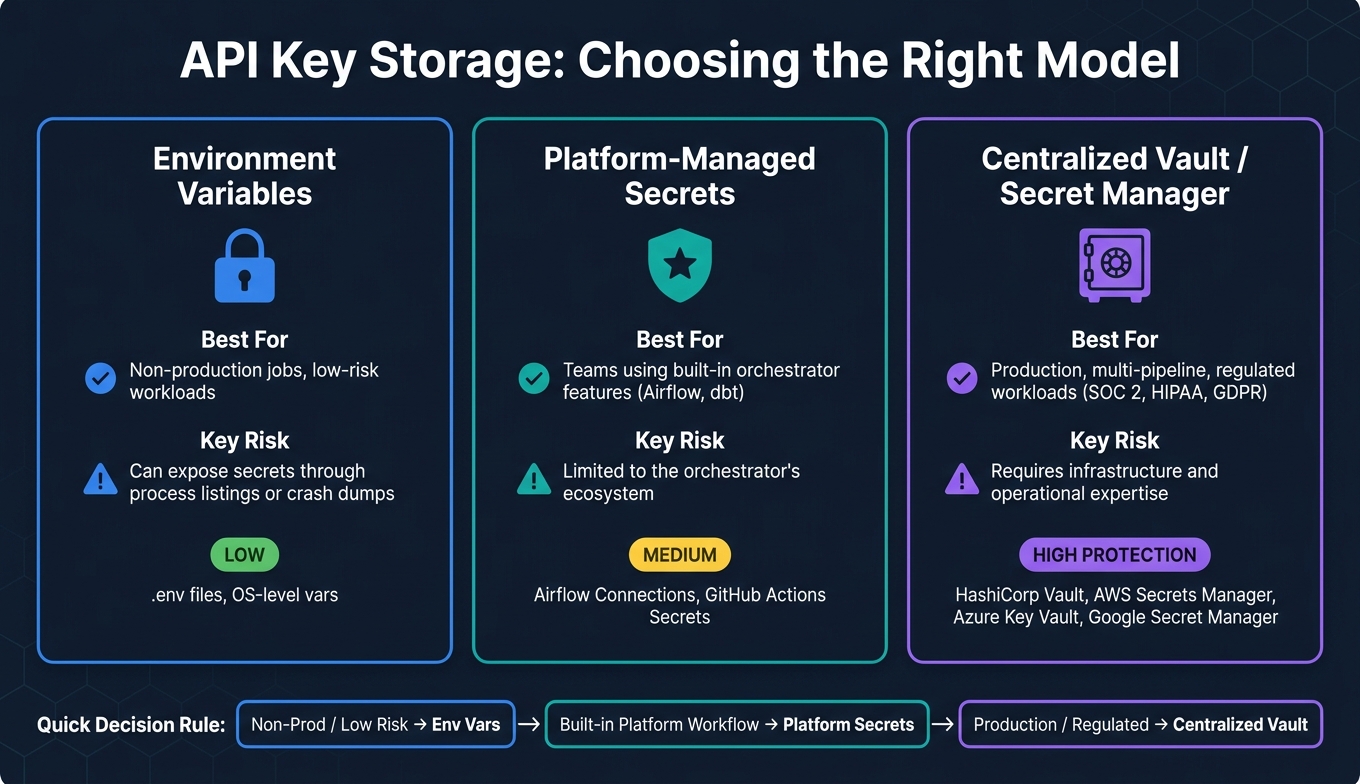
API Key Storage Options: Environment Variables vs. Platform Secrets vs. Vaults
Start by listing every secret. Then decide where each one should live. In most data stacks, credentials end up scattered across build servers, scripts, monitoring tools, and microservices. If you skip the inventory step, storage choices turn into guesswork.
Build a secret inventory across ETL, analytics, and marketing systems
A secret inventory is a record of every credential used by each pipeline. For each item, note the system name such as Salesforce, the owner like Engineering or Marketing, the environment such as Dev, Staging, or Prod, the scope like read-only or admin, the last rotation date, where it is used, and the business impact - including whether it touches revenue systems or PII [3][8].
Assign ownership to IAM roles or Active Directory groups, not individual people [5]. That cuts the risk of orphaned credentials when someone leaves. In a data mesh setup, each data product team owns its own secrets, while a federated governance team sets the security rules used across teams [9].
Don’t build this list from memory. Use automated scanners such as Gitleaks, Talisman, or GitGuardian to scan repo history and flag hardcoded secrets [3].
Once the inventory is done, match each secret to a storage model based on sensitivity and how the pipeline uses it at runtime.
Choose between environment variables, platform secrets, and centralized vaults
You have 3 main storage options. Pick based on runtime needs and risk.
Environment variables are better than hardcoding, but they can still leak through process listings or crash dumps [1][7].
Platform-managed secrets sit a step above environment variables. They give teams more control by using built-in orchestrator secret features, without the work of running a separate vault.
Centralized secret managers - AWS Secrets Manager, HashiCorp Vault, Azure Key Vault, and Google Secret Manager - fit production and regulated workloads, especially when many pipelines share credentials [3][7]. They give you a single approved store, support automatic rotation, and log access events. The tradeoff is overhead. HashiCorp Vault, for example, needs its own infrastructure and people who know how to run it well.
| Storage Model | Best For | Key Risk |
|---|---|---|
| Environment variables | Non-production jobs | Can expose secrets through process listings or crash dumps |
| Platform-managed secrets | Teams using built-in platform secrets | Limited to the orchestrator's ecosystem |
| Centralized vault | Production, multi-pipeline, regulated workloads | Requires infrastructure and operational expertise |
Use the inventory to place each key in the right tier: env vars for low-risk jobs, platform secrets for controlled workflows, and vaults for production. The next step is to store each secret where pipelines can fetch it at runtime without exposing it in code or config.
Step 2: Store API keys in vaults, secret managers, and inject them at runtime
After you inventory each secret, move it into a runtime-only store. Keep keys out of code, and inject them only when the job runs.
Use centralized secret managers for production pipelines
For production, use a central secret store such as HashiCorp Vault, AWS Secrets Manager, Azure Key Vault, or Google Secret Manager. These tools encrypt secrets at rest and gate access with IAM or RBAC, so a pipeline pulls only the key it needs [3][10]. AWS, Azure, and Google also support native identity-based retrieval from their secret stores, which means you don't have to bake credentials into code or config.
HashiCorp Vault adds another option: dynamic secrets. Instead of keeping a static API key around, Vault creates a short-lived credential when the pipeline asks for it, passes it to the job, and revokes it when the TTL runs out [7][4]. That's a plain win when something leaks, because the exposure window is much smaller. The downside is the ops load. A self-hosted Vault setup needs its own infrastructure and people who know how to keep it running.
Across tools, the pattern stays the same:
- authenticate
- fetch
- inject
- exit
That runtime-only setup also makes access control, rotation, and audit logging easier in the next step.
Connect secret stores to Airflow, Kubernetes, and ETL platforms

The rule is simple: fetch the secret right before execution, whether the runner is Kubernetes or a managed ETL platform. You can also explore top analytics tools and resources to find platforms that integrate with these secure workflows.
In Kubernetes, use the Vault Agent or cert-manager with ServiceAccount-based authentication to inject secrets into pods as volumes. Native Kubernetes Secrets are not encrypted by default, so identity-based retrieval from a vault is the stronger production pattern [4][7].
For cloud-managed ETL services such as AWS Glue or Azure Data Factory, use the platform's native identity - an IAM role for Glue, or a Managed Identity for Data Factory - to authenticate straight to the secret store. The platform proves who it is and pulls the secret directly [10][6].
Once storage is in place, the next control points are access scope, rotation, and audit trails.
Step 3: Control access, rotate keys, and log usage
Fetching secrets at runtime is a good start, but it doesn't solve the whole problem. You still need tight access control, clean rotation, and logs you can trust. That's what keeps keys from turning into a weak spot.
Apply least privilege and separate access by role and environment
Start with least privilege. Each job should get only the secret it needs, nothing more. Use your inventory to tie every secret to an owner, environment, and permission scope.
Keep dev, staging, and prod apart with different vaults, namespaces, or accounts. That way, a mistake in one environment doesn't spill into another. Use identity-based access - IAM roles, managed identities, or service accounts - so pipelines can authenticate without hardcoded master keys.
For ETL jobs, Vault AppRole can issue a token from a RoleID and SecretID. The safer move is to issue credentials just in time for the job or pod that needs them.
Once access is scoped, rotation usually becomes the next place things go wrong.
Rotate keys without breaking scheduled jobs and connectors
Manual rotation is where pipelines often break. One credential changes, a downstream service doesn't get the update, and then scheduled jobs and connectors start failing at the worst time.
Automate the full path: issue, store, test, rotate, and revoke. Also make sure you have a refresh process in place, so scheduled jobs can pick up new credentials without a restart.
Use audit logs to support compliance and investigations
When access and rotation are under control, logs become your evidence trail. Log each access with the identity, timestamp, secret, action, and source IP or system. Those records show who used which key, when, and from where.
That matters for SOC 2, ISO 27001, HIPAA, and GDPR reviews. It also helps during incident response because you can see the blast radius of a compromised key - which jobs used it and which data flows it touched.
Send logs to a restricted security project, so a compromised account can't tamper with the evidence. Those same logs also help with offboarding or vendor changes, since you can use them to revoke service accounts and tokens fast.
Apply the framework to marketing analytics pipelines
Secure common marketing data flows from ad platforms to the warehouse
Marketing pipelines move secrets through ad connectors, CRM syncs, warehouse loaders, and reporting jobs. If a marketing API key leaks, it can expose campaigns, CRM records, and warehouse data. This is a revenue risk, not only a security problem.
In a marketing stack, the setup should be simple: extract in one layer, transform in another, and keep secrets out of both. Store ad, CRM, and warehouse credentials in a vault, then inject them only at runtime. Use an ingestion tool like Airbyte to pull data into a staging area, and keep dbt free of credentials. If your team runs dozens of marketing integrations, an API proxy can centralize authentication for downstream providers [2].
Give dashboard keys read-only access and limit them to the exact endpoints they query. If a key gets compromised, it should not be able to change campaign settings or reach CRM records.
Use tool evaluation criteria that include secret handling
Check secret handling before anything else. When you compare tools, start there. Before you commit to a connector or ETL platform, verify that it integrates natively with your vault, supports runtime secret injection, and produces audit logs that ordinary users cannot alter.
Use the Marketing Analytics Tools Directory to compare RBAC, vault integration, and audit logging before choosing a tool.
Conclusion: the minimum secure standard for API keys in data pipelines
Start with your secret inventory. Find every hardcoded credential across your ETL jobs and marketing connectors, move the highest-risk ones into a vault first, and confirm your audit logs are flowing to a location that a compromised account cannot reach or modify.
FAQs
When should I use a vault instead of environment variables?
Use a vault when you need centralized secret storage, strict access controls, audit logs for each retrieval, and automated rotation or expiration.
Environment variables can be exposed, and they don’t give you the same lifecycle management. For ETL jobs, connectors, and sync tools, fetch API keys and OAuth or database credentials at runtime through a secrets manager instead of storing them in job config or in environment variables that others can access.
How can I rotate API keys without breaking pipelines?
Put secrets in a central secrets manager. Then have each pipeline fetch them at runtime instead of storing them in hardcoded config.
Set up key rotation with a grace period. That gives your systems time to pick up the new keys before you revoke the old ones. During that window, both keys stay valid, which cuts the risk of failed jobs during rollout.
Add a refresh path so running jobs can load updated secrets without restarts. That matters in long-running workflows, where a stale key can break work halfway through.
Keep least-privilege access in place so each job can read only the secrets it needs. Also keep audit logs for secret retrieval, so you can trace who accessed what and when.
What should a secret inventory include?
A secret inventory should list every sensitive credential in one place. That includes API keys, database passwords, access tokens, SSH keys, certificates, and encryption keys.
It should also show how each secret is used, flag any security gaps or hardcoded credentials, define the secret type, and map each one to the right owners and workloads. That gives teams a clear base for governance, rotation schedules, and audit trails.