Here’s the short answer: an event schema tells your team what data must exist, and a data layer is where the site or app passes that data at runtime. If you mix them up, you risk broken attribution, bad dashboards, and revenue reports that do not match actual sales.
I’d boil it down to this:
- Schema = rules
- Data layer = live values
- Mapping = translation
- Governance = change control
If order_total is required in the schema but your data layer sends purchase_value instead, reporting can fail even when orders still come in. That is how teams end up with $0 revenue in a dashboard while the business is still selling.
For marketers, the practical test is simple:
you need both the contract and the implementation. One keeps naming and types stable. The other feeds tools like GTM, analytics tools, ad platforms, and BI systems.
Quick comparison
| Criteria | Event Schema | Data Layer |
|---|---|---|
| Main job | Defines tracking rules | Sends data from the site or app |
| What it includes | Event names, fields, types, required values | Page, user, product, and transaction values |
| Main owner | Analytics, BI, data teams | Developers, tag management teams |
| If it breaks | Metrics lose meaning | Tags fire with missing or wrong values |
| Why it matters | Keeps reporting consistent | Keeps collection working |
In my view, the cleanest way to think about this is: the schema is the source of truth, the data layer is the delivery method, and governance keeps them in sync.
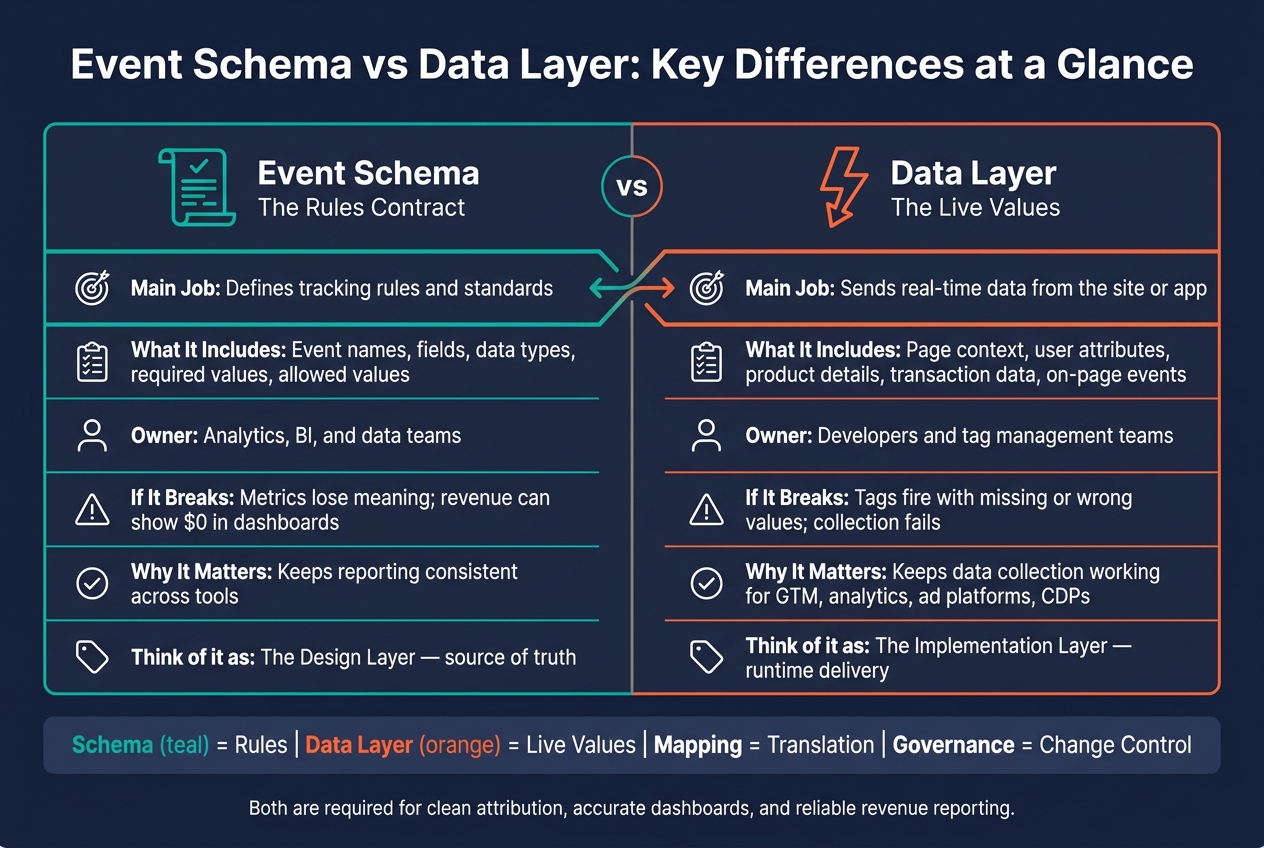
Event Schema vs Data Layer: Key Differences at a Glance
Event schema: the contract for clean measurement
An event schema is the rulebook for tracking. It defines the events, fields, and data types your team will collect. You’ll usually keep it in documentation, a tracking plan, or a schema registry - one shared standard for analysts and developers. That structure becomes the source of truth for downstream mapping and BI models.
What an event schema includes
For each event, a schema defines 5 things: the event name, the property keys, the data types, whether each field is required or optional, and the allowed values. Here’s how that looks in practice:
| Schema Element | Description | Example |
|---|---|---|
| Event Name | The action being tracked | order_completed |
| Property Key | The specific attribute name | revenue, currency, user_id |
| Data Type | The format of the value | Integer, String, ISO 8601 timestamp |
| Requirement | Whether the field must be present | Required vs. Optional |
| Allowed Values | Specific set of accepted inputs | Allowed values, such as USD, EUR, and GBP |
These definitions help raw event data land cleanly in warehouse tables and BI models. Use one verb-object naming pattern, like order_completed, so reporting stays consistent. Once names start drifting, funnel reports get hard to trust.
Why schemas improve downstream analysis
A stable schema stops bad data before it spreads. If a developer changes a property from purchase_value to order_total without updating the schema, revenue can fall to zero in dashboards even while transactions keep flowing [2]. No alert may fire. The issue can sit there until someone notices the numbers no longer reconcile.
Validation at ingestion catches type mismatches and missing fields before data reaches your warehouse or BI models [2]. The schema defines the target. The data layer has to send values that match it.
Who owns schema decisions
Schema ownership is a governance issue. Analytics leads, data engineers, BI stakeholders, and business owners all need input [2][3]. The analytics team usually sets naming rules and data types. Business owners decide what needs to be measured. BI stakeholders check that the schema supports the metrics behind attribution, dashboards, and data quality KPIs.
Handle schema changes the same way you handle code changes: require review and approval before release. Every schema change should be approved before it goes live. When you treat the schema as a versioned asset with a documented change history, implementation stays aligned as tracking changes - and the data layer has a clear spec to work from.
sbb-itb-5174ba0
Data layer: the runtime source for tags and tools
A data layer is a JavaScript object on a page or in an app that holds current tracking values. It carries the data itself, not the measurement rules. In plain terms, it is the runtime input that tag managers, analytics tools, and CDPs read from.
What a data layer carries in practice
At any point, a data layer may store a user's login status, subscription plan, the SKU of the product they are viewing, and the order total when a purchase happens. A lead form submission might push a lead_type value such as "demo_request" or "free_trial". These key-value pairs feed ad platforms, analytics tools, and CDPs downstream. After collection, the same values also flow into warehouse tables and BI models.
| Data Category | Example Values | Purpose |
|---|---|---|
| Page Context | Page category, environment (staging/prod) | Segments content for behavioral analysis |
| User Attributes | User ID, subscription plan, login status | Enables audience segmentation and cross-device tracking |
| Product Details | SKU, product name, category, brand | Tracks inventory interest and performance |
| Transaction Data | Order total ($USD), tax, shipping, order ID | Feeds ROI calculations and Smart Bidding |
| On-Page Events | Purchase, add to cart, form submission | Triggers conversion tags and ad signals |
Those values are the inputs downstream tools read and use.
How tag managers and destinations use it
Once values are in the data layer, tag managers such as Google Tag Manager can read them and decide which tags should fire. Analytics platforms record the structured data, ad platforms receive conversion signals, and CDPs log the user action.
The main win is simple: write once, send to many places. Developers write to the data layer one time, then marketers and analysts decide in the UI what to do with those values. That cuts out a code release every time a new tool needs the same data.
Why data layers reduce duplicated tracking work
A shared data layer cuts duplicate tracking work. Without one, each tool often tries to read data straight from the page by scraping HTML, watching CSS selectors, or depending on hardcoded scripts. That works until the UI changes. Rename a button, move an element, or redo the checkout flow, and tracking can fail in ways that are easy to miss.
A shared data layer reduces that drift by separating tracking from the UI [1][4]. It also lets teams add new tools without rebuilding the same tracking logic for each destination.
Schema rules then determine whether those values are valid downstream.
Event schema vs data layer: key differences and how they work together
The key difference is simple: the schema sets the rules, while the data layer passes the live values. That distinction starts to matter fast once raw events need to flow cleanly into BI models, dashboards, warehouses, and ad platforms. The schema defines field names, data types, and required values that downstream systems check against. The data layer exposes the runtime values that tags and tools can read.
| Dimension | Event Schema | Data Layer |
|---|---|---|
| Purpose | Defines the data contract and standards | Handles real-time collection and delivery |
| Ownership | Analytics and data teams | Developers and tag management teams |
| Change Impact | Affects metric definitions and BI consistency | Affects tag firing and whether required fields are present |
Design layer vs implementation layer
Think of the schema as the design layer. It sets the field names, types, and required values that downstream systems validate against. It answers questions like: Is user_id required on every event? What data type does order_total expect? Analytics and data teams usually own this work.
The data layer is the implementation layer. It exposes the values available at runtime. Developers write to it, and tag managers plus website analytics tools read from it. That setup lets one source feed many destinations without rebuilding tracking for each tool. In plain terms, the schema says what data should look like, and the data layer supplies what the site or app is producing at that moment.
That split helps keep measurement stable even when the product changes. A page redesign, checkout update, or app release may change how data gets produced, but the reporting logic can stay steady if the schema remains intact.
How changes affect measurement and collection
This shows up most clearly when data reaches reporting and BI. If the schema changes and the implementation does not, downstream systems may stop recognizing a field at all. The result can be ugly: revenue may look like it dropped to $0 in reports even though transactions are still happening [2].
A data layer failure causes a different kind of problem. If a key stops populating after a site update, tags may still fire but send incomplete payloads. That breaks the mapping rules BI models rely on for clean, cross-tool reporting [4].
Put another way, schema issues tend to break meaning, while data layer issues tend to break collection. Both can distort reporting, just in different ways.
When a business needs both
Most marketing stacks need both. The data layer collects the values, and the schema standardizes them for mapping, BI, and governance. One without the other is where teams get into trouble. A clean data layer with no clear schema leads to messy reporting. A clean schema with weak implementation turns into rules on paper that production data never meets.
When the two stay aligned, downstream mapping, validation, and BI are much more dependable.
Downstream mapping, BI models, and data quality governance
From raw values to standardized event properties
Raw fields in the data layer usually do not match what BI models, CDPs, or attribution platforms expect. Mapping logic fixes that gap.
For example, purchase_value might need to map to order_total before BI, a CDP, or attribution tools can use it. If that mapping is documented and version-controlled, adding a new destination is mostly a configuration job, not a full re-instrumentation project.
Once those mappings are set, the next issue is drift between the schema and the values that are actually coming through.
Validation, monitoring, and ownership
Mapping only holds up if schema changes are controlled. Schema drift is a governance issue. Version control, review, and sign-off keep definitions stable before release.
A failed schema check should block a release, not sit there as a warning. Automated monitoring can catch renamed properties or changed parameter types before they distort reporting [2]. Some platforms validate at collection, while others validate downstream. That changes how fast bad data gets blocked.
Tools and services teams may evaluate
Once the governance model is clear, tool selection gets simpler. Teams reviewing analytics platforms, CDPs, attribution tools, or implementation support can use the Marketing Analytics Tools Directory to compare options by use case.
Conclusion
The schema sets the contract. The data layer provides the values. Governance keeps both aligned for analytics, attribution, and BI.
FAQs
Do I need both a schema and a data layer?
Yes. You need both because they do different jobs in your marketing stack.
A data layer is the structured source your tracking tools use to collect user actions in a stable way. An event schema is the contract that sets event names, data types, and required properties. Without a data layer, collection gets messy. Without a schema, data drifts, becomes inconsistent, and can skew your analytics.
Who should own schema changes?
Schema changes should be a shared job across engineering, analytics, and marketing. Engineering usually sets up the first version of the data layer. After that, marketing or analytics often manage day-to-day changes in a tag management system.
Treat the schema as a contract. Put a formal review process in place for any change to fields, event names, or data types. That helps prevent broken reporting, bad dashboards, and BI models that fail when one small change slips through.
How do I catch tracking drift early?
Treat your schema like a contract. If the data doesn’t match, deployment should stop.
Add automated schema validation to your CI/CD pipeline so failed checks block releases instead of showing up as warnings no one acts on later. That shifts the issue left, when it’s still cheap to fix.
You’ll also want continuous monitoring in place for common failure points, including:
- Missing fields
- Type changes
- Unexpected values
In GTM, use Preview and Debug mode before publishing anything. Keep version control tight so you can roll back fast if a change breaks tracking. And don’t just trust what shows up in the browser - audit the data layer against your warehouse or source records to make sure the numbers line up.