I’d choose Kafka for deployment control, Kinesis Data Streams for AWS-based pipelines, and Google Cloud Pub/Sub for managed fan-out in Google Cloud. Before choosing, check your replay window: Kinesis supports up to 365 days of retention, Pub/Sub up to 31 days, and Kafka retention depends on your settings and storage.
I compare setup work, capacity, ordering, replay, cloud dependence, analytics fit, and total cost. Less infrastructure work does not remove pipeline work - you still own consumer capacity, duplicate handling, and downstream writes.
Quick Comparison
| Factor | Apache Kafka | Kinesis Data Streams | Google Cloud Pub/Sub |
|---|---|---|---|
| Setup and upkeep | Self-managed or managed | AWS-managed service | Google-managed service |
| Capacity | Partitions and broker resources | Provisioned shards or on-demand | Quotas and subscriber capacity |
| Ordering | Per partition | Per shard | Per ordering key when enabled |
| Replay | Consumer offsets within retained history | Stream positions within retained history | Seek with suitable retention or snapshots |
| Cloud and analytics fit | Cross-cloud deployment and processing control | AWS storage and analytics | Google Cloud analytics and separate subscriptions |
| Cost drivers | Infrastructure, staffing, storage, and reads | Capacity, reads, retention, and fan-out | Delivery, retention, and processing |
My final check is a pilot: test peak traffic, message sizes, consumer count, replay, and outage recovery. Reviewing real-time analytics success stories can help identify common pitfalls in these architectures. <u>Confirm that backfills can finish without delaying live reporting</u>, then compare 3-year costs in USD.
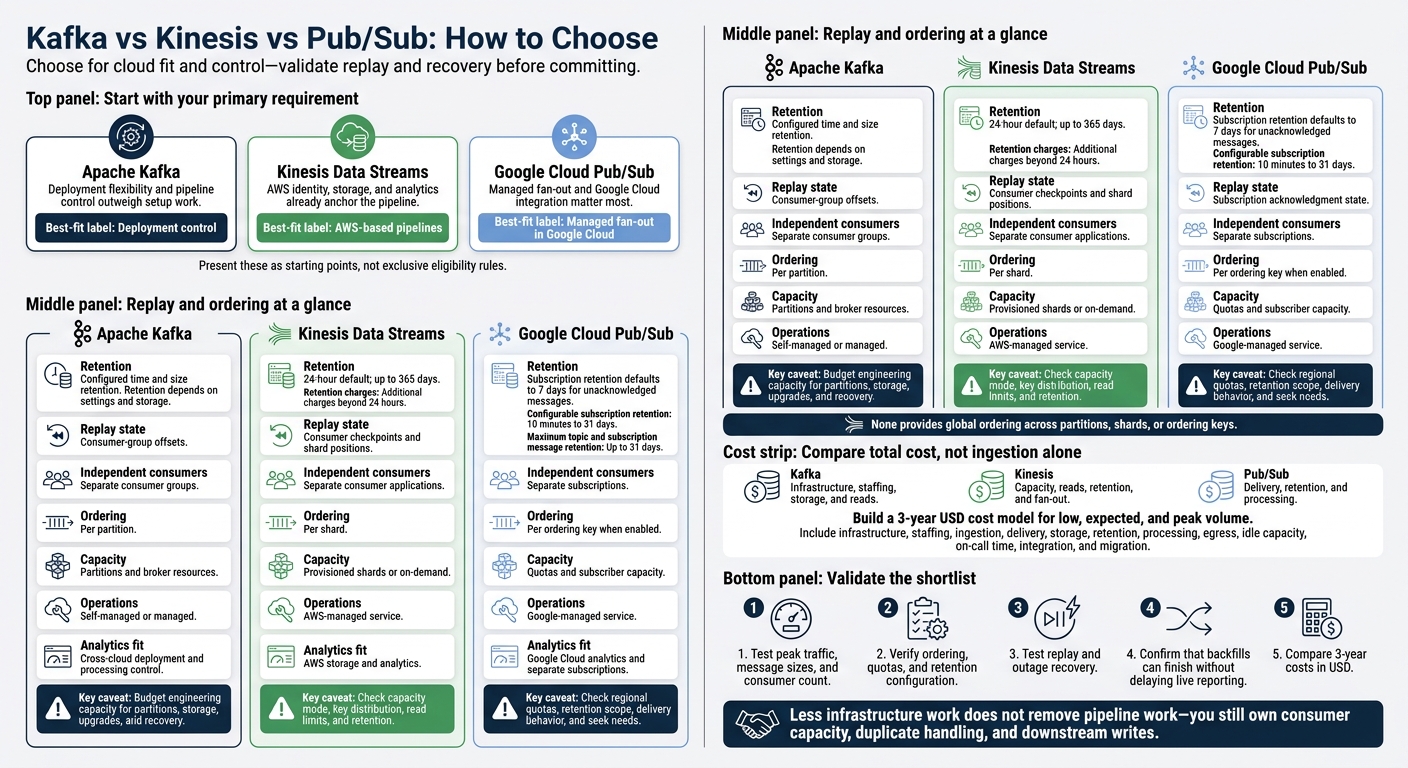
Kafka vs Kinesis vs Pub/Sub: How to Choose
kafka vs kinesis
sbb-itb-5174ba0
Apache Kafka: Log Control and Deployment Options
Kafka fits teams that need long replay windows, independent consumers, and deployment control. Teams can control partitioning, retention, replay, and where Kafka runs.
| Dimension | Kafka advantage | Limitation or trade-off |
|---|---|---|
| Throughput | Partitioned logs and parallel consumers support high-volume workloads. | More partitions add coordination, storage, file, and recovery overhead. Throughput depends on partition, broker, and network sizing. |
| Retention | Time- and size-based policies control record availability independently of consumer progress.[16] | Longer retention adds storage, replication, monitoring, and recovery costs. |
| Replay | Stable offsets and independent consumer groups support repeatable reprocessing.[13][15] | Records must still be retained, and downstream writes must remain idempotent. |
| Ordering | Records stay ordered within each partition.[13] | There is no global ordering across partitions. Poor key selection can create hot partitions. |
| Infrastructure management | Self-managed Kafka gives teams control over brokers, networking, security, storage, upgrades, and topology. | Teams handle provisioning, upgrades, failures, observability, and disaster recovery. |
| Portability | Apache Kafka runs across environments. Portable interfaces and tooling can reduce dependence on one cloud. | Managed Kafka can still tie teams to provider identity, networking, connectors, and pricing. |
| Extensibility and downstream analytics | Custom producers, consumers, processors, and connectors can feed warehouses, dashboards, reporting and attribution tools from one log. | Teams manage compatibility, connector reliability, schema evolution, replay semantics, data quality, and downstream costs. |
Partitions, Consumer Groups, and Retention
Kafka lets multiple consumers make progress independently. It stores records in topics, which are split into partitions across brokers. Each partition is an ordered log, with offsets marking record positions.[13][18]
Within a consumer group, each partition belongs to 1 consumer at a time. Adding consumers beyond the partition count does not increase processing parallelism. Committed offsets track each group’s progress.[13][15] Separate reporting and attribution jobs can read the same topic without sharing progress.[17] Choose keys that maintain the order your application needs without sending too much traffic to a few partitions.
Time- and size-based retention delete old log segments even when consumers have not read them. Size limits apply per partition.[16] Compaction serves a different purpose: it retains the latest state for each key and eventually removes older, superseded values. It does not preserve a complete event history.[14][19]
Separate offsets let reporting, attribution, and reprocessing jobs work independently. For attribution backfills, reset only the affected group, write to a versioned output table, and validate schema compatibility and deduplication. Resetting that group’s offsets leaves the reporting group’s position unchanged.[15][17]
Capacity Planning and Management Tasks
Kafka’s flexibility comes with more sizing and management work. Collect average and peak ingress rates, message sizes, partition count, consumer count, retention window, latency target, and replay volume. Size broker CPU, memory, disk, and network for ingestion, replication, and reads - not ingestion alone. A replication factor of 3 improves failure tolerance when acknowledgment and placement settings match the durability target.[8][18]
| Responsibility | Self-managed Kafka | Managed Kafka |
|---|---|---|
| Provisioning | Provision brokers, disks, zones, networking, and security. | The provider supplies infrastructure; the customer chooses capacity, regions, access, and configuration. |
| Upgrades | Plan, test, execute, and recover from upgrades. | The provider handles platform work; the customer tests clients, connectors, and maintenance impact. |
| Monitoring | Monitor brokers, replication, storage, lag, and application errors. | The provider exposes service metrics; the customer monitors consumers, connectors, lag, and workloads. |
| Scaling | Add resources, rebalance partitions, and verify capacity. | The provider simplifies infrastructure changes; the customer manages partitions, quotas, and costs. |
| Recovery | Design replication, backups, regional recovery, and incident procedures. | The provider supplies defined recovery capabilities; the customer validates restore and application recovery. |
Tune producer batching, compression, acknowledgments, and retries. For consumers, tune fetch sizes, concurrency, back-pressure, and offset commits while monitoring lag. Set the starting position explicitly for new groups.[17]
Batch and flush warehouse loads with schema checks, error handling, and idempotent writes. For attribution backfills, preserve campaign and identity fields, source offsets or event timestamps, and a run ID or model version.
Kinesis keeps the streaming-log pattern but shifts capacity and operations into AWS-managed shards.
Amazon Kinesis Data Streams: Capacity and AWS Integration
Kinesis fits AWS-first teams that need controlled replay, managed scaling, and less infrastructure work than Kafka.[5][11] Firehose handles delivery, not a replayable stream. Use it when managed delivery matters more than consumer control.[23]
| Decision factor | Kinesis Data Streams | Selection trade-off |
|---|---|---|
| Capacity planning | Provisioned shards or on-demand capacity | Less infrastructure work, but key distribution and consumer demand still need planning. |
| Scaling | Manual resharding or automatic on-demand scaling | Traffic patterns and service quotas still limit scaling. |
| Retention costs | Additional charges beyond 24 hours.[20][5] | Budget separately for retention, reads, and enhanced fan-out. |
| Replay | Resume reads from a chosen sequence number within retained data | Expired records require storage outside the stream. |
| AWS integration | Native connections to Lambda, Flink, S3, and Redshift | Convenient for existing AWS pipelines. |
| Portability | AWS-specific APIs, IAM, and operations | Moving clouds requires more application and integration changes. |
| Ops burden | AWS manages the service; teams own partition keys, consumers, checkpoints, monitoring, and cost control. | Less infrastructure to run, but teams still need to manage the stream. |
The main choice is predictable shard planning versus elastic on-demand scaling.
Shards, Capacity Modes, and Read Limits
A provisioned shard supports up to 1 MB/second or 1,000 records/second.[12][11] Shared GetRecords consumers divide 2 MB/second per shard and share a limit of 5 read transactions per second.[5][12] Enhanced fan-out gives each registered consumer up to 2 MB/second per shard for an additional charge. It helps when independent, latency-sensitive consumers compete for reads.[22]
| Consideration | Provisioned mode | On-demand mode |
|---|---|---|
| Provisioning | The team sets shard capacity and manages changes. | AWS automatically manages capacity based on traffic. |
| Scaling limits | Capacity changes require resharding, such as splitting or merging shards, within service constraints. | A stream can scale to about twice its observed peak write throughput from the previous 30 days.[7] |
| Traffic | Best for predictable workloads that teams can capacity-plan. | Useful for variable traffic. A new on-demand stream has a documented default write capacity of 4 MB/second and 4,000 records/second.[1][12] |
| Billing | Primarily provisioned shard-hours, plus ingestion, retrieval, retention, and feature charges as applicable. | Data written and read, plus a stream-hour charge. Retention and enhanced fan-out cost extra.[1][20] |
On-demand does not fix hot shards. Choose partition keys around the entity whose ordering matters. Ordering holds within a shard, not across the stream. Use backoff for retries and handle duplicates. Monitor shard-level throttling and partial PutRecords failures, and check Region throughput limits and quotas before provisioning.[12]
Retention, Replay, and AWS Analytics
Default retention is 24 hours, with documented options extending to 365 days.[20][5] AWS distinguishes extended retention through 7 days from long-term retention beyond 7 days.[20] Consumers save checkpoints in Amazon DynamoDB or through a managed connector. Checkpoint after downstream processing finishes, and define checkpoint frequency, duplicate handling, and retention alarms.[21]
Use Kinesis when the stream needs to feed AWS storage and top analytics tools with little integration code. S3 stores history, Flink handles stateful processing, Redshift or Athena support analysis, and Glue handles cataloging.[23] These connections reduce setup work but increase dependence on AWS IAM, networking, monitoring, and availability. Store historical event data outside the stream so replay is not limited by its retention window.[23]
Pub/Sub keeps the managed model but shifts fan-out to topics and subscriptions.
Google Cloud Pub/Sub: Managed Messaging and Fan-Out
Where Kinesis centers on AWS integration, Pub/Sub shifts more infrastructure work to Google Cloud and manages message delivery.
Pub/Sub removes broker and partition management, not pipeline work. Choose it when managed messaging and real-time analytics tools integration matter more than partition-level control.[9][26] The trade-off is managed fan-out versus log-style control.
| Decision area | Pub/Sub behavior | Selection trade-off |
|---|---|---|
| Setup and scaling | Google manages infrastructure; teams manage topics, subscriptions, quotas, and subscriber capacity.[3] | Less infrastructure work, but teams still need to size the pipeline. |
| Ordering | Optional ordering keys provide per-key order. | No global order; each key has a 1 MB/s publishing limit.[4] |
| Retention | Subscription retention defaults to 7 days; topic and subscription message retention can reach 31 days. | Set retained history explicitly and budget for storage charges.[10][28] |
| Replay | Seek resets subscription acknowledgment state for retained messages. | Replay depends on retained messages, not a permanent log.[6] |
| Delivery behavior | At-least-once delivery by default. | Processing must handle duplicates safely.[25] |
| Pipeline customization | Dataflow handles streaming transforms without broker or partition management.[26] | - |
| Google Cloud integration | Supports Dataflow, BigQuery, and Cloud Storage pipelines. | Less integration work for real-time marketing analytics.[26] |
| Portability | Google Cloud-specific APIs and operations model. | Moving clouds requires changes to applications and operations. |
Topics, Subscriptions, and Delivery
Each subscription tracks delivery and acknowledgments independently. A dashboard acknowledgment does not acknowledge the event for an audience-update service or warehouse consumer. Pull consumers request messages, StreamingPull keeps a streaming connection open, and push sends messages to an HTTPS endpoint. Acknowledge messages only after processing succeeds. Missed acknowledgment deadlines can trigger redelivery, so use stable event IDs and idempotent writes.[9][25]
Enable ordering only when per-entity sequencing matters. Redelivery can cause later messages with the same key to be delivered again, even if they were already acknowledged. Check regional quotas, distribute traffic across keys, and monitor backlog age, undelivered messages, and acknowledgment failures.[3][4]
Exactly-once delivery applies only to pull subscriptions, including StreamingPull, in supported regions. It does not guarantee exactly-once database updates or analytics results. Combining it with ordering also requires in-order acknowledgments.[27][29]
Retention, Seek, and Snapshots
Pub/Sub replay resets subscription acknowledgment state, not Kafka offsets or Kinesis checkpoints. Retention and snapshots determine which messages a subscription can receive again.[6]
Subscription retention defaults to 7 days for unacknowledged messages, with a configurable range of 10 minutes to 31 days. You must explicitly configure retention for acknowledged messages. Topic retention keeps publication history available to later subscriptions for up to 31 days. Use topic retention for shared replay needs, and budget for retention charges.[10][28]
Seeking to a timestamp marks retained messages published before that timestamp as acknowledged and those after it as unacknowledged. Seeking to a snapshot restores the acknowledgment state recorded in that snapshot for a subscription on the same topic.[6]
Create snapshots before risky deployments, and check their expiration. Snapshot lifetime depends on the source subscription’s retained backlog and cannot exceed 7 days. A snapshot may expire sooner if the oldest unacknowledged message is older. Neither seek nor snapshots restore expired messages.[6][30]
Pub/Sub fits pipelines whose downstream analytics already run in Google Cloud. A BigQuery subscription provides at-least-once delivery; use Dataflow for validation, enrichment, windowing, or deduplication.[24][26] Teams still own schema changes, late-event handling, and write correctness.
How to Choose a Streaming Platform
Throughput, Setup, and Total Cost
Test the workload, not the platform name. Use the same event generator, payload distribution, producers, and consumers. Match durability, replication expectations, acknowledgments, and retention. Measure sustained traffic, burst duration, end-to-end latency, and recovery after a consumer outage.
| Workload requirement | Kafka considerations | Kinesis considerations | Pub/Sub considerations | Trade-off |
|---|---|---|---|---|
| Throughput | Size for peak traffic and recovery. | Check capacity mode, key distribution, and scaling response. | Check regional quotas, batching, and flow control. | Too little capacity creates lag; too much adds cost. |
| Payload size | Benchmark compression, batching, and storage demand. | Test byte and record limits against actual payloads. | Test message-size limits and quota accounting. | Small messages can hit record limits before byte limits; large messages can reverse that pattern. |
| Fan-out and consumer counts | Test consumer-group parallelism and connection load. | Budget shared reads or enhanced fan-out for each consumer. | Model subscription demand, retries, and subscriber lag. | More consumers can require capacity changes or a redesign. |
| Ordering | Test key placement and partition changes. | Test hot keys and retry behavior. | Test hot keys and retry behavior. | Global ordering limits parallelism. |
| Recovery | Test catch-up without starving live traffic. | Check read capacity and recovery time. | Test subscriber scaling, flow control, and redelivery during catch-up. | Live throughput does not guarantee timely recovery. |
| Region and residency | Check placement, failover, and consistency. | Account for cross-region replication and transfer. | Check regional quotas and placement. | Region choice affects latency, resilience, residency, and egress. |
| Cost | Include infrastructure, staffing, and idle capacity. | Include capacity, reads, retention, and fan-out charges. | Include delivery, retention, and downstream processing. | Compare total cost, not ingestion prices alone. |
Label each figure as a documentation value or a test result.
Build a 3-year USD cost model for low, expected, and peak volume. Separate infrastructure, staffing, ingestion, delivery, storage, retention, processing, and egress. Include idle capacity, on-call time, integration, and migration. Use current prices for the selected U.S. region. Neither self-managed Kafka nor managed messaging is automatically cheapest.
Once load and cost are clear, replay and cloud fit usually determine the final choice.
Replay, Cloud Dependence, and Analytics Fit
Compare how each platform handles replay, backfills, and cloud dependence after checking cost.
| Replay requirement | Kafka | Kinesis Data Streams | Google Cloud Pub/Sub |
|---|---|---|---|
| Rewind depth | Configured time and size retention | 24-hour default; up to 365 days.[12][2] | Up to 31 days; replay of acknowledged messages requires suitable topic or subscription retention.[3] |
| State tracking | Consumer-group offsets | Consumer checkpoints and shard positions | Subscription acknowledgment state |
| Independent consumers | Separate consumer groups | Separate consumer applications | Separate subscriptions |
| Backfill isolation | Separate group; budget shared cluster capacity | Separate consumer; budget read capacity | Separate subscription; budget delivery capacity |
| Retention ownership | Team sets topic retention and storage | Team sets stream duration and budgets | Team sets topic and subscription retention |
Document dependencies on AWS IAM or Google Cloud IAM, monitoring, storage, website analytics tools, processing, connectors, and infrastructure-as-code. Kafka gives you deployment flexibility, but portability still takes work. Before adoption, define an export format, schema strategy, replay procedure, dual-write or replication plan, and migration estimate.
Use the checklist to confirm your choice under actual workload conditions, not just against documentation.
Platform Selection Checklist
| Start with | When it fits | Configuration and quota caveat |
|---|---|---|
| Kafka | Deployment flexibility and pipeline control outweigh setup work. | Budget engineering capacity for partitions, storage, upgrades, and recovery. |
| Kinesis Data Streams | AWS identity, storage, and analytics already anchor the pipeline. | Check capacity mode, key distribution, read limits, and retention. |
| Google Cloud Pub/Sub | Managed fan-out and Google Cloud integration matter most. | Check regional quotas, retention scope, delivery behavior, and seek needs. |
Require a pilot that tests load, replay, quotas, retention, recovery, and live-reporting isolation.
FAQs
When is Kafka’s added complexity worth it?
Kafka’s added complexity pays off when you need high-throughput, low-latency streaming and full control over your infrastructure [1][2]. It fits teams with strong engineering resources that need flexibility, exactly-once processing guarantees, and freedom from vendor lock-in [1].
Implementing and maintaining Kafka takes deep expertise. For large-scale, mission-critical applications, such as real-time fraud detection or high-volume event streaming, that effort is justified when standard automated pipelines cannot meet performance or architecture requirements [1][2].
How can I backfill data without slowing live analytics?
Use log-based Change Data Capture (CDC) instead of heavy re-extracts to stream new events in seconds. Backfill historical data separately [1].
Partition by key to process data in parallel. Monitor consumer lag or iterator age to check that live pipelines keep pace. During backfill, use caching or tiered storage to serve “hot” data quickly. Apply backpressure or throttling when the system is overloaded [2].
How can I reduce cloud lock-in?
Keep control of your stack by prioritizing open-source tools like Apache Kafka. Spread workloads across clouds for redundancy and flexibility. Choose cloud-agnostic ETL tools that use containers and orchestration to run across platforms without changes.
Keep data portable: avoid proprietary formats and vendor-specific APIs, and negotiate clear exit clauses and data ownership rights. Separate architectural concerns so you can replace components without disrupting the entire system [1].