If your API gateway does not enforce access, TLS, logging, and change control at the route level, your audit trail is weak and your data flow is exposed. For data teams, the checklist is simple: verify identity on every request, encrypt every hop, log each security decision, and keep vendor and config changes tied to approvals.
Here’s the short version:
- Access comes first - a valid token is not enough if route-level authorization is missing.
- Encryption must cover each hop - client to gateway and gateway to backend.
- Logs need to show decisions - who called what, what was denied, and why.
- Rate limits and alerts need to catch misuse early - especially from partners and third parties.
- Vendor review and Git-based change tracking matter - audit teams will ask for both.
A few points stand out fast:
- BOLA drives about 40% of API attacks, so object-level checks cannot sit on the sidelines.
- Short-lived access tokens, usually 5 to 15 minutes, cut exposure when credentials leak.
- HSTS set to 1 year and TLS 1.2 or 1.3 help close weak transport settings.
- Log retention often splits into 30 to 90 days for platform logs, 1 to 3 years for security logs, and 5 to 7 years for audit logs.
If I were reviewing a gateway before launch or before an audit, I would look for 4 things first:
- Per-route auth enforcement
- mTLS or HTTPS on each link
- Structured logs with trace IDs
- Version-controlled configs with approval records
That is the core of this article: a plain check on whether gateway controls work in practice, not just on paper.
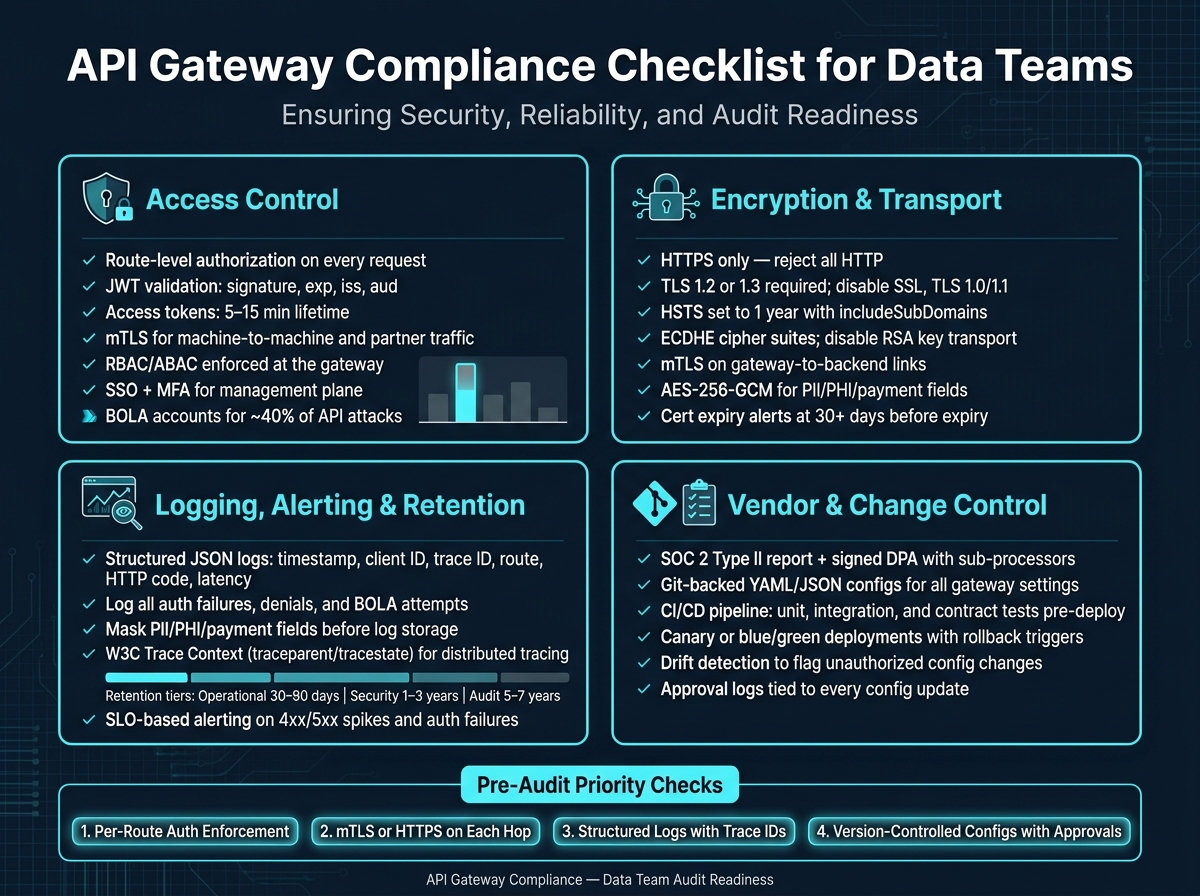
API Gateway Compliance Checklist for Data Teams
Amazon API Gateway Security | Serverless Office Hours
sbb-itb-5174ba0
1. Access control, authentication, and admin access
Start with access control first. If identity checks fail, every other gateway control gets weaker. BOLA drives a large share of API attacks, and many successful attacks use valid credentials against weak authorization [3]. A valid token alone does not prove access. The gateway has to check what that token can do on every request.
Validate tokens, API keys, OAuth 2.0, and mTLS settings
Make the gateway the single place for identity validation. Verify the JWT signature, exp, iss, and aud before the request goes upstream.
Use access tokens with a 5- to 15-minute lifetime. Keep refresh tokens long-lived and managed by the identity provider. For machine-to-machine traffic or partner connections with higher sensitivity, add mutual TLS (mTLS) so each side proves its identity.
Validate API key scope, rotation, and revocation at the gateway. Reject shared keys and hard-coded keys.
Confirm route-level authorization rules and policy enforcement
Route-level authorization means checking the caller, endpoint, and HTTP method on every request. It is not enough to confirm that the user is signed in.
Enforce RBAC or ABAC rules at the gateway rather than spreading that logic across backend services. If the rules get more detailed, connect a policy engine like Open Policy Agent (OPA) so claims-based checks stay consistent. In production, use exact CORS origins and never use *. For internal APIs, add IP allowlists.
Lock down the management plane and compare auth methods
Lock down the management plane with SSO and MFA tied to a central identity provider. Assign least-privilege IAM roles. Limit console access to a VPN or approved IP ranges. Require administrator approval before new API consumers can invoke routes - most gateways support consumer approval workflows [2].
Use the table below to match the control to the type of gateway exposure.
| Auth Method | Security Strength | Operational Complexity | Audit/Compliance Fit |
|---|---|---|---|
| API Keys | Low - static, easily leaked or shared | Low - simple to issue | Poor - hard to rotate, scope, or audit |
| OAuth 2.0 / JWT | High - scoped, short-lived tokens | Medium - requires an identity provider | Strong audit fit |
| mTLS | Very high - mutual certificate auth | High - requires PKI and cert management | Best fit for regulated or partner/M2M flows |
2. Encryption, certificates, and traffic protection
Transport security is the next layer after access checks. Start here, because weak encryption can undercut every other gateway control.
Enforce HTTPS, TLS 1.2 or 1.3, and secure transport defaults
Reject HTTP and allow HTTPS only. Require HTTPS on all endpoints, disable SSL and TLS 1.0/1.1, and block weak cipher suites. Use ECDHE-based cipher suites, turn off RSA key transport and CBC mode, and set HSTS to 1 year with includeSubDomains.
Once transport settings are in place, move to certificate handling - how certs are issued, stored, renewed, and monitored for expiry.
Review certificate issuance, storage, rotation, and expiry alerts
Every certificate on the gateway should come from a trusted Certificate Authority (CA). Check issuance against certificate transparency logs [7]. Store private keys in an HSM or TPM [7].
Automate certificate renewal so teams do not get caught by an expired cert [7]. Set expiration alerts at least 30 days before expiry to leave time to respond [7]. Use certificate pinning for mobile apps and internal services that need stronger MITM protection [7].
Then check the internal path. A secure edge is not enough if traffic is exposed on the next hop.
Protect gateway-to-backend links and compare encryption controls
Protect both client-to-gateway and gateway-to-backend traffic. Gateway compliance only counts if each hop in the analytics flow is protected. Enforce HTTPS on backend connections and use mTLS on backend listeners for internal microservices and partner endpoints. Tools like Istio or Linkerd can help automate mTLS enforcement across microservice boundaries.
Document every non-encrypted link in the data flow diagram and isolate it to non-sensitive traffic.
Use payload-level encryption for sensitive fields like PII, PHI, and payment data, with AES-256-GCM as a second layer [3][7]. Encrypt any sensitive data in the gateway response cache at rest with AES-256 [3][7].
| Protection Method | Scope | Compliance Value | Operational Cost |
|---|---|---|---|
| TLS Baseline (HTTPS) | Data in transit: client to gateway | Standard requirement | Low |
| Mutual TLS (mTLS) | End-to-end identity: gateway to backend | High | Medium |
| Payload-Level Encryption | Field-specific data at rest and in transit | Critical for PII/PHI/PCI | High |
Next, check whether rate limits, logs, alerts, and retention rules expose abuse fast enough.
3. Rate limits, logging, alerting, and retention
Once encryption is in place, the next job is control and visibility. You need to see what hits the gateway and stop abuse before it spreads into downstream systems. Rate limits, logs, and alerts do that together.
Set global limits, per-client throttles, and usage quotas
Use both rate limiting and throttling. Rate limiting caps total request volume. Throttling smooths sudden bursts.
Set tighter limits for unauthenticated and third-party clients. Give trusted internal services higher caps where that makes sense. Also set payload size limits so oversized requests can't eat up memory or network bandwidth [3].
When a client goes over the limit, return HTTP 429 Too Many Requests with Retry-After. For visibility, use the IETF headers ratelimit-limit, ratelimit-remaining, and ratelimit-reset [5].
| Control Type | Purpose | Risk Reduction | Common Configuration Fields |
|---|---|---|---|
| Global Rate Limiting | Protects infrastructure from total saturation | Prevents DDoS and system-wide outages | requests_per_second, time_window |
| Per-Client Throttling | Ensures fair resource allocation among tenants | Prevents "noisy neighbor" issues and backend lag | burst_capacity, steady_state_rate |
| Usage Quotas | Controls long-term integration costs and volume | Prevents budget overruns and data scraping | calls_per_month, data_volume_gb |
Use the same review process to flag unusual third-party usage before it gets downstream.
Log request activity and security decisions in structured form
Log structured JSON entries with the fields that matter: timestamp, client ID, request or trace ID, route, HTTP response code, latency, and denied-request reason when relevant [1][3]. For authenticated requests, include claim context such as user ID or scopes. Do not log full JWTs, API keys, or passwords [3].
Security events need extra attention. Log all authentication failures, access denials, and signs of broken object-level authorization, or BOLA, attempts. BOLA accounts for roughly 40% of all API attacks [3], and many of those attacks come from authenticated users taking advantage of missing authorization checks [3].
Send logs to one approved SIEM. Limit access to sensitive log data to approved roles only. PII, PHI, and payment-related fields should be masked or redacted at the proxy layer before they ever reach the log store [5].
These logs should support alerting, incident response, and audit evidence.
Configure alerts, tracing, and log retention rules
Alert on behavior, not just raw volume. Watch for spikes in 4xx and 5xx responses, latency percentiles, failed authentication attempts, and traffic anomalies by geography or source IP. SLO-based alerting helps cut noise by firing when an error budget is consumed too fast instead of triggering on every CPU spike [1].
For distributed analytics pipelines, use the W3C Trace Context specification with traceparent and tracestate headers to tie log entries across microservices back to one originating request [1]. That makes incident response and audits faster.
Use a retention matrix to define how long each log class stays in the system [6].
| Log Type | Contents | Likely Owners | Recommended Retention |
|---|---|---|---|
| Operational Logs | Latency (p50/p95/p99), 4xx/5xx rates, request volume | Platform Engineering / SRE | 30–90 days |
| Security Logs | Auth failures, denied requests, source IP, geographic origin | Security / SOC | 1–3 years |
| Audit Logs | Admin changes, policy updates, API key rotations, access grants | Compliance / Legal | 5–7 years |
Keep these records aligned with vendor reviews and approval workflows. Use the logs and alerts to support vendor reviews and change tracking.
4. Vendor controls, configuration reviews, and change tracking
After logs and alerts, check whether the vendor and the gateway change process can stand up to an audit. This is what tells you if the gateway can be trusted to enforce access, encryption, and logging rules in practice.
Review vendor security features and compliance evidence
Start with the vendor baseline. Request the latest SOC 2 Type II report and a signed DPA that names all sub-processors [6]. Confirm ZDR settings and verify that SSO is in place for management-plane access [10].
Once you have that baseline, move to change control. The goal is simple: every config change should be tracked, reviewed, and approved.
Track gateway changes with version control and approval workflows
Treat gateway configs like code. Store YAML or JSON configs, policies, and templates in Git-backed version control so you can reconstruct who changed what and when [1][8].
Before deployment, run unit, integration, and contract tests through CI/CD [4]. After each change, regenerate docs and keep the approval logs with the update [9].
For releases, use canary or blue/green deployment patterns with clear rollback triggers [8][4]. Tie rollback to p99 latency spikes, 5xx error spikes, or failed policy checks [1][8].
Review configs on a regular cadence to catch policy drift. Use drift detection to flag unauthorized config or route changes [9].
Conclusion: Use the checklist to cut risk and improve audit readiness
Use this table during vendor reviews and internal audits.
| Review Criteria | What to Check | Evidence to Request |
|---|---|---|
| Compliance Readiness | SOC 2 Type II, ZDR, DPA with sub-processors | Latest audit report, signed DPA |
| Access Management | SSO support for the management plane | SSO integration guide |
| Change Tracking | Git-backed configuration, approval logs, post-commit hooks | Git history, approval logs, regenerated docs |
| Pre-Deployment Validation | Unit, integration, and contract tests | CI/CD pipeline configuration |
| Deployment Safety | Canary or blue/green releases, rollback triggers | Deployment runbook, rollback criteria |
| Policy Drift | Drift detection between configurations | Drift detection output |
Use this checklist to prove vendor due diligence, keep changes auditable, and make rollback paths explicit.
FAQs
How do I verify route-level authorization is actually enforced?
Test the gateway first. It should block unauthorized requests before anything hits the backend, and only requests with the exact permissions or claims for each route should pass.
Check each route for an explicit auth policy by method and path. At the gateway, validate token signature, expiration, and claims. Then run negative tests for:
- missing tokens
- expired tokens
- wrong scope
- wrong role
Also confirm backend logs show that unauthorized requests were not forwarded.
When should a data team require mTLS instead of HTTPS alone?
Use mTLS instead of standard HTTPS when you need mutual authentication, not just encryption in transit.
This matters most in high-security setups such as financial data connections, enterprise systems, multi-tenant platforms, and compliance-driven environments where the client certificate must be checked against managed certificates. Standard HTTPS protects data as it moves between systems. mTLS does that too, but it also confirms the identity of both the client and the server.
What audit evidence should we collect for API gateway changes?
Collect proof of a structured, repeatable, secure change process.
Use:
- IaC files as the source of truth
- CI/CD history that shows who made the change, when it shipped, and whether it was peer-reviewed
- Centralized logs for requests, auth status, and config updates
Also keep security policies up to date. If a change affects data handling, keep penetration test summaries and compliance records current too, including revised Data Processing Agreements.