If you care about paid media accuracy, server-side tracking usually wins. Client-side pixels often miss 30% to 40% of conversions, which can skew CAC, ROAS, and revenue reporting.
Here’s the short version:
- Client-side tracking is easier to launch, but browser rules, ad blockers, consent prompts, and page errors can block events, making it harder to analyze website performance.
- Server-side tracking sends data through your own endpoint first, which gives you more control over what gets passed to Meta, Google, and GA4.
- Page speed often improves with server-side setups because fewer third-party scripts run in the browser.
- Privacy handling is tighter server-side because you can hash, filter, or remove fields before sending data out.
- Hybrid tracking is often the best fit at scale, especially when you need event deduplication and steadier attribution. This is especially critical when using real-time marketing analytics tools to optimize active campaigns.
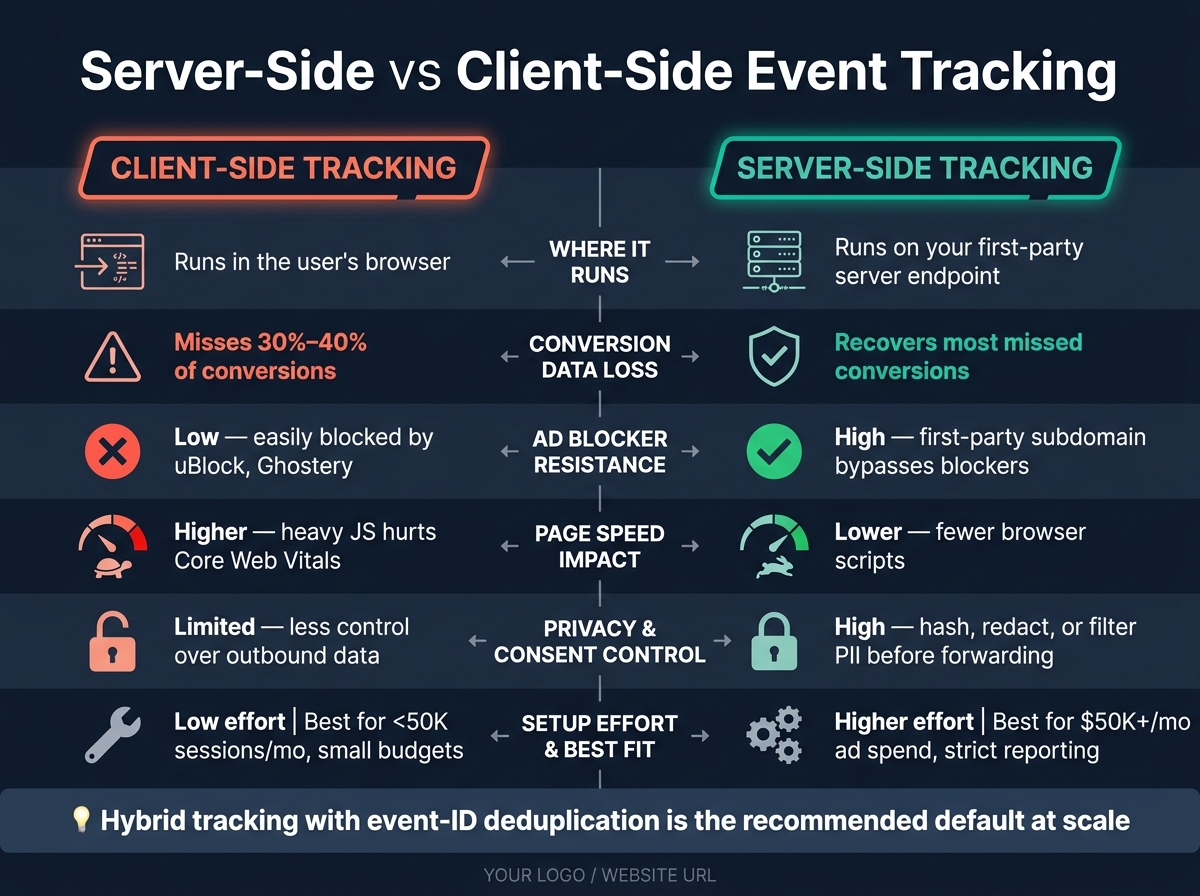
Server-Side vs Client-Side Tracking: Key Differences at a Glance
Client-Side vs Server-Side Tracking Explained
sbb-itb-5174ba0
Quick Comparison
| Factor | Client-Side | Server-Side |
|---|---|---|
| Where tracking runs | User’s browser | Your server endpoint |
| Conversion loss risk | Higher | Lower |
| Ad blocker resistance | Low | Higher |
| Page speed impact | Higher | Lower |
| Consent and data control | Less control | More control |
| Setup effort | Lower | Higher |
| Best fit | Small budgets, basic reporting | Larger spend, stricter reporting needs |
My takeaway: if missed conversions are changing bidding decisions, client-side alone is usually not enough. The right choice comes down to how much bad data is costing you each month, which is why it's critical to compare marketing analytics tools based on your specific tracking needs.
Client-Side Event Tracking: Fast to Set Up, Prone to Data Loss
Client-side tracking is easy to launch. It runs JavaScript tags and pixels in the visitor's browser, and teams often ship it through tools like Google Tag Manager or Segment. On platforms like Shopify or WooCommerce, it may also run through built-in pixel fields.
How Browser-Based Tags Collect Events
When someone lands on your site, the browser loads tags from tools like Google Analytics, Meta Pixel, social media analytics tools like TikTok or LinkedIn. If that person clicks a button, submits a form, or finishes a purchase, those scripts pick up the action and turn it into an event.
Many setups also use a dataLayer. Think of it as a shared browser object that holds event details for a moment, so tags can read that data and send it to each platform's servers.
Where Client-Side Data Gets Lost
The main issue is simple: client-side code runs in the user's browser, not on infrastructure you control. That makes it easy to block.
Ad blockers, Safari's Intelligent Tracking Prevention, and Firefox's Enhanced Tracking Protection all cut into event collection. In 2026, client-side pixels often miss 30% to 40% of conversions because of blockers and browser privacy rules [2][8]. Safari's Intelligent Tracking Prevention can also shrink client-side cookie life to as little as 24 hours [3].
Loss happens in other places too. A user may leave before the confirmation-page tag fires. A JavaScript error may stop the tag from running. An enterprise firewall or VPN may block analytics domains altogether.
Each missed event leaves a hole in reporting. It also strips ad platforms of conversion signals, which can push up CPA and send budget to the wrong places [1][3]. That's why many teams move event collection out of the browser and into a server they control.
Tradeoffs for Page Speed, Privacy, and Reporting
Client-side tracking also adds weight to the page. Every third-party script asks the browser to do more work. If you run Meta Pixel, GA4, TikTok, and LinkedIn Insight Tag at the same time, you increase Total Blocking Time and Largest Contentful Paint - two Core Web Vitals metrics tied to Google search rankings [3].
That slowdown has a direct cost. More users bounce before tags fire. Fewer events get recorded. Attribution gets weaker.
Privacy rules make the picture even messier. Since Google Consent Mode v2 became required in many markets, client-side tags are often paused or limited until a user interacts with a Consent Management Platform (CMP) [4][6]. If a user closes the banner or never gives consent, you may get little to no data.
The default outcome is incomplete business analytics reporting. And that's the gap server-side tracking is meant to cut down.
Server-Side Event Tracking: More Control, Better Data Integrity
Server-side tracking puts event collection on infrastructure you control, not in the browser. That lets you filter, hash, and enrich events before they reach ad platforms. It matters most when browser-based data is patchy or unreliable.
How Server-Side Collection Changes the Event Path
With a server-side setup, you replace a pile of third-party browser scripts with one lightweight request to a first-party endpoint, such as analytics.yourdomain.com. Your server receives that request and forwards it.
A server container, like server-side Google Tag Manager or a CDP, handles the event on the way through. It can strip or hash sensitive fields, filter bot traffic, and add backend data like CRM IDs. Platforms like FoxMetrics specialize in this type of behavioral tracking and data enrichment. From there, it sends the event to tools such as Meta's Conversions API (CAPI), Google Ads, or GA4 through secure server-to-server connections.
That cleaner event path tends to improve match quality, attribution, and downstream reporting.
Why Server-Side Setups Reduce Data Loss and Improve Reporting
A first-party endpoint gets around most ad blockers and browser limits. In practice, that means more conversion data makes it through, and reporting tends to hold steadier. Teams often recover a meaningful share of the conversion data that client-side pixels miss [2][7].
For Meta, server-side data also tends to lift Event Match Quality (EMQ) scores. A score of 8 or above is the recommended threshold for optimal algorithm performance [9].
More usable signal usually leads to better match rates, stronger bidding input, and cleaner CPA and ROAS reporting.
What Teams Give Up for Better Control
The downside is simple: more moving parts and more cost. Server-side tracking adds cloud spend, DNS setup, and ongoing monitoring. Managed hosting can lower the setup burden, but it still adds recurring cost.
There’s also an ownership issue. Server containers need security patching, governance rules, and someone to decide what gets forwarded and what gets dropped. This is not a set-it-and-forget-it setup.
For low-volume teams, that overhead may not pencil out. For teams that make spend decisions based on attribution quality, the extra control often justifies the work. You see the tradeoff most clearly in site speed, privacy handling, ad-blocking resistance, and reporting quality.
Side-by-Side Comparison: Data Loss, Speed, Privacy, Ad Blockers, and Reporting Quality
The practical gap comes down to 5 things: data capture, page speed, privacy control, ad blocker resistance, and reporting quality.
| Factor | Client-Side Tracking | Server-Side Tracking |
|---|---|---|
| Execution Location | User's browser | Your first-party server endpoint |
| Data Loss | High - client-side pixels can miss 30% to 40% of conversions[2] | Low - can recover more of the conversions client-side misses[3] |
| Page Speed Impact | Higher - heavy JavaScript can slow rendering and hurt Core Web Vitals[1] | Lower - fewer browser scripts reduce page load[1][3] |
| Consent & Privacy Control | Limited - browser-side tags give you less control over what leaves the browser | High - the server can redact PII, mask IPs, or hash data before forwarding[3][10] |
| Ad Blocker Resilience | Low - easily identified and blocked by extensions like uBlock Origin and Ghostery[8] | High - uses a first-party subdomain, such as analytics.yourdomain.com, that blockers are less likely to catch[2] |
| Reporting Quality | Fragmented and under-reported | Higher match rates and less undercounting[3] |
Data Capture and Ad Blocker Resilience
More conversion events get through with server-side tracking. That matters because client-side pixels can miss 30% to 40% of conversions from ad blockers and browser limits alone[2]. When that data drops out, paid media platforms lose signal, and bid optimization gets weaker.
Page Performance and Consent Control
Client-side tag stacks add up fast. More browser-side scripts mean more work for the page, which can slow rendering and hurt Core Web Vitals[1]. Server-side tracking cuts down the number of scripts running in the browser, which can improve page rendering and reduce browser load[1][3].
It also gives teams tighter control over what gets passed downstream. Instead of sending raw data straight from the browser, the server can redact PII, mask IPs, or hash data before it reaches third-party platforms[3][10]. If your team cares about control, this is one of the biggest shifts.
Reporting Accuracy and Business Impact
Incomplete conversion data creates a simple problem: bidding systems optimize against a partial picture. Once that happens, budget starts drifting away from what is driving results.
Server-side collection can help clean that up. When paired with Meta's Conversions API, it can improve Event Match Quality (EMQ) and give ad platforms better input for automated bidding[3]. In practice, that usually means less undercounting and reporting you can trust more when you're deciding where to put the next dollar using the top marketing analytics tools.
Choosing the Right Tracking Setup for Your Team
This comes down to cost. After you look at data loss, site speed, privacy, and reporting, the main question is simple: what does missed conversion data cost your team? That’s the lens for choosing client-side, server-side, or hybrid tracking. The pattern is pretty clear.
When Client-Side Tracking Is Enough
Client-side tracking is a fine starting point if your site gets fewer than 50,000 sessions per month and your ad budgets are small[3]. It can go live in minutes through a tag snippet or a storefront dashboard toggle, and at that level, the gaps in data are often tolerable. If your team runs simple campaigns and only needs basic reporting, a server-side setup can feel like extra work without much payoff.
That changes once missing conversions start to affect bidding or attribution. At that point, the cheap setup can get expensive.
When Server-Side or Hybrid Tracking Makes Sense
Server-side tracking starts to make more sense as ad spend goes up. If you spend $50,000 per month on ads and lose 15% of conversions, your bidding systems miss $7,500 in results each month. Put that next to server maintenance costs of $20-$120 per month, and the tradeoff looks very different[3].
A few cases tend to push teams in this direction:
- Attribution across platforms gets messy fast when client-side pixels are blocked or Safari's ITP cuts cookie lifespans to as little as 24 hours[3][8].
- PE-backed teams focused on EBITDA usually can’t let missing conversions throw off CAC math or channel decisions[3].
- A jump in direct traffic with flat reported performance is often an attribution gap, not a channel issue[5].
For most teams that are scaling, this usually isn’t an either-or choice. In practice, the default at scale is hybrid tracking with event-ID deduplication, so if one path fails, you don’t end up with gaps or double-counting[2][7].
FAQs
How does hybrid tracking work?
Hybrid tracking uses both browser-side and server-side tracking to get cleaner conversion data. The site sends a small event from the browser to your own first-party server. That server can add context, then pass the event to platforms like Meta or Google.
The setup runs both paths at the same time and uses event-ID deduplication so each conversion is counted once, even if both paths report it. That matters because one path can fail. A browser event might get blocked. A server event might arrive without some front-end detail. Using both gives you a better shot at recording the conversion.
There’s another upside: this setup is more resilient against ad blockers and privacy limits. It can also help front-end performance because the browser only needs to send a minimal event, while the heavier processing happens on the server.
When should I switch to server-side tracking?
Switch to server-side tracking when client-side tracking starts hurting data accuracy, site speed, or privacy compliance. That usually shows up as reporting gaps from browser limits, ad blockers, Safari ITP, or stricter privacy settings.
It also makes sense when you need platform APIs like Meta Conversions API or Google Enhanced Conversions. The same goes for cases where you want to hash or strip PII before sending data to vendors. The tradeoff is simple: more infrastructure cost and more technical upkeep.
Does server-side tracking improve attribution accuracy?
Yes. Server-side tracking can improve attribution accuracy because it cuts data loss that often happens in client-side setups.
When you send data through your own server, more events make it through. That helps get around ad blockers and browser rules that can hide 20% to 40% of conversion data. Attribution still happens afterward, but the models tend to perform better when the event data underneath is more complete and more dependable.